1. Introduction
The Honeywell S9200U1000 is a Universal Integrated Furnace Control designed for residential natural or liquid propane fueled furnaces. This control unit is compatible with conventional thermostats, as well as EnviraCOM-enabled VisionPRO IAQ and FocusPRO thermostats. It facilitates communication with local and remote diagnostic devices, such as the QuickLook handheld device (QuickLook 72), EnviraLINK web-based application, and the W8735D Telephone Access Module (TAM). The S9200U1000 also manages a standard induction-type circulating fan motor.
2. Safety Information
WARNING: Improper installation, adjustment, alteration, service, or maintenance can cause property damage, injury, or death. Read these instructions thoroughly before installing or servicing this equipment.
- Always disconnect power to the furnace before installing or servicing the control.
- Ensure all wiring complies with local electrical codes and ordinances.
- This control is intended for use by qualified service technicians.
- Do not bypass any safety devices.
- Verify proper operation after installation.
3. Product Overview
The S9200U1000 serves as the central control for your furnace's ignition and fan operations. It integrates various functions into a single board, simplifying furnace management and diagnostics.

Figure 1: Top view of the Honeywell S9200U1000 Universal Integrated Furnace Control board, showing various terminals, relays, and the main processor.
Key features include:
- Universal Compatibility: Designed to replace a wide range of furnace control boards.
- EnviraCOM Communication: Enables advanced diagnostics and remote monitoring when paired with compatible devices.
- Thermostat Integration: Works with both conventional and EnviraCOM-enabled thermostats.
- Fan Control: Manages the operation of the induction-type circulating fan motor.
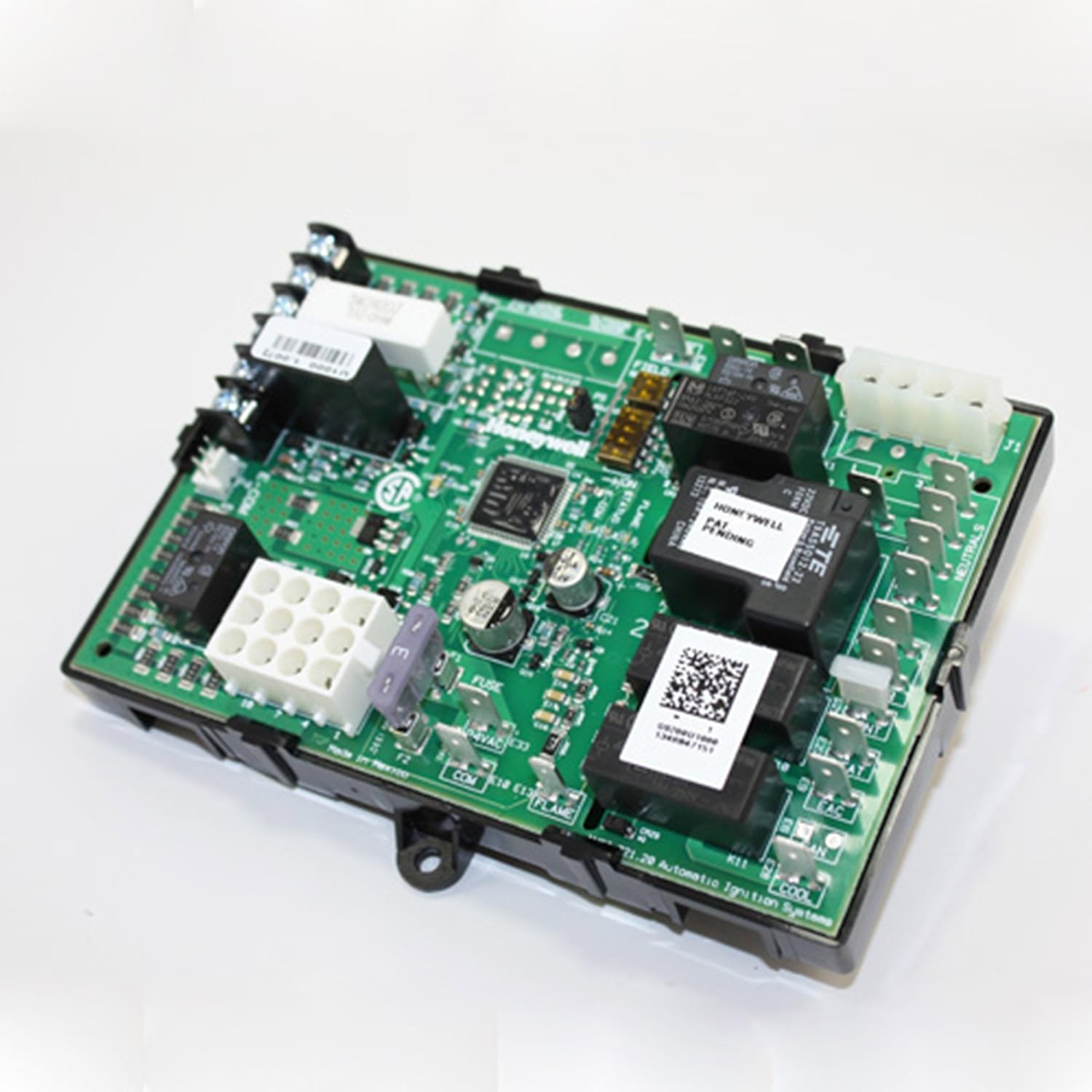
Figure 2: Angled view of the Honeywell S9200U1000 control board, highlighting its compact design and various connection points.
4. Setup and Installation
Installation of the S9200U1000 should be performed by a qualified HVAC technician. Refer to the detailed wiring diagrams and instructions provided in the physical manual included with the product for specific furnace models.
4.1 Pre-Installation Steps
- Disconnect Power: Turn off all electrical power to the furnace at the main service panel.
- Access Control Board: Locate and open the furnace access panel to expose the existing control board.
- Document Wiring: Take clear photographs or make detailed drawings of all existing wiring connections before disconnecting them. Label each wire for easy re-connection.
- Remove Old Board: Carefully disconnect all wires and mounting screws from the old control board and remove it.
4.2 Wiring and Mounting
The S9200U1000 comes with various adapter wiring harnesses to ensure compatibility with different furnace configurations. These harnesses simplify the connection process.

Figure 3: Various adapter wiring harnesses included with the S9200U1000, designed to facilitate connection to different furnace models.
- Mount New Board: Secure the S9200U1000 in the designated location using appropriate mounting hardware. It may be necessary to drill new mounting holes if the new board's dimensions differ from the original.
- Connect Wiring: Use the provided adapter harnesses and your documented wiring plan to connect all wires to the S9200U1000. Ensure all connections are secure and correct. Pay close attention to line voltage, low voltage, and accessory connections (e.g., humidifier, electronic air cleaner).
- Configure DIP Switches: The board features DIP switches (S1 and S2 banks) for configuring specific operational parameters to match your furnace and desired delays. Consult the included manual for recommended settings based on your OEM board number.
4.3 Post-Installation Checks
- Verify Connections: Double-check all wiring connections for tightness and correctness.
- Restore Power: Restore electrical power to the furnace.
- Test Operation: Initiate a call for heat and cool from the thermostat to verify the furnace operates correctly through all cycles (inducer motor, igniter, gas valve, flame detection, blower motor).
- Observe LED: The control board features an LED that indicates status and error codes. Observe its behavior during startup and operation.
5. Operating Instructions
Once properly installed and configured, the Honeywell S9200U1000 operates automatically in conjunction with your thermostat. When the thermostat calls for heating or cooling, the control board initiates the appropriate sequence of operations for the furnace.
- Heating Cycle: Upon a call for heat, the control board will activate the inducer motor, followed by the hot surface igniter. Once the igniter is hot, the gas valve opens, and the flame is detected. After a short delay, the circulating fan motor will engage to distribute warm air.
- Cooling Cycle: Upon a call for cool, the control board will activate the air conditioning compressor contactor and the circulating fan motor to distribute cool air.
- Fan Only Operation: If your thermostat supports a "Fan On" setting, the control board will activate the circulating fan motor independently of heating or cooling.
6. Maintenance
The S9200U1000 is designed for reliable operation with minimal maintenance. However, regular furnace maintenance is crucial for overall system longevity and efficiency.
- Annual Inspection: Have your furnace system, including the control board, inspected annually by a qualified HVAC technician.
- Cleanliness: Ensure the area around the control board and within the furnace compartment remains clean and free of dust or debris.
- Air Filter: Regularly replace or clean your furnace air filter as recommended by your furnace manufacturer to ensure proper airflow and prevent strain on the system.
7. Troubleshooting
The S9200U1000 features an onboard LED indicator that provides diagnostic error codes. Refer to the complete manual for a comprehensive list of error codes and their meanings.
Common Issues and Solutions:
- No Power:
- Check the furnace circuit breaker.
- Ensure the furnace access panel is securely closed (safety switch).
- Verify all power connections to the control board.
- Furnace Not Heating/Cooling:
- Check thermostat settings.
- Observe the LED on the control board for error codes.
- Ensure gas supply is open (for heating).
- Blower Fan Not Operating:
- Check for error codes related to the fan motor.
- Ensure fan settings on the thermostat are correct.
For complex issues or persistent problems, contact a qualified HVAC technician. Do not attempt repairs beyond your technical expertise.
8. Specifications
| Brand | Honeywell |
| Model Number | S9200U1000 |
| Product Dimensions | 1.5"D x 6.13"W x 4.13"H |
| Controller Type | Hot Surface Ignition |
| Special Feature | Fan Control |
| Voltage | 120 Volts |
| Item Weight | 1.3 Pounds |
| Connectivity Technology | EnviraCOM |
| UPC | 662766443981, 085267152754, 703765997461, 085267316149 |
| Part Number | S9200U1000 |
9. Warranty and Support
Warranty: This Honeywell S9200U1000 Universal Integrated Furnace Control is a genuine OEM replacement part. Specific warranty details are typically provided with the product packaging or can be obtained from Honeywell directly.
Technical Support: For technical assistance, installation guidance, or troubleshooting beyond the scope of this manual, please contact Honeywell customer support or a certified HVAC professional. Honeywell generally provides support to qualified contractors for furnace control boards.
You can find additional resources and contact information on the official Honeywell Store on Amazon.


