
Sony DVPFX750
Sony DVP-FX750 Portable DVD Player User Manual
Model: DVP-FX750
1. Introduction
Welcome to the user manual for your Sony DVP-FX750 Portable DVD Player. This guide provides essential information for setting up, operating, and maintaining your device to ensure optimal performance and longevity.
The DVP-FX750 is a compact and stylish portable DVD player featuring a vibrant 7-inch widescreen display, extended battery life, and versatile playback options, making it ideal for entertainment on the go.
2. Important Safety Information
Please read all safety instructions carefully before using your device. Keep this manual for future reference.
- Do not expose the unit to rain, moisture, or extreme temperatures.
- Ensure proper ventilation; do not block ventilation openings.
- Use only the specified power adapters and accessories provided by Sony.
- Avoid placing heavy objects on the unit.
- Do not attempt to disassemble or repair the unit yourself. Refer all servicing to qualified personnel.
3. Package Contents
Verify that all items listed below are included in your product packaging:
- Sony DVP-FX750 Portable DVD Player (Black)
- Built-in Rechargeable Battery Pack
- Remote Control
- AC Adapter
- Car Battery Charger (DC Power)
- A/V Cable
- Operating Instructions (this manual)
4. Product Overview
Familiarize yourself with the key components and design of your portable DVD player.

Figure 4.1: Sony DVP-FX750 Portable DVD Player in open position, showing the screen and control panel.

Figure 4.2: Front view of the Sony DVP-FX750 Portable DVD Player with the screen open.
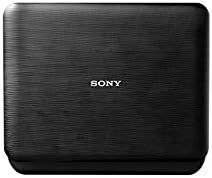
Figure 4.3: Top view of the Sony DVP-FX750 Portable DVD Player in its closed state, highlighting the textured finish.
5. Setup
5.1 Charging the Battery
The DVP-FX750 features a built-in rechargeable Lithium Ion battery. For optimal performance and battery life, fully charge the battery before its first use.
- Connect the supplied AC adapter to the DC IN 9V jack on the side of the DVD player.
- Plug the AC adapter into a standard wall outlet. The CHARGE indicator light on the player will illuminate.
- Allow the unit to charge until the CHARGE indicator turns off, indicating a full charge. A full charge provides up to 3 hours of continuous playback.
5.2 Connecting to Power in a Vehicle
For extended use in a vehicle, use the included car adapter:
- Connect the car adapter to the DC IN 9V jack on the player.
- Insert the other end of the car adapter into your vehicle's 12V accessory (cigarette lighter) socket.
5.3 Connecting to a Television
You can connect your portable DVD player to a television to view content on a larger screen:
- Ensure both the DVD player and the television are turned off.
- Connect one end of the supplied A/V cable to the A/V OUT jack on the portable DVD player.
- Connect the other end of the A/V cable to the corresponding A/V INPUT jacks (usually yellow for video, white for left audio, red for right audio) on your television.
- Turn on both devices and select the correct A/V input source on your television.
6. Operating Your DVD Player
6.1 Power On/Off
Press the POWER button located on the unit or remote control to turn the player on or off.
6.2 Inserting a Disc
- Press the OPEN button to release and open the disc compartment lid.
- Gently place a DVD or CD onto the disc tray with the label side facing up.
- Close the disc compartment lid firmly until it clicks into place. The player will begin reading the disc automatically.
6.3 Playback Controls
Use the control buttons on the unit or the remote control for playback:
- PLAY/PAUSE: Starts or pauses playback.
- STOP: Stops playback.
- FAST FORWARD / REWIND: Fast forwards or rewinds through content.
- NEXT / PREVIOUS: Skips to the next or previous chapter/track.
- VOLUME + / -: Adjusts the audio volume level.
6.4 Using Headphones
The DVP-FX750 is equipped with two 3.5mm headphone jacks, allowing two users to listen simultaneously without disturbing others.
6.5 Disc Resume Function
The player features a convenient disc resume function, which remembers the last scene played on a disc. This allows you to resume playback from that exact point, even if the unit was turned off or the disc was removed.
6.6 Multiple Format Playback
Your DVP-FX750 supports a variety of disc and media formats, including:
- DVD movie, DVD±R, DVD±R DL, DVD±RW
- CD music, CD-R/RW
- MP3 audio files
- JPEG image files
7. Maintenance
7.1 Care and Cleaning
To ensure the longevity and optimal performance of your DVD player, follow these care and cleaning guidelines:
- Wipe the exterior of the unit with a soft, dry cloth. Do not use abrasive cleaners, waxes, or solvents.
- Keep the disc compartment clean and free of dust and debris.
- Handle discs by their edges to avoid fingerprints and scratches on the playback surface.
- Store the player in a cool, dry place when not in use.
8. Troubleshooting
If you encounter any issues with your DVP-FX750, refer to the table below for common problems and their solutions.
| Problem | Solution |
|---|---|
| No power | Ensure the battery is charged. Check that the AC adapter or car adapter is securely connected to both the player and the power source. |
| No picture on screen | If connected to a TV, ensure the A/V cable is properly connected and the TV input source is correctly selected. Check the player's display settings. |
| Disc not playing / Disc error | Ensure the disc is inserted correctly with the label side up. Check the disc for scratches, dirt, or damage. Verify that the disc format is compatible with the player. |
| No sound | Adjust the volume level. If using headphones, ensure they are fully plugged into one of the headphone jacks. If connected to a TV, check the TV's volume and mute settings. |
| Remote control not working | Ensure there are no obstructions between the remote and the player. Replace the remote control batteries if necessary. |
9. Specifications
Detailed technical specifications for the Sony DVP-FX750 Portable DVD Player:
| Feature | Detail |
|---|---|
| Screen Size | 7 inches (diagonal) |
| Display Resolution | 480 x 234 pixels |
| Outputs | 2 x 3.5mm Headphone Jacks, 1 x A/V (Audio/Video) Output |
| DVD Disc Compatibility | DVD movie, DVD±R, DVD±R DL, DVD±RW |
| CD Disc Compatibility | CD music, CD-R/RW |
| Media Playback | MP3, JPEG |
| Video DAC | 12-bit/108MHz |
| Battery Type | Built-in Lithium Ion |
| Battery Life | Up to 3 hours (approximate) |
| Dimensions (W x H x D) | 7.9 x 1.7 x 6.1 inches (200 x 43 x 155 mm) |
| Weight | 1.9 pounds (0.86 kg) |
10. Warranty and Support
10.1 Warranty Information
The Sony DVP-FX750 Portable DVD Player is covered by a limited warranty. This typically includes 1 year for parts and 90 days for labor from the original date of purchase. Please refer to the warranty card included with your product for complete terms and conditions, as warranty details may vary by region.
10.2 Customer Support
For further assistance, technical support, or service inquiries, please visit the official Sony support website or contact their customer service department. Have your product model number (DVP-FX750) and serial number ready when contacting support.
Related Documents - DVPFX750
 |
Portable DVD Player 11JJ200262-EU User Guide User guide and specifications for the OOTDTY 11JJ200262-EU 7-inch portable DVD player, featuring multi-format support, TV/game functions, and included accessories. |
 |
7"/9" TFT LCD Headrest DVD Player User's Manual User's manual for the 7"/9" TFT LCD Headrest DVD Player, covering installation, operation, features, troubleshooting, and technical specifications. Supports DVD, VCD, CD, MP3, MP4, JPEG, and MPEG5 formats. |
 |
Laser DVD-PT-7D Portable DVD Player User Manual User manual for the Laser DVD-PT-7D 7-inch portable DVD player, covering setup, playback, system settings, troubleshooting, specifications, and warranty information. |
 |
How to Connect and Set Up Your DVD Player with HDMI or AV Cables Learn how to easily connect your DVD player to your TV using either standard A/V (Red-White-Yellow) cables or a modern HDMI cable. This guide provides step-by-step instructions for a seamless setup, ensuring you can enjoy your movies quickly. |
 |
Sylvania SDVD8739 Portable DVD Player User Manual Comprehensive user manual for the Sylvania SDVD8739 portable DVD player, covering safety precautions, package contents, main features, unit controls, system connection, remote control operation, basic usage, system setup, specifications, and troubleshooting. |
 |
Craig CTFT719 Dual Screen 7-Inch Portable DVD/CD Player Owner's Manual Comprehensive owner's manual for the Craig CTFT719 Dual Screen 7-Inch Portable DVD/CD Player, covering safety instructions, operation, features, connections, settings, maintenance, specifications, and warranty. |
Ask a question about this manual
Ask about setup, troubleshooting, compatibility, parts, safety, or missing instructions. Manuals+ will review the question and use this page’s manual context to help answer it.