
Introduction
This manual provides detailed instructions for the safe and proper installation, operation, and maintenance of your Leviton 20A 125V Industrial Grade 4-in-1 Receptacle, Model 21254-HI. Please read this manual thoroughly before installation and retain it for future reference.
Safety Information
WARNING: To avoid fire, shock, or death, turn off power at the circuit breaker or fuse box and test that power is off before wiring. Installation should be performed by a qualified electrician in accordance with all local and national electrical codes.
CAUTION: Use this device only with copper or copper-clad wire. Do not use with aluminum wire.
Product Features
- 20 Amp, 125 Volt rating
- Grounding type receptacle
- Durable Nylon body material
- Zinc-plated steel 8-32 mounting screws
- Industrial Series Extra Heavy Duty Hospital Grade design
- 4-in-1 receptacle configuration
- Ivory color finish
Package Contents
- 1 x Leviton 20A 125V Industrial Grade 4-in-1 Receptacle (Model 21254-HI)
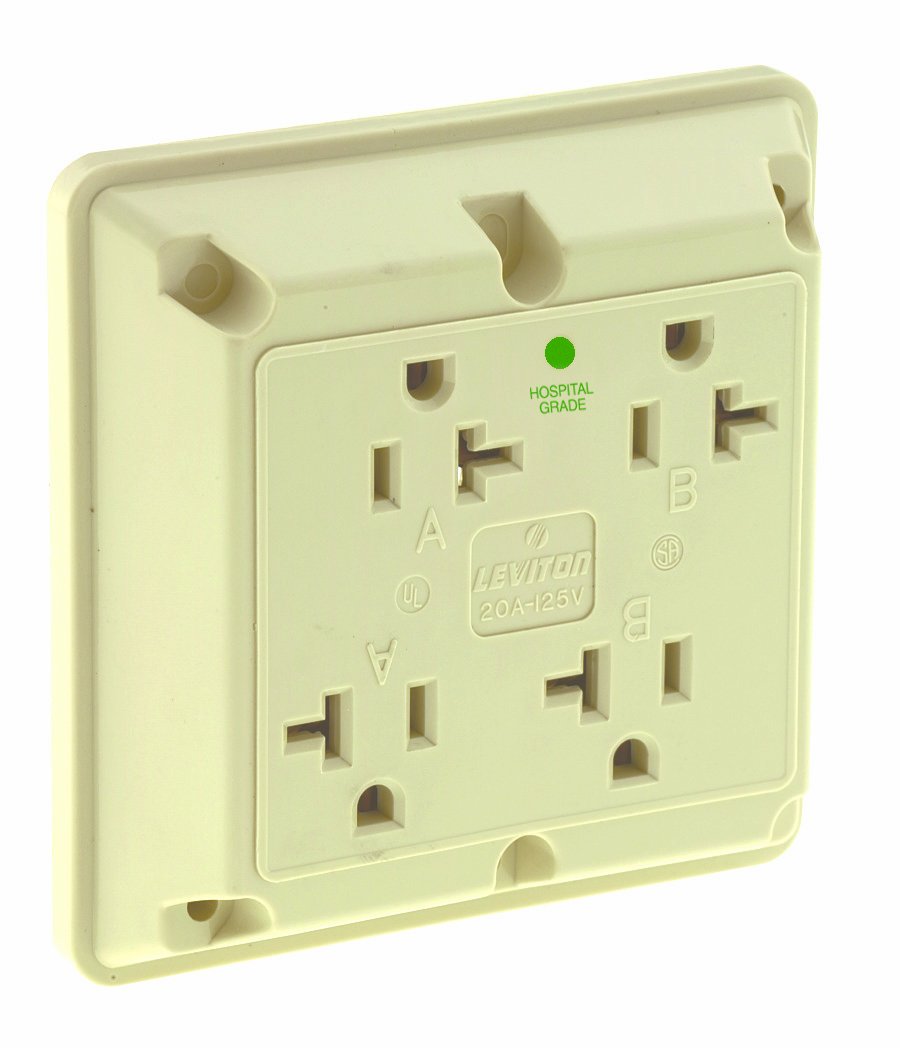
Image: Leviton 20A 125V Industrial Grade 4-in-1 Receptacle in Ivory. This image shows the front view of the electrical outlet with four receptacles.
Installation Instructions
- Turn Off Power: Locate the circuit breaker or fuse box that controls the power to the outlet where you intend to install the receptacle. Turn off the power completely and verify it is off using a voltage tester.
- Remove Old Receptacle (if applicable): Carefully remove the wall plate and unscrew the old receptacle from the electrical box. Disconnect the wires, noting their connections (hot, neutral, ground).
- Prepare Wires: Strip approximately 1/2 inch (12.7 mm) of insulation from the ends of the circuit wires. Ensure wires are straight and free of nicks.
- Connect Wires:
- Connect the green or bare copper ground wire to the green grounding screw on the receptacle.
- Connect the white neutral wire to the silver-colored screw terminals.
- Connect the black or colored hot wire to the brass-colored screw terminals.
Ensure all connections are tight and secure. For back-wiring, insert stripped wires into the appropriate holes and tighten screws.
- Mount Receptacle: Carefully fold the wires into the electrical box. Secure the new receptacle to the electrical box using the provided mounting screws.
- Install Wall Plate: Attach the wall plate over the receptacle.
- Restore Power: Turn the power back on at the circuit breaker or fuse box.
- Test: Test the receptacle with a known working device to ensure proper operation.
Always consult a qualified electrician if you are unsure about any part of the installation process.
Operation
The Leviton 21254-HI receptacle provides four outlets for connecting electrical devices. Simply insert the plug of your device into any of the available outlets. This heavy-duty receptacle is designed for demanding environments, offering reliable power connections.
Important: Do not overload the receptacle. Ensure the total current draw of all connected devices does not exceed the 20 Amp rating of the receptacle.
Maintenance
- Cleaning: To clean the receptacle, first turn off the power at the circuit breaker. Use a soft, damp cloth to wipe the surface. Do not use abrasive cleaners or solvents.
- Inspection: Periodically inspect the receptacle for any signs of damage, such as cracks, discoloration, or loose connections. If any damage is found, turn off power and replace the receptacle immediately.
- Tightness: Ensure mounting screws and wire connections remain tight. Loose connections can cause overheating.
Troubleshooting
| Problem | Possible Cause | Solution |
|---|---|---|
| No power at receptacle | Circuit breaker tripped or fuse blown | Check and reset the circuit breaker or replace the fuse. |
| Loose wire connection | Improper wiring during installation | Turn off power, remove wall plate, and check all wire connections for tightness. Reconnect if necessary. |
| Receptacle feels warm | Overload or loose connection | Unplug devices to reduce load. If warmth persists, turn off power and inspect wiring for loose connections. Consult an electrician if unsure. |
Specifications
| Attribute | Value |
|---|---|
| Brand | Leviton |
| Model Number | 21254-HI |
| Amperage | 20 Amp |
| Voltage | 125 Volt |
| Material | Nylon |
| Color | Ivory |
| Grounding | Yes |
| Mounting Screws | Zinc-plated steel 8-32 |
| Product Dimensions | 32.39 x 13.02 x 21.59 cm |
| Item Weight | 181.44 g |
Warranty and Support
For warranty information or technical support, please contact Leviton customer service. Details can typically be found on the product packaging or the official Leviton website.
Leviton Official Website: www.leviton.com


