
1. Introduction
This manual provides essential information for the safe installation, operation, and maintenance of the Leviton 1500W Mogul Base Porcelain Incandescent Lampholder, Model 8678. Please read these instructions thoroughly before proceeding with installation or use. Retain this manual for future reference.
2. Product Overview
The Leviton Model 8678 is a durable porcelain lampholder designed for incandescent lamps with a mogul base. It is rated for up to 1500W and 600V, suitable for various lighting applications. The robust porcelain construction ensures high heat resistance and longevity.
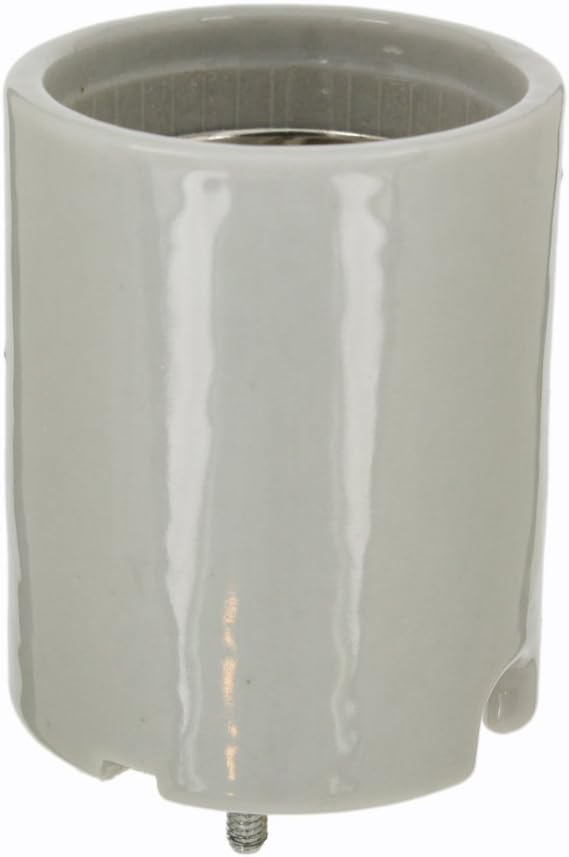
Figure 1: Front view of the Leviton 8678 Mogul Base Porcelain Incandescent Lampholder.
Key Features:
- Porcelain construction for high heat resistance.
- Mogul lamp base compatibility.
- Rated for 1500W and 600V.
- Includes 1/4 inch cap and liner for installation.
3. Safety Information
WARNING: Risk of electric shock or fire. Improper installation or use can lead to serious injury or death.
- Always disconnect power at the circuit breaker or fuse box before installing, servicing, or replacing any electrical component.
- Installation should be performed by a qualified electrician or a person with thorough knowledge of electrical wiring and building codes.
- Ensure the lampholder's voltage and wattage ratings are compatible with your electrical system and the bulb being used. Do not exceed 1500W or 600V.
- Use only with mogul base incandescent bulbs.
- Do not operate the lampholder if it is damaged.
- Keep away from flammable materials.
4. Installation
Follow these steps carefully for proper installation.
4.1 Pre-Installation Checks
- Verify that the power supply to the installation area is OFF at the main circuit breaker or fuse panel.
- Confirm that the electrical box or fixture where the lampholder will be installed is properly grounded and suitable for the lampholder's weight and dimensions.
- Ensure you have all necessary tools: screwdriver, wire strippers, electrical tape, and mounting hardware (if not included with fixture).
4.2 Wiring Instructions
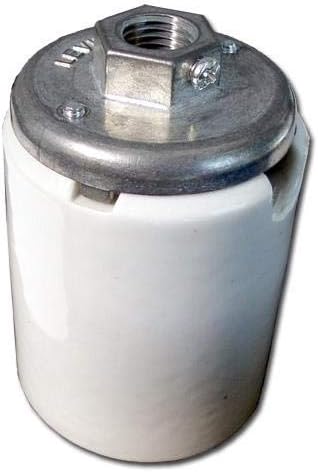
Figure 2: Top view of the lampholder showing the mounting cap and screw terminals.
- Carefully separate the lampholder body from its mounting cap. The 1/4 inch cap and liner are typically supplied loose in the packaging.
- Strip approximately 1/2 inch of insulation from the ends of the supply wires (hot, neutral, and ground).
- Connect the hot (usually black) wire to the brass screw terminal.
- Connect the neutral (usually white) wire to the silver screw terminal.
- Connect the ground (usually green or bare copper) wire to the green ground screw terminal on the mounting cap or fixture, if applicable. Ensure all connections are tight and secure.
- Ensure no bare wire strands are exposed outside the terminals.

Figure 3: Exploded view showing the lampholder body, mounting cap, and included hardware.
4.3 Mounting
- Once wiring is complete, carefully reassemble the lampholder body onto the mounting cap, ensuring wires are not pinched.
- Mount the assembled lampholder to the electrical box or fixture using appropriate screws and hardware. Ensure it is securely fastened.
- Double-check all connections and mounting security before restoring power.
5. Operating Instructions
After successful installation and power restoration:
- Ensure the power is ON at the circuit breaker.
- Carefully screw a mogul base incandescent bulb into the lampholder until it is snug. Do not overtighten.
- The lamp should illuminate. If not, refer to the Troubleshooting section.
6. Maintenance
6.1 Cleaning
To clean the lampholder, ensure power is disconnected. Wipe the exterior with a dry, soft cloth. Do not use abrasive cleaners or solvents.
6.2 Bulb Replacement
Always disconnect power before replacing a bulb. Allow the old bulb to cool completely before removal. Screw in the new mogul base incandescent bulb firmly but gently.
7. Troubleshooting
| Problem | Possible Cause | Solution |
|---|---|---|
| Lamp does not light | No power to fixture Loose wiring connection Defective bulb | Check circuit breaker/fuse Verify all wire connections (with power off) Replace bulb |
| Lamp flickers | Loose bulb Loose wiring connection | Tighten bulb Verify all wire connections (with power off) |
8. Specifications
- Brand: Leviton
- Model Number: 8678
- Body Material: Porcelain
- Lamp Wattage: 1500W (Maximum)
- Voltage Rating: 600V (Maximum)
- Lamp Base Type: Mogul
- Bulb Type: Incandescent
- Included Components: Lampholder, 1/4 inch cap, liner
- Item Weight: Approximately 8.2 ounces
9. Warranty and Support
For warranty information or technical support regarding your Leviton 8678 Lampholder, please refer to the official Leviton website or contact Leviton customer service directly. Keep your purchase receipt for warranty claims.
Leviton Contact Information:
- Visit the official Leviton website: www.leviton.com
- Refer to product packaging for specific customer service contact details.