
Introduction
This manual provides detailed instructions for assembling your CubicFun C065h Dubai Burj Al Arab 3D Puzzle. This model is part of the World's Great Architectures series, designed to be an engaging and educational building experience. The puzzle consists of 46 pieces made from paper and EPS foam board, requiring no scissors or glue for assembly.
Safety Information
WARNING: CHOKING HAZARD - Small Parts. Not for children under 3 years. Adult supervision is recommended during assembly, especially for younger users, to ensure all small parts are handled appropriately.
Package Contents
- 46 x Pre-cut EPS foam board puzzle pieces
- 1 x Instruction sheet (this manual)
Please verify all pieces are present before beginning assembly. If any parts are missing or damaged, please refer to the Support section.
Assembly Instructions
Follow these steps carefully to assemble your Dubai Burj Al Arab 3D Puzzle. No tools, scissors, or glue are required.
- Preparation: Carefully detach all 46 puzzle pieces from their sheets. Organize them by number or shape as indicated in the included diagram.

Image: Overview of puzzle sheets and initial assembly steps. This diagram illustrates how to identify and prepare the pieces for construction.
- Base Assembly: Begin by assembling the base structure of the Burj Al Arab. Identify the pieces that form the foundation and the surrounding water/land area. Interlock the corresponding tabs and slots.
- Building Structure: Proceed with constructing the main tower sections. The pieces are designed to interlock securely. Pay close attention to the numbering and orientation of each piece.

Image: A hand demonstrating the interlocking mechanism of the puzzle pieces. This shows how to gently push tabs into slots for a secure fit.
- Detailing: Attach smaller detail pieces, such as the sail-like structure and the helipad, as indicated in the instructions. Ensure all connections are firm.
- Final Check: Once all pieces are assembled, gently press on all connections to ensure they are fully seated and the structure is stable.
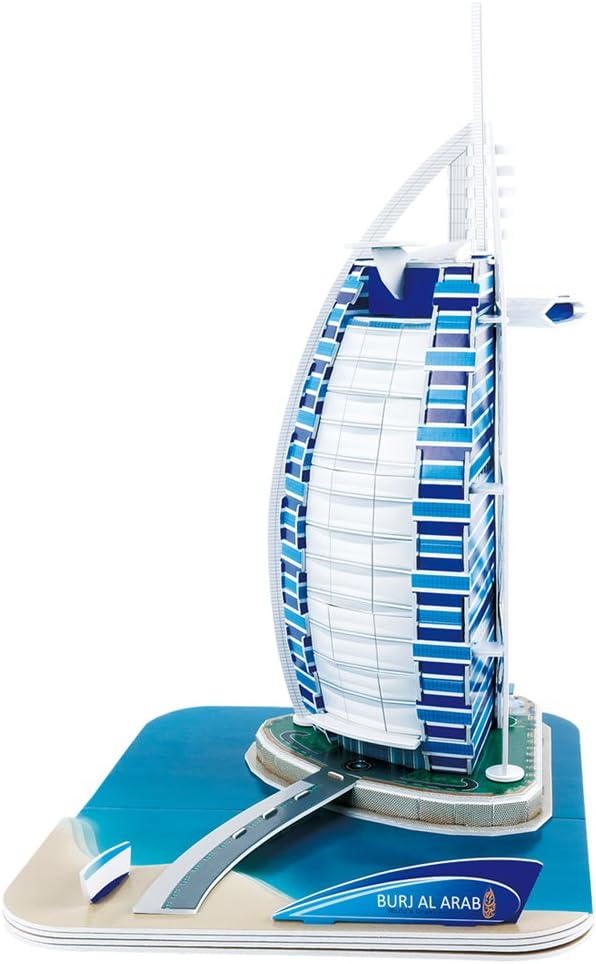
Image: The completed CubicFun Dubai Burj Al Arab 3D Puzzle, showcasing its intricate design and scale.
Display and Care
Your assembled 3D puzzle can be displayed as a decorative item or part of a collection. To maintain its condition:
- Place the model on a stable, flat surface.
- Keep it away from direct sunlight and excessive moisture to prevent material degradation.
- Dust gently with a soft, dry cloth as needed. Avoid using liquid cleaners.
Troubleshooting
| Problem | Solution |
|---|---|
| Pieces do not fit together easily. | Ensure you are using the correct pieces for the current step. Do not force pieces; gently align tabs with slots. Refer to the instruction diagram for correct orientation. |
| Model is unstable after assembly. | Check all connections to ensure tabs are fully inserted into their corresponding slots. Re-examine the base and core structure for any loose connections. |
| Missing or damaged pieces. | Carefully check the packaging and surrounding area for any small pieces. If pieces are genuinely missing or damaged, contact CubicFun customer support (see Support section). |
Specifications
- Model: C065h
- Built-up Model Size: 9.7" L x 7.9" W x 11.8" H (24.7 x 20 x 30 cm)
- Number of Pieces: 46
- Material: Paper and EPS foam board
- Assembly Method: Interlocking pieces, no glue or scissors required
- Recommended Age: 6 years and up
- Item Weight: 10.2 ounces (289.2 grams)
Support
For further assistance, missing parts, or inquiries regarding your CubicFun C065h Dubai Burj Al Arab 3D Puzzle, please contact CubicFun customer support. You can often find contact information on the product packaging or by visiting the official CubicFun website.
For general information about CubicFun products, you may visit the CubicFun Store on Amazon.