Introduction
The Voltcraft AT-1000 NV Transformer is designed to facilitate the use of electrical appliances across different power supply standards. This device allows for voltage conversion between 115V/AC and 240V/AC, enabling compatibility between devices and power grids with varying voltage requirements. This manual provides essential information for the safe and effective operation of your transformer.
Safety Instructions
Please read and understand all safety instructions before operating the transformer. Failure to follow these instructions may result in electric shock, fire, or damage to the product or connected devices.
- Voltage Compatibility: Always ensure the input voltage of the transformer matches the local power supply and the output voltage selected matches the requirements of the connected appliance. Incorrect voltage selection can cause severe damage.
- Power Rating: Do not exceed the maximum power rating of 1000 Watts. Overloading the transformer can lead to overheating and damage.
- Ventilation: Ensure adequate ventilation around the transformer. Do not cover the ventilation openings.
- Environment: Use the transformer in a dry environment, away from moisture, water, and extreme temperatures.
- Grounding: Ensure the transformer is properly grounded.
- Fuse: The device is protected by a T 10A, 250V fuse. If the fuse blows, replace it only with a fuse of the same type and rating.
- Children and Pets: Keep the transformer out of reach of children and pets.
- Maintenance: Do not attempt to open or repair the transformer yourself. Refer all servicing to qualified personnel.
Product Overview
The Voltcraft AT-1000 NV transformer features a robust design with clearly labeled controls and indicators for ease of use.
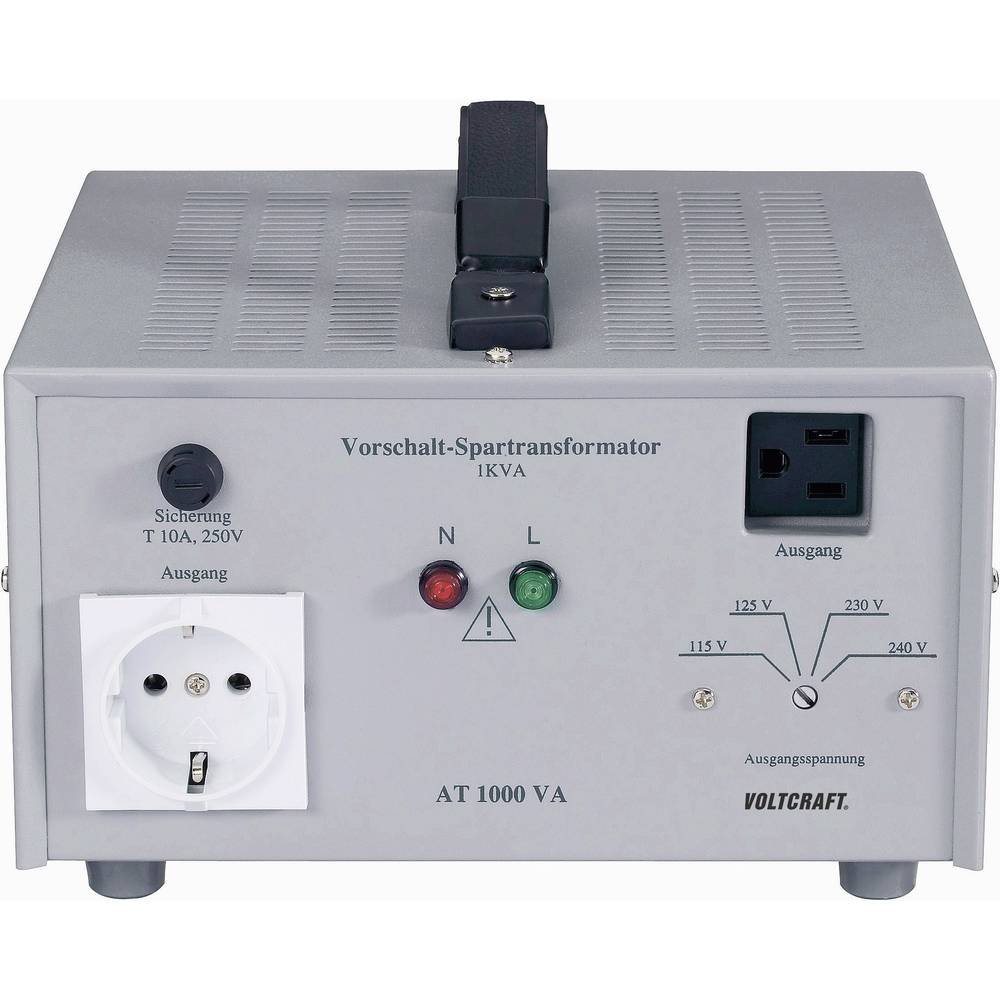
Figure 1: Front Panel of the AT-1000 NV Transformer. This image displays the main operational components including the fuse, European and US-style output sockets, voltage selection dial, and power indicator lights.
Key Components:
- Fuse (Sicherung T 10A, 250V): Located on the left side, protects the unit from overcurrent.
- European Output Socket (Ausgang): Standard European type socket for connecting appliances.
- Power Indicators (N, L): Red and green lights indicating power status and phase.
- Voltage Selection Switch (Ausgangsspannung): A rotary switch to select the desired output voltage (115V, 125V, 230V, 240V).
- US Output Socket (Ausgang): Standard US type socket for connecting appliances.
- Input Power Cord: (Not visible in image, typically on the rear) Connects the transformer to the main power supply.
Setup
- Unpacking: Carefully remove the transformer from its packaging. Inspect for any signs of damage.
- Placement: Place the transformer on a stable, flat surface in a well-ventilated area. Ensure there is sufficient space around the unit for air circulation. Avoid placing it near heat sources or in direct sunlight.
- Determine Input Voltage: Identify the voltage of your local power supply (e.g., 115V/AC or 240V/AC).
- Select Output Voltage: Rotate the Voltage Selection Switch on the front panel to match the voltage requirement of the appliance you intend to power. For example, if your appliance requires 115V and your supply is 240V, select 115V. If your appliance requires 240V and your supply is 115V, select 240V.
- Connect Appliance: Plug your appliance into the appropriate output socket (European or US type) on the transformer.
- Connect to Power Supply: Plug the transformer's input power cord into a wall outlet that matches your local power supply voltage.
Important: Always connect the appliance to the transformer first, then connect the transformer to the wall outlet.
Operating Instructions
- Power On: Once all connections are secure and voltage is correctly selected, the transformer is ready for operation. The power indicator lights (N, L) should illuminate.
- Monitor Load: Ensure the total power consumption of the connected appliance(s) does not exceed 1000 Watts. Continuous operation near the maximum load may cause the unit to heat up.
- Power Off: To turn off the transformer, first switch off the connected appliance, then unplug the transformer from the wall outlet.
For optimal performance and safety, avoid frequently switching the voltage selection while the unit is powered on and under load.
Maintenance
- Cleaning: Disconnect the transformer from the power supply before cleaning. Use a soft, dry cloth to wipe the exterior. Do not use liquid cleaners or solvents.
- Fuse Replacement: If the transformer stops functioning, the fuse may have blown.
- Disconnect the transformer from the main power supply and all connected appliances.
- Locate the fuse holder on the front panel (labeled "Sicherung").
- Unscrew the fuse holder cap and carefully remove the old fuse.
- Replace it with a new fuse of the exact same type and rating (T 10A, 250V).
- Screw the fuse holder cap back into place.
- Storage: When not in use for extended periods, store the transformer in a cool, dry place, away from direct sunlight and moisture.
Troubleshooting
| Problem | Possible Cause | Solution |
|---|---|---|
| Transformer does not power on. | No power from wall outlet, loose connection, blown fuse. | Check wall outlet with another device. Ensure power cord is securely plugged in. Check and replace fuse if necessary (refer to Maintenance section). |
| Connected appliance does not work. | Incorrect output voltage selected, appliance faulty, transformer overloaded. | Verify the output voltage selection matches the appliance's requirement. Test the appliance directly if possible. Ensure total wattage does not exceed 1000W. |
| Transformer overheats. | Overloaded, insufficient ventilation. | Reduce the load on the transformer. Ensure ventilation openings are clear and the unit is in a well-ventilated area. |
Specifications
| Model Number | AT-1000 NV |
| Brand | VOLTCRAFT |
| Power Rating | 1000 Watts |
| Input/Output Voltage | 115 V/AC to 240 V/AC, 240 V/AC to 115 V/AC |
| Power Type | Alternating Current (AC) |
| Fuse | T 10A, 250V |
| Dimensions (L x W x H) | 24 x 30.5 x 13.5 cm |
| Weight | 5.3 Kilograms |
| Included Components | 1 Transformer Unit |
Warranty and Support
Spare parts for the Voltcraft AT-1000 NV Transformer are available for a period of 1 year from the date of purchase. For technical support, service, or warranty claims, please refer to the contact information provided with your purchase documentation or visit the official VOLTCRAFT website. Do not attempt to repair the unit yourself, as this may void the warranty and pose safety risks.


