
1. Introduction
This manual provides essential information for the safe and effective use of your Wiha SoftFinish Electric Screwdriver with ClickFix, Model 283100. This tool is designed for professional use, particularly in electrical applications, offering VDE insulation for work on live parts up to 1000V AC. Please read these instructions thoroughly before initial use and retain them for future reference.
2. Safety Information
- Always verify the voltage rating of the tool (1000V AC) before use on live electrical components.
- Inspect the tool for any damage to the insulation before each use. Do not use if insulation is compromised.
- Use appropriate personal protective equipment (PPE) as required by local safety regulations.
- This tool is designed for electrical work. Do not use it for prying, chiseling, or other non-intended applications.
- Keep the tool clean and dry. Moisture can compromise insulation properties.
3. Product Components
The Wiha SoftFinish Electric Screwdriver with ClickFix consists of two primary components: the insulated SoftFinish handle and interchangeable insulated screwdriver blades. The ClickFix mechanism ensures a secure connection between the handle and the blade.
4. Setup and Blade Installation
The ClickFix system allows for quick and secure blade changes.
- Inserting a Blade: Align the desired insulated screwdriver blade with the opening in the SoftFinish handle. Push the blade firmly into the handle until you hear and feel a distinct 'click'. This indicates the blade is securely locked in place. Gently pull on the blade to confirm it is seated correctly.

Figure 1: The Wiha SoftFinish Electric Screwdriver with ClickFix fully assembled and ready for use. The red and yellow handle provides an ergonomic grip, and the insulated blade is securely in place.
- Removing a Blade: To remove a blade, firmly grasp the handle and the blade. Pull the blade straight out of the handle with a steady motion. The ClickFix mechanism will release the blade.

Figure 2: This image illustrates the ClickFix mechanism, allowing for quick and secure interchangeability of screwdriver blades. The blade is shown being detached from the insulated handle.
5. Operating Instructions
Once the desired blade is securely installed, the screwdriver is ready for use. Ensure the correct tip size and type (e.g., Flat Head) is selected for the fastener.
- Position the screwdriver tip onto the screw head.
- Apply firm, steady pressure while turning the handle clockwise to tighten or counter-clockwise to loosen.
- The VDE insulation provides protection when working on or near live electrical components up to 1000V AC. Always confirm power is off if possible, and follow all lockout/tagout procedures.

Figure 3: This image demonstrates the safe application of the Wiha SoftFinish Electric Screwdriver with ClickFix on an electrical outlet, highlighting its VDE insulation for live work up to 1000V AC.
5.1. SlimTechnology Feature
The screwdriver blades feature Wiha's SlimTechnology, which involves a reduced blade diameter. This design allows for improved access to deeply recessed screws and spring elements, particularly in confined spaces within electrical components and terminal blocks, without compromising insulation integrity.
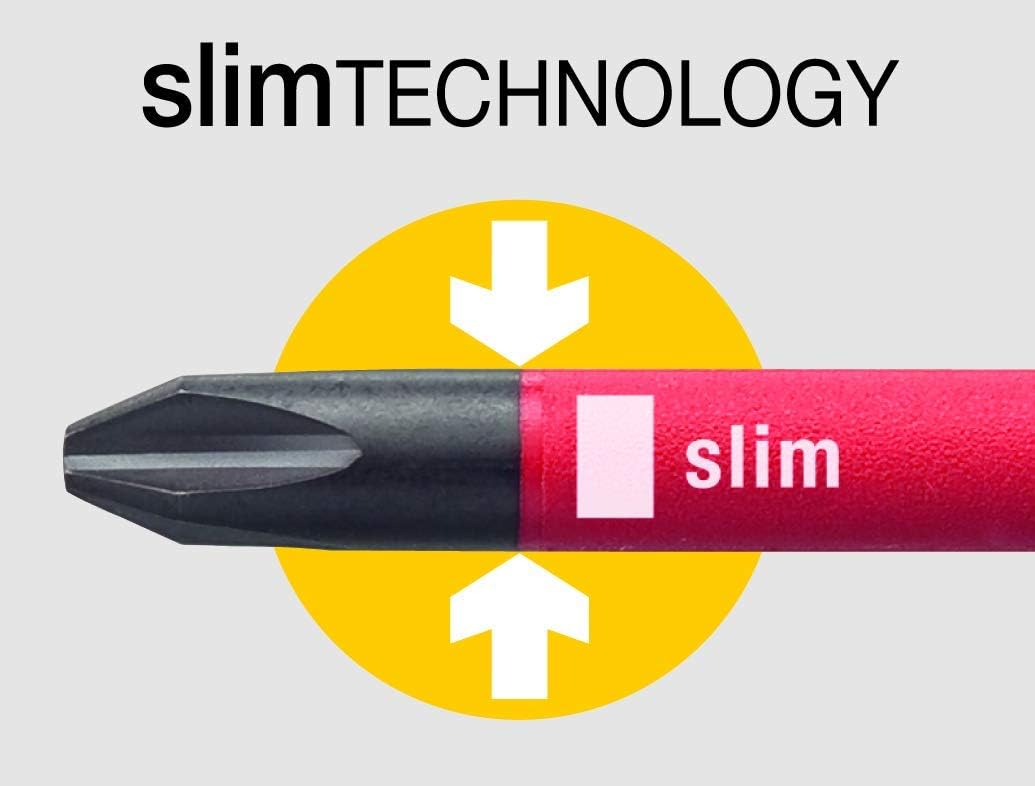
Figure 4: This graphic highlights Wiha's slimTECHNOLOGY, which features a reduced blade diameter. This design allows access to deeply recessed screws and spring elements, particularly useful in tight spaces within electrical components.
6. Maintenance and Care
- Cleaning: Wipe the handle and blades with a clean, dry cloth after each use. For stubborn dirt, a mild detergent solution can be used, ensuring the tool is completely dry before storage or next use. Do not use abrasive cleaners or solvents.
- Storage: Store the screwdriver and its blades in a dry environment, away from direct sunlight and extreme temperatures. Protect the insulation from sharp objects or impacts that could cause damage.
- Inspection: Regularly inspect the insulation on both the handle and the blades for cracks, cuts, or any signs of wear. Damaged tools must be immediately removed from service and replaced.
7. Troubleshooting
- Blade not locking: Ensure the blade is fully inserted into the handle until a 'click' is heard. Check for any debris obstructing the ClickFix mechanism.
- Blade difficult to remove: Pull the blade straight out with firm, steady pressure. Avoid twisting.
- Screwdriver slipping: Ensure the correct tip size and type is used for the screw head. Apply adequate downward pressure to prevent cam-out.
8. Specifications
| Feature | Detail |
|---|---|
| Brand | Wiha |
| Model Number | 283100 |
| Head Style | Flat |
| Material | Metal (Blade), Insulated (Handle) |
| Color | Multicolor (Red/Yellow) |
| Recommended Use | Electronics Item, Electrical Work (VDE 1000V AC) |
| Item Dimensions | 0.39 x 0.39 x 0.39 inches (approximate, for packaging) |
| Item Weight | 0.07 Kilograms |
| Special Feature | Ergonomic, VDE Insulated, ClickFix System, SlimTechnology |
9. Warranty Information
Specific warranty details for the Wiha SoftFinish Electric Screwdriver with ClickFix (Model 283100) are not provided within this manual. For comprehensive warranty information, please refer to the official Wiha website or contact Wiha customer service directly. Retain your proof of purchase for any warranty claims.
10. Customer Support
For further assistance, technical support, or inquiries regarding your Wiha SoftFinish Electric Screwdriver with ClickFix, please visit the official Wiha website or contact their customer service department. Contact information can typically be found on the product packaging or the manufacturer's website.


