
1. Introduction
This manual provides essential instructions for the safe and efficient operation of your Kern BOBP Floor Scale, model BOBP 300K200. The Kern BOBP series is designed for various industrial weighing applications, offering precise measurements and simplifying complex processes. Please read this manual thoroughly before initial use and keep it for future reference.
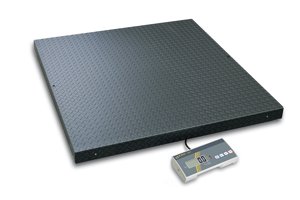
An image showing the Kern BOBP floor scale with its weighing platform and separate display unit.
2. Safety Information
Always observe the following safety precautions to prevent injury and damage to the scale.
- Ensure the scale is placed on a stable, level surface. Use the adjustable screw feet to level the platform.
- Do not exceed the maximum weighing capacity of 300 kg.
- Avoid dropping heavy objects onto the weighing platform.
- Keep the scale away from strong electromagnetic fields and direct sunlight.
- Do not immerse the display unit or platform in water.
- Only use the specified power adapter or batteries (6 x 1.5 V AA, not included for battery operation).
- Disconnect the power supply before cleaning or maintenance.
3. Package Contents
Verify that all items are present and undamaged upon unpacking.
- Kern BOBP Weighing Platform (Model BOBP 300K200)
- Display Unit
- Wall Bracket for Display Unit
- Power Adapter
- User Manual
4. Setup
- Unpacking: Carefully remove all components from the packaging. Retain packaging for future transport or storage.
- Placement: Place the weighing platform on a firm, level surface. Ensure there is sufficient space around the platform for safe operation.
- Leveling: Use the height-adjustable screw feet located at the bottom of the weighing platform to ensure it is perfectly level. A spirit level (not included) can assist in achieving optimal accuracy.
- Display Unit Installation:
- Mount the display unit to a wall using the provided wall bracket at an ergonomic viewing height.
- Alternatively, place the display unit on a stable surface near the scale.
- Connecting the Display Unit: Connect the display unit to the weighing platform using the provided cable. The cable length is approximately 6 meters.
- Power Supply:
- AC Power: Connect the power adapter to the display unit and then to a suitable power outlet.
- Battery Power (Optional): For battery operation, insert 6 x 1.5 V AA batteries (not included) into the battery compartment of the display unit. Observe correct polarity.
- Initial Power On: Press the ON/OFF button on the display unit. The display will perform a self-test and then show "0.00 kg".
5. Operation
5.1 Basic Weighing
- Power On: Press the ON/OFF button. Wait for the display to show "0.00 kg".
- Place Item: Carefully place the item to be weighed onto the center of the weighing platform.
- Read Weight: The display will show the stable weight of the item.
- Remove Item: Remove the item from the platform. The display should return to "0.00 kg".
5.2 Tare Function
The tare function allows you to subtract the weight of a container, so only the net weight of the contents is displayed.
- Place Container: Place the empty container onto the weighing platform. The display will show its weight.
- Tare: Press the TARE button. The display will reset to "0.00 kg", indicating the container's weight has been tared.
- Add Contents: Place the items to be weighed into the container. The display will now show only the net weight of the contents.
- Clear Tare: Remove both the container and its contents from the platform. The display will show a negative value equal to the tared weight. Press TARE again to return to "0.00 kg".
5.3 Animal Weighing Program (HOLD Function)
This program is useful for weighing moving subjects, such as animals, by calculating a stable average weight.
- Activate HOLD: Place the animal on the weighing platform. Once the animal is relatively still, press the HOLD button.
- Stable Value: The scale will calculate and display a stable average weight, which will remain frozen on the display even if the animal moves.
- Release HOLD: To clear the held value and return to live weighing, press the HOLD button again.
5.4 Automatic Shutdown
To conserve battery life, the scale features an automatic shutdown function. If no weighing activity is detected for a certain period, the scale will automatically turn off. The operating time on batteries is approximately 60 hours.
6. Maintenance
6.1 Cleaning
- Always disconnect the power supply before cleaning.
- Wipe the weighing platform and display unit with a damp cloth and a mild detergent.
- Do not use abrasive cleaners, solvents, or immerse any part of the scale in water.
- Ensure all parts are completely dry before reconnecting power.
6.2 Battery Replacement
If using battery power, replace the 6 x 1.5 V AA batteries when the low battery indicator appears on the display. Ensure correct polarity when inserting new batteries.
6.3 Storage
If the scale will not be used for an extended period, remove the batteries to prevent leakage. Store the scale in a dry, dust-free environment within the permissible ambient temperature range.
7. Troubleshooting
| Problem | Possible Cause | Solution |
|---|---|---|
| Scale does not turn on. | No power supply; batteries depleted or incorrectly inserted; power adapter faulty. | Check power adapter connection. Replace batteries, ensuring correct polarity. Try a different power outlet. |
| Inaccurate readings. | Scale not level; unstable surface; exceeding capacity; external vibrations. | Level the scale using adjustable feet. Place on a stable surface. Ensure weight is within capacity. Avoid vibrations. |
| Display shows "Err" or error code. | Overload; internal malfunction. | Remove excess weight. Turn off the scale, wait a few seconds, then turn it back on. If the error persists, contact customer support. |
| Display is blank or flickering. | Loose cable connection; low battery. | Check the cable connection between the platform and display unit. Replace batteries if applicable. |
8. Specifications
| Model | BOBP 300K200 |
| Manufacturer | Kern |
| Capacity | 300 kg |
| Accuracy (Readability) | 200 g |
| Weighing Platform Dimensions (WxDxH) | 1006 x 996 x 90 mm |
| Display Unit Dimensions (WxDxH) | 210 x 110 x 45 mm |
| Display | Large LCD, 25 mm digit height |
| Cable Length (Display Unit) | Approx. 6 m |
| Material | Painted steel (platform), Alloy steel (general) |
| Net Weight | Approx. 50.5 kg |
| Power Supply | AC adapter (included) or 6 x 1.5 V AA batteries (optional, not included) |
| Battery Operating Time | Approx. 60 hours (with automatic shutdown) |
| Ambient Temperature | 10 °C to 35 °C |
8.1 Optional Accessories
- Stand for Display Unit (KERN MWS-A01): Approx. 950 mm height.
- Rising Ramp (KERN BOBP-A01): WxDxH 996 x 507 x 87 mm, includes fixing plate.
9. Warranty and Support
For warranty information and technical support, please refer to the documentation provided with your purchase or contact the retailer. Keep your purchase receipt as proof of purchase.
For further assistance or to inquire about additional weighing units, please visit the official Kern website or contact their customer service.