Introduction
The AKAI MPD26 is a versatile MIDI-over-USB pad controller designed for music producers, programmers, musicians, and DJs. It integrates the renowned MPC pad feel and control technologies with modern USB connectivity, providing an intuitive platform for computer-based music production. This manual provides detailed instructions for setting up, operating, maintaining, and troubleshooting your MPD26.

Figure 1: AKAI MPD26 USB/MIDI Pad Controller, showing the pads, faders, knobs, and display screen.
Setup
Follow these steps to set up your AKAI MPD26 for the first time.
1. Unpacking and Inspection
- Carefully remove all components from the packaging.
- Verify that all items listed in the "Included Components" section are present.
- Inspect the unit for any signs of damage during transit.
2. Physical Connections
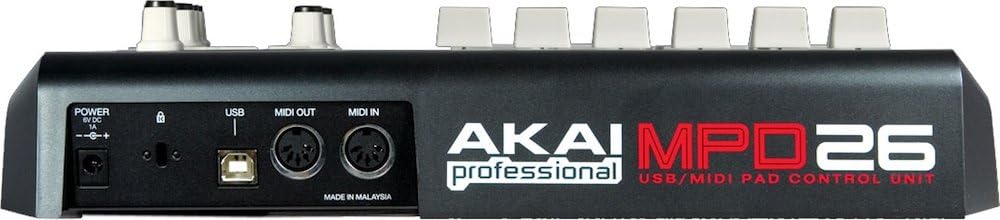
Figure 2: Rear panel of the AKAI MPD26, showing Power, USB, MIDI Out, and MIDI In ports.
- USB Connection: Connect the included USB cable from the MPD26's USB port to an available USB port on your computer. The MPD26 is USB bus-powered, so no external power adapter is typically needed when connected to a computer.
- MIDI Connections (Optional): If you are connecting to external MIDI hardware, use standard 5-pin DIN MIDI cables to connect the MPD26's MIDI OUT to your device's MIDI IN, and the MPD26's MIDI IN to your device's MIDI OUT.
- Power (Optional): While primarily USB bus-powered, an optional 6V DC, 1A power adapter (not included) can be used for standalone operation or if your USB port does not provide sufficient power. Connect it to the "POWER 6V DC 1A" input.
3. Software Installation
- The MPD26 is class-compliant and typically does not require specific drivers for basic functionality on most operating systems (Windows, macOS).
- Ableton Live Lite: Your MPD26 includes Ableton Live Lite software. Install this software from the provided media or download it from the Akai Professional website using the included license key.
- Editor Librarian Software: For advanced configuration and preset management, download and install the dedicated Editor Librarian software from the Akai Professional website.
4. Initial Configuration
- Once connected, your computer should recognize the MPD26 as a MIDI device.
- Open your Digital Audio Workstation (DAW) or sequencing software (e.g., Ableton Live Lite).
- Navigate to your software's MIDI/Controller settings and ensure the AKAI MPD26 is selected as an input and output device.
- Refer to your DAW's manual for specific MIDI setup instructions.
Operating the MPD26
The MPD26 offers a range of controls for expressive performance and precise parameter manipulation.

Figure 3: Top view of the AKAI MPD26, highlighting the pads, Q-Link controls, and transport section.
1. MPC Pads
The MPD26 features 16 genuine MPC pads that are both pressure and velocity-sensitive. These pads are the core interface for triggering samples and playing drums.
- Pad Banks: The MPD26 provides four pad banks (A, B, C, D), allowing you to access a total of 64 different sounds or samples from the 16 physical pads. Use the "PAD BANK" buttons to switch between banks.
- MPC Note Repeat: This function automatically plays a rhythm pattern (e.g., 16th notes) when a pad is held down, ensuring accuracy and speed for repetitive patterns like hi-hats.
- MPC Swing: Apply a humanized feel to your sequences by adjusting the swing parameter. This feature can turn perfectly quantized sequences into more natural, grooving rhythms.
- MPC Full Level: When activated, all pad hits will trigger at maximum velocity (127), regardless of how hard you strike the pad.
- MPC 16-Level: This mode assigns the same sound to all 16 pads, but each pad triggers the sound at a different velocity level, allowing for dynamic expression.
- Tap Tempo: Use the Tap Tempo button to set the tempo of your session by tapping along to the desired beat.
2. Q-Link Controls
The MPD26 includes assignable Q-Link controls for real-time manipulation of software parameters.
- Faders (F1-F6): Six assignable faders can be mapped to control volume, filter cutoff, effects sends, or any other continuous parameter in your software.
- Knobs (K1-K6): Six assignable 360-degree knobs provide precise control over parameters, ideal for fine-tuning or continuous adjustments.
- Assignment: Use the Editor Librarian software or your DAW's MIDI learn function to assign these controls to specific parameters.
3. Transport Controls
A dedicated set of transport controls allows for seamless integration with your DAW or sequencing software.
- Play, Stop, Record: Standard transport functions for controlling playback and recording in your software.
- Rewind, Fast Forward: Navigate through your project timeline.
- These controls transmit MIDI Machine Control (MMC) and standard MIDI messages, ensuring broad compatibility.
4. Display Screen
The backlit LCD screen provides visual feedback on current settings, parameters, and navigation within the MPD26's internal menus.
Maintenance
Proper care and maintenance will extend the life of your AKAI MPD26.
- Cleaning: Use a soft, dry cloth to wipe down the exterior of the unit. For stubborn dirt, a slightly damp cloth with mild soap can be used, but ensure no liquid enters the unit. Avoid abrasive cleaners or solvents.
- Storage: When not in use, store the MPD26 in a clean, dry environment away from direct sunlight, extreme temperatures, and excessive dust.
- Handling: Avoid dropping the unit or subjecting it to strong impacts. Do not place heavy objects on top of the MPD26.
- Connectivity: Always grasp the connector when plugging or unplugging cables, rather than pulling on the cable itself, to prevent damage to the ports.
Troubleshooting
If you encounter issues with your AKAI MPD26, refer to the following common problems and solutions.
| Problem | Possible Cause | Solution |
|---|---|---|
| MPD26 does not power on. | No USB connection or insufficient USB power. Optional power adapter not connected or faulty. | Ensure the USB cable is securely connected to both the MPD26 and your computer. Try a different USB port or USB cable. If using an optional power adapter, ensure it is correctly connected and functional. |
| No sound or MIDI output in software. | Incorrect MIDI settings in DAW. Drivers not installed (if required). Incorrect routing. | Verify that the MPD26 is selected as a MIDI input device in your DAW's preferences. Check that the correct instrument or track is armed for recording/playback. Ensure the correct MIDI channel is being used. Reinstall any necessary drivers or software. |
| Pads are not responding or are too sensitive/insensitive. | Full Level or 16-Level mode active. Pad sensitivity settings. | Check if "Full Level" or "16-Level" mode is active and deactivate if not desired. Adjust pad sensitivity settings using the Editor Librarian software. |
| Q-Link controls do not affect software parameters. | Controls not assigned or mapped. MIDI learn not engaged. | Use your DAW's MIDI learn function to assign the Q-Link faders and knobs to desired parameters. Ensure the MPD26 is sending MIDI CC messages for these controls. |
Specifications
| Feature | Detail |
|---|---|
| Model Number | MPD26 |
| Item Weight | 5.18 pounds (approx. 2.35 kg) |
| Package Dimensions | 13.54 x 12.36 x 3.46 inches (approx. 34.4 x 31.4 x 8.8 cm) |
| Pads | 16 velocity and pressure-sensitive MPC pads with 4 banks |
| Q-Link Controls | 6 assignable faders, 6 assignable 360-degree knobs |
| Connectivity | USB (bus-powered), MIDI In (5-pin DIN), MIDI Out (5-pin DIN) |
| Hardware Interface | USB |
| Compatible Devices | Computers and other devices with USB ports |
| Supported Software | Ableton Live (includes Lite version) |
| Special Feature | Backlit, Velocity Sensitive Pads, MPC Note Repeat, MPC Swing, Full Level, 16-Level |
| Included Components | AKAI MPD26 unit, USB cable, Ableton Live Lite software (download/license) |
Warranty and Support
For information regarding warranty coverage, technical support, and product registration, please visit the official Akai Professional website or contact their customer service department.
You can find more information and resources at the Akai Professional Store on Amazon.


