
Introduction
This manual provides instructions for the installation, operation, and maintenance of your Pasco 1435 Temperature and Pressure Boiler Gauge. Please read this document thoroughly before installation and use to ensure proper function and safety.
Product Overview
The Pasco 1435 is a dual-scale gauge designed to accurately measure both temperature and pressure within boiler systems. It features a durable polycarbonate face and a robust brass connection for reliable performance.
- Dual Scale: Measures temperature from 60-320°F (Fahrenheit) and 20-160°C (Celsius).
- Pressure Range: Measures pressure from 0-75 PSI (Pounds per Square Inch).
- Face Diameter: Approximately 2-3/4 inches for clear readability.
- Connection: 1/4 inch MPT (Male Pipe Thread) brass connection, designed for center backmount installation.
- Face Material: Constructed with a polycarbonate face for durability.
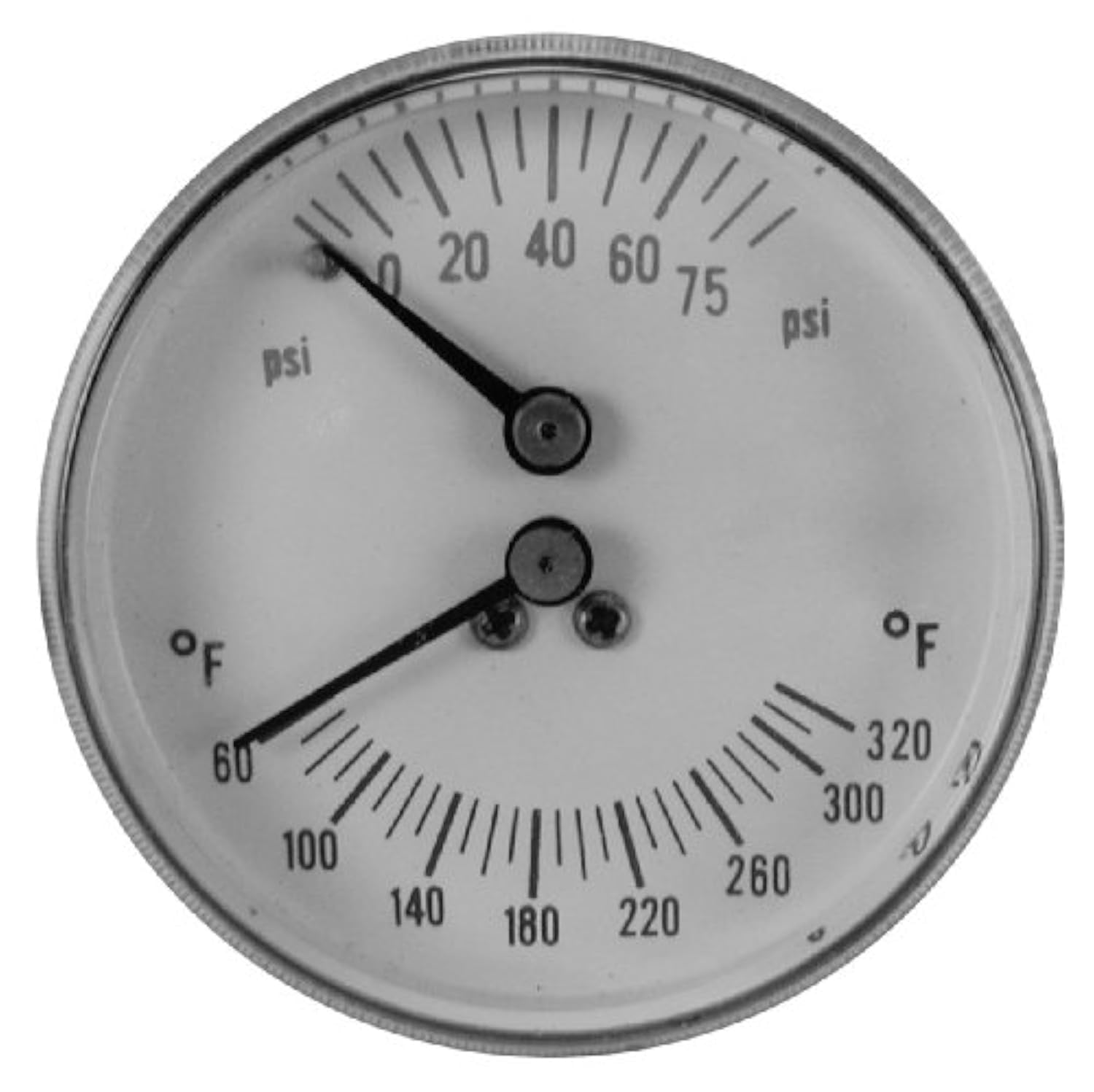
Image: Front view of the Pasco 1435 boiler gauge, displaying dual scales for pressure (0-75 psi) and temperature (60-320 °F).
Setup and Installation
Proper installation is critical for accurate readings and safe operation of the boiler system. Follow these steps carefully:
- Safety First: Before beginning installation, ensure the boiler system is completely depressurized and cooled to prevent injury.
- Identify Connection Point: Locate the appropriate 1/4 inch NPT female connection port on your boiler system where the gauge will be installed.
- Apply Thread Sealant: Apply a suitable thread sealant, such as PTFE tape or pipe dope, to the 1/4 inch MPT brass connection threads of the gauge. This helps ensure a watertight and airtight seal.
- Thread Gauge: Carefully thread the gauge into the connection port. Begin by hand-tightening until snug. Then, use an appropriate wrench to tighten further, ensuring a secure fit. Do not overtighten, as this can damage the gauge or the connection port.
- Orient for Readability: Position the gauge face so that it is easily visible and readable from your typical viewing angle.
- Leak Check: After installation, slowly repressurize the boiler system. Carefully inspect the gauge connection point for any signs of leaks. If leaks are detected, depressurize the system and re-evaluate the connection.
Operating Instructions
The Pasco 1435 gauge provides continuous, real-time readings for both boiler pressure and temperature. Understanding how to read these scales is essential for monitoring your system.
Reading Pressure
The upper scale on the gauge face indicates pressure in Pounds per Square Inch (PSI). The needle will point to the current pressure value, which ranges from 0 to 75 PSI. Monitor this reading to ensure it stays within the safe operating limits specified by your boiler manufacturer.
Reading Temperature
The lower scale on the gauge face indicates temperature. The outer markings represent Fahrenheit (°F), with a range from 60°F to 320°F. The inner markings (or corresponding values) represent Celsius (°C), with a range from 20°C to 160°C. The needle will point to the current temperature value. Regularly check this reading against your boiler's recommended operating temperature range.
Consistent monitoring of both pressure and temperature readings helps ensure the efficient and safe operation of your boiler system.
Maintenance
The Pasco 1435 gauge is designed for durability and typically requires minimal maintenance. Adhering to these simple guidelines will help prolong its lifespan and ensure continued accuracy.
- Regular Inspection: Periodically inspect the gauge for any visible signs of damage, such as cracks in the polycarbonate face, corrosion on the brass connection, or bent needles.
- Cleaning: To clean the gauge face, use a soft, damp cloth. Do not use abrasive cleaners, harsh chemicals, or solvents, as these can scratch or damage the polycarbonate material.
- Accuracy Check: If you suspect the gauge is providing inaccurate readings, compare its measurements with a known calibrated instrument. Significant discrepancies may indicate that the gauge needs to be replaced.
- Leak Prevention: Ensure the connection point remains free of leaks. If a leak is detected, follow the troubleshooting steps to address it promptly.
Troubleshooting
This section addresses common issues you might encounter with your Pasco 1435 boiler gauge.
Inaccurate Readings
- Cause: Gauge malfunction, incorrect installation, or an issue within the boiler system itself.
- Solution: Verify that the gauge was installed correctly and securely. Compare the gauge's readings with those from another calibrated pressure or temperature gauge. If readings are consistently inaccurate, the gauge may require replacement.
Leaking at Connection
- Cause: Insufficient thread sealant, a loose connection, or damaged threads on either the gauge or the boiler port.
- Solution: Depressurize the boiler system completely. Carefully remove the gauge, clean the threads, reapply fresh thread sealant, and reinstall the gauge, ensuring it is tightened appropriately without overtightening. Inspect threads for any damage that might prevent a proper seal.
Fogging on Face
- Cause: Moisture ingress into the gauge housing or internal condensation due to temperature fluctuations.
- Solution: While minor, temporary fogging may clear on its own, persistent or heavy fogging can indicate a compromised seal. If visibility is significantly impaired or fogging persists, consider replacing the gauge to ensure accurate readings.
Specifications
| Feature | Detail |
|---|---|
| Model Number | 1435 |
| Pressure Range | 0-75 PSI |
| Temperature Range | 60-320°F (20-160°C) |
| Face Diameter | 2-3/4 inches |
| Connection Size | 1/4 inch MPT |
| Connection Type | Center Backmount |
| Materials | Brass (connection), Polycarbonate (face) |
| Item Weight | Approx. 0.40 lbs (6.4 ounces) |
Warranty Information
Pasco products are manufactured to high-quality standards. For specific warranty details pertaining to your Pasco 1435 gauge, please refer to the documentation provided with your original purchase. It is recommended to retain your proof of purchase for any potential warranty claims.
Support
For technical assistance, inquiries regarding replacement parts, or any other support needs, please contact Pasco customer service. The most current contact information can typically be found on the official Pasco website or on the product packaging.