
Introduction
The Celestron MAK 90mm Angled Spotting Scope is a versatile optical instrument designed for both terrestrial and astronomical observations. Its Maksutov-Cassegrain optical design provides bright, sharp images with high contrast, making it suitable for a wide range of applications including bird watching, nature observation, target shooting, and basic astronomy. This manual provides essential information for setting up, operating, maintaining, and troubleshooting your spotting scope.
What's in the Box
Upon unpacking your Celestron MAK 90mm Angled Spotting Scope, please ensure all components are present:
- Celestron MAK 90mm Angled Spotting Scope (Model 52268-CGL)
- 32mm Plossl Eyepiece
- 45° Erect Image Diagonal
- 8x21 Erect Image Finderscope
- Nylon Backpack for storage and transport

Image: The Celestron MAK 90mm Angled Spotting Scope shown alongside its included nylon backpack.
Product Overview
The Celestron MAK 90mm spotting scope features a Maksutov-Cassegrain optical design, which is known for its compact size and excellent image quality. This design folds the light path, allowing for a much shorter optical tube compared to other scopes of similar focal length, enhancing portability. The scope is equipped with multi-coated optics to maximize light transmission and ensure bright, sharp views.

Image: Front view of the Celestron MAK 90mm Angled Spotting Scope, highlighting the objective lens, eyepiece, and finderscope.
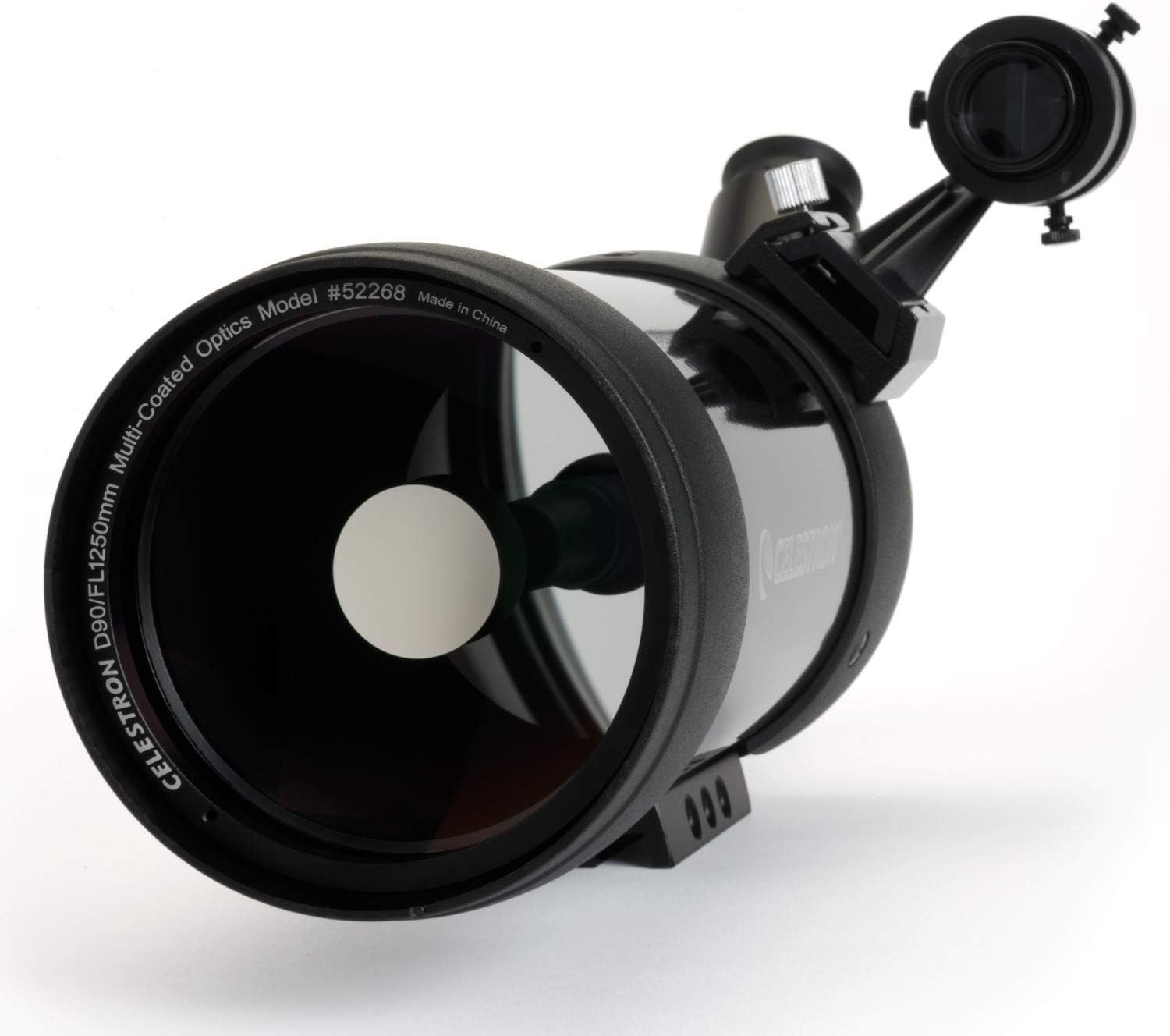
Image: A close-up of the objective lens of the Celestron MAK 90mm Angled Spotting Scope, displaying the Celestron logo and model information.
Setup
Follow these steps to set up your Celestron MAK 90mm Angled Spotting Scope:
- Mounting the Scope: Attach the spotting scope to a sturdy tripod (not included) using the integrated mounting plate. Ensure it is securely fastened.
- Attaching the Diagonal: Insert the 45° erect image diagonal into the eyepiece port of the scope. Secure it with the thumbscrew.
- Inserting the Eyepiece: Insert the 32mm Plossl eyepiece into the diagonal. Tighten the thumbscrew to hold it in place.
- Mounting the Finderscope: Slide the 8x21 erect image finderscope into its bracket on the main scope. Secure it with the thumbscrew.
- Aligning the Finderscope: Point the main scope at a distant, easily identifiable object (e.g., a telephone pole). Look through the finderscope and adjust its alignment screws until the object is centered in both the finderscope and the main scope's eyepiece.

Image: The Celestron MAK 90mm Angled Spotting Scope with the 45° erect image diagonal and 32mm Plossl eyepiece correctly installed.

Image: The Celestron MAK 90mm Angled Spotting Scope fully assembled with the finderscope, eyepiece, and diagonal in position.
Operating the Spotting Scope
Focusing
To achieve a clear image, rotate the focus knob located on the side of the main optical tube until the image appears sharp. For terrestrial viewing, focus on a distant object. For astronomical viewing, focus on a bright star or the Moon.
Terrestrial Viewing
The 45° erect image diagonal provides a correctly oriented image, making the scope ideal for observing land-based targets. Use the finderscope to locate your desired object, then look through the main eyepiece and adjust the focus for clarity. The 90mm aperture gathers ample light for bright views even in challenging conditions.
Astronomical Viewing
While primarily a spotting scope, the Maksutov-Cassegrain design also excels at astronomical observations. Its high magnification and light-gathering capability allow for detailed views of the Moon, planets, and brighter deep-sky objects. For comfortable viewing of objects high in the sky, the angled eyepiece is particularly beneficial.
Digiscoping (Photography)
The C90 spotting scope is designed to be camera adaptable for digiscoping. To capture images through your scope, you will need an optional T-Adapter and a T-Ring specific to your DSLR camera model. Remove the eyepiece and diagonal, then attach the T-Adapter to the scope's visual back and the T-Ring to your camera body. Finally, connect the camera with the T-Ring to the T-Adapter on the scope. This setup allows the scope to function as a powerful telephoto lens.
Video: This official product video demonstrates the features and versatility of Celestron spotting scopes, including their use for terrestrial observation and digiscoping. It highlights the compact design and optical performance.
Maintenance
Proper care and maintenance will ensure the longevity and optimal performance of your spotting scope:
- Cleaning Optics: Use a soft, lint-free cloth specifically designed for optical surfaces. Gently brush away any loose dust particles. For smudges, use a small amount of optical cleaning fluid on the cloth, then wipe gently. Avoid touching optical surfaces with bare hands.
- Cleaning Body: Wipe the body of the scope with a soft, damp cloth. Avoid harsh chemicals.
- Storage: Store the scope in its included nylon backpack or a dry, dust-free environment when not in use. Avoid extreme temperatures and humidity.
- Moisture: If the scope gets wet, dry it thoroughly before storing. Do not immerse the scope in water.
Troubleshooting
Here are solutions to common issues you might encounter:
| Problem | Possible Cause | Solution |
|---|---|---|
| Image is blurry or out of focus | Improper focus setting | Adjust the focus knob until the image is sharp. |
| No image visible | Lens caps still on; eyepiece not inserted correctly; object not in field of view | Remove all lens caps. Ensure eyepiece and diagonal are fully inserted and secured. Use the finderscope to locate the object. |
| Image is dim | Low light conditions; dirty optics | Observe in brighter conditions if possible. Clean the objective lens and eyepiece as described in the Maintenance section. |
| Finderscope not aligned | Finderscope screws loose or misaligned | Re-align the finderscope as described in the Setup section. |
Specifications
Key technical specifications for the Celestron MAK 90mm Angled Spotting Scope (Model 52268-CGL):
| Feature | Detail |
|---|---|
| Aperture | 90 mm |
| Focal Length | 1250 mm |
| Magnification (with 32mm eyepiece) | 39x |
| Angular Field of View (FOV) | 1.3° |
| Linear FOV (ft @ 1000 yds) | 68 @ 39x |
| Eye Relief | 20 mm |
| Near Focus | 15 ft / 4.6 m |
| Coating | Multi-Coated Optics |
| Optical Tube Length | 70 Millimeters |
| Item Weight | 4.62 pounds |
| Product Dimensions | 15.7 x 10.2 x 10.2 inches |
| Finderscope | 8x21 Erect Image Finderscope |

Image: A diagram illustrating the physical dimensions of the Celestron MAK 90mm Angled Spotting Scope.
Warranty & Support
Your Celestron MAK 90mm Angled Spotting Scope comes with a Celestron Limited Lifetime US Warranty. For warranty claims or technical assistance, please contact Celestron's US-based expert tech support. Details regarding the warranty and support contact information can be found on the official Celestron website or in the documentation included with your product.

