
1. Introduction
The Panasonic VW-AD20-KKIT is an AC adapter and charger kit designed to provide power to select Panasonic camcorders and charge compatible batteries. This kit ensures your camcorder remains powered for extended use and keeps your batteries ready for recording.
It is compatible with batteries such as the VW-VBG130 and VW-VBG260, offering a versatile power solution for your photographic equipment.
2. Safety Information
Please read and understand all safety instructions before using this product to prevent injury or damage.
- Do not expose the adapter/charger to rain, moisture, or extreme temperatures.
- Do not disassemble, modify, or attempt to repair the unit. Refer servicing to qualified personnel.
- Use only with specified Panasonic camcorders and compatible batteries (VW-VBG130, VW-VBG260).
- Ensure the power outlet voltage matches the adapter's input requirements.
- Keep out of reach of children.
- Unplug the unit from the power outlet when not in use or during electrical storms.
3. Package Contents
Verify that all items are present in your package:
- Panasonic VW-AD20-KKIT AC Adapter/Charger Unit
- AC Power Cable
- DC Power Cable
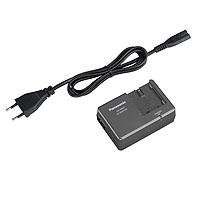
An image showing the Panasonic VW-AD20-KKIT AC Adapter/Charger Kit, which includes the main adapter unit and connected cables.
4. Setup
4.1 Connecting to Power Outlet
- Connect the AC power cable to the AC input port on the VW-AD20-KKIT adapter unit.
- Plug the other end of the AC power cable into a standard wall outlet.
4.2 Connecting to Camcorder (AC Adapter Mode)
- Ensure the AC adapter is connected to a power outlet as described in Section 4.1.
- Connect the DC power cable to the DC output port on the VW-AD20-KKIT adapter unit.
- Connect the other end of the DC power cable to the DC input jack on your compatible Panasonic camcorder.
- The camcorder will now receive power directly from the AC adapter.
5. Operating Instructions
5.1 Charging a Battery
This kit charges compatible Panasonic batteries such as VW-VBG130 and VW-VBG260.
- Ensure the AC adapter is connected to a power outlet (Section 4.1).
- Insert the compatible battery into the designated charging slot on the VW-AD20-KKIT adapter unit. Ensure it is securely seated.
- A charging indicator light (if present on the unit or battery) will illuminate, indicating that charging has begun.
- Charging time varies depending on the battery's capacity and current charge level. Refer to your battery's manual for specific charging times.
- Once charging is complete, the indicator light may change color or turn off. Remove the battery from the charger.
5.2 Using as an AC Adapter for Camcorder
When connected to the camcorder as described in Section 4.2, the unit functions as an AC adapter, providing continuous power for operation without draining the camcorder's internal battery (if applicable) or an attached battery.
- This mode is ideal for long recording sessions, playback, or transferring data to a computer.
- Ensure all connections are firm before operating the camcorder.
6. Maintenance
Proper maintenance ensures the longevity and optimal performance of your VW-AD20-KKIT.
- Cleaning: Disconnect the unit from the power outlet before cleaning. Use a soft, dry cloth to wipe the exterior. Do not use liquid cleaners or solvents.
- Storage: Store the adapter/charger in a cool, dry place away from direct sunlight and extreme temperatures when not in use.
- Cable Care: Avoid bending or crimping the cables excessively. Do not place heavy objects on the cables.
7. Troubleshooting
If you encounter issues with your VW-AD20-KKIT, try the following solutions:
- No Power/Not Charging:
- Check if the AC power cable is securely plugged into both the adapter and the wall outlet.
- Verify that the wall outlet is functional by plugging in another device.
- Ensure the battery is correctly inserted into the charging slot.
- Confirm that the battery is compatible with the charger.
- Camcorder Not Receiving Power:
- Check the connection of the DC power cable to both the adapter and the camcorder.
- Ensure the camcorder is turned on.
- Verify that your camcorder model is compatible with this adapter.
If problems persist after trying these steps, contact Panasonic customer support.
8. Specifications
| Feature | Specification |
|---|---|
| Model Number | VW-AD20-KKIT |
| Product Dimensions | 2.6 x 4.8 x 10.1 inches |
| Item Weight | 11.2 ounces |
| Input Voltage | 12 Volts |
| Output Voltage | 7.4 Volts |
| Color | Black |
| Certifications | CE, FCC, UL |
9. Warranty Information
For detailed warranty information regarding your Panasonic VW-AD20-KKIT, please refer to the warranty card included with your product or visit the official Panasonic website. Warranty terms and conditions may vary by region and purchase date.
10. Support
If you require further assistance, technical support, or have questions not covered in this manual, please contact Panasonic customer service or visit their official support website:
- Panasonic Official Website: www.panasonic.com
- Refer to the contact information provided in your product packaging for regional support details.