
1. Introduction
This manual provides essential instructions for the safe and efficient operation of your Panasonic SC-BT330 5.1 Channel Cinema Surround Home Entertainment System. This system integrates a Blu-ray Disc player/amplifier with a 5.1-channel speaker set, delivering 1000 watts of total power. Please read this manual thoroughly before using the product and retain it for future reference.
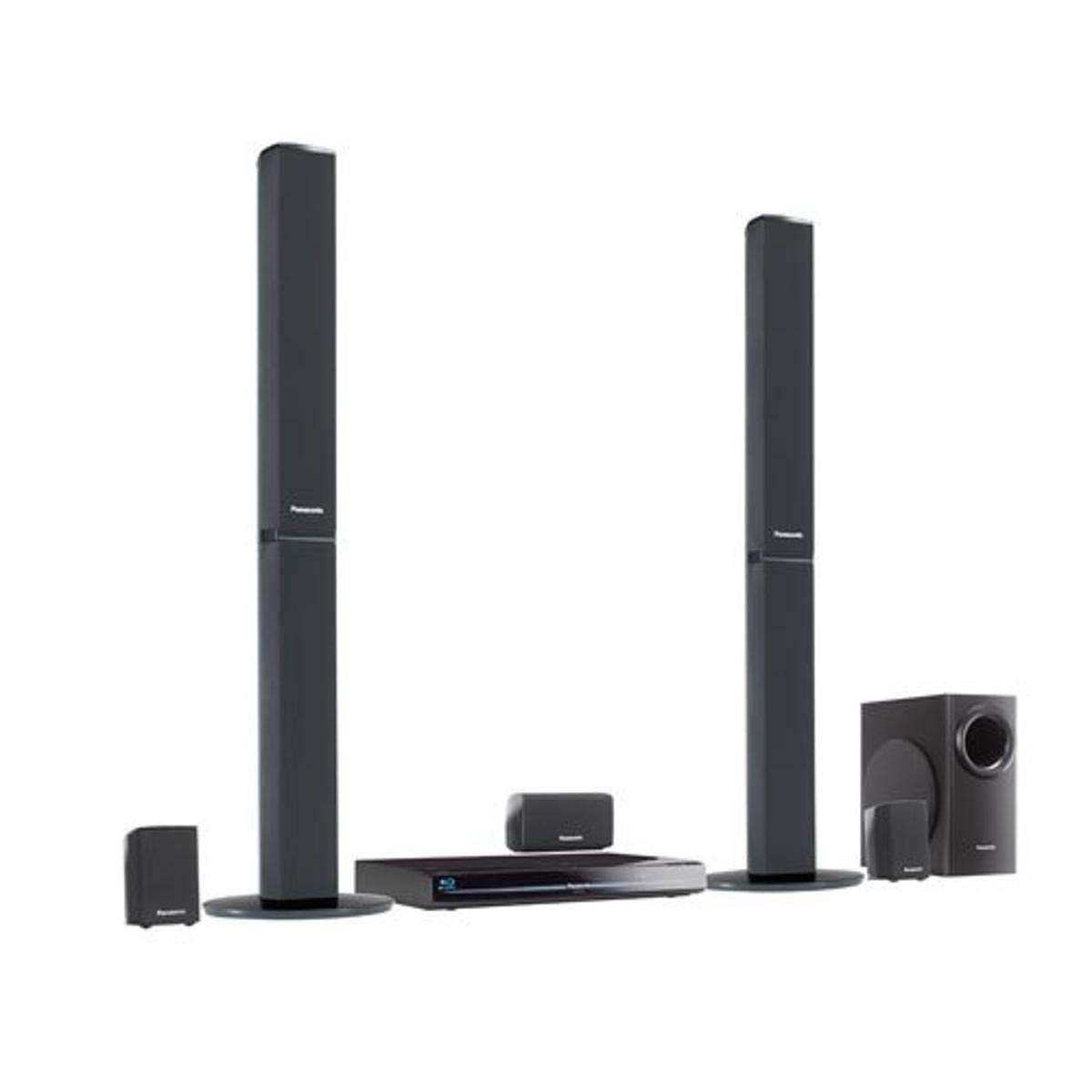
Figure 1: Panasonic SC-BT330 Home Theater System. This image displays the main unit (Blu-ray player/amplifier) and the accompanying speakers, including the tallboy front speakers and the subwoofer, providing a visual overview of the complete system.
2. Safety Information
To ensure safe operation and prevent damage, observe the following precautions:
- Power Supply: Connect the unit only to an AC 120 V, 60 Hz power supply. Do not overload electrical outlets.
- Ventilation: Ensure adequate ventilation. Do not block ventilation openings with items such as newspapers, tablecloths, or curtains. Maintain a minimum distance of 10 cm (4 inches) around the unit for proper airflow.
- Moisture and Liquids: Do not expose the unit to rain, moisture, dripping, or splashing. Do not place objects filled with liquids, such as vases, on the unit.
- Foreign Objects: Never insert any metallic objects or flammable materials into the unit's ventilation openings.
- Speaker Placement: Place speakers on a stable, level surface to prevent them from falling. Keep speakers away from heat sources and direct sunlight.
- Batteries: Replace batteries in the remote control with the correct type (2 AA batteries). Do not mix old and new batteries, or different types of batteries. Dispose of used batteries according to local regulations.
- Servicing: Do not attempt to repair this unit yourself. Refer all servicing to qualified service personnel.
3. Package Contents
Verify that all items are present in the package before proceeding with setup:
- Main Unit (Blu-ray Disc Player/Amplifier)
- Front Speakers (2 tallboy speakers)
- Center Speaker (1)
- Surround Speakers (2)
- Subwoofer (1)
- Remote Control with Batteries (2 AA)
- Speaker Cables
- FM Indoor Antenna
- AC Power Cord
- Operating Instructions (this manual)
4. Setup
4.1 Speaker Placement
Optimal speaker placement is crucial for achieving the best 5.1 channel surround sound experience. Position the speakers as follows:
- Front Speakers: Place one on each side of your television, equidistant from the viewing position.
- Center Speaker: Position directly above or below the center of your television.
- Surround Speakers: Place to the sides or slightly behind the main listening area, facing inwards.
- Subwoofer: Position in a corner of the room or near a wall for enhanced bass response. Experiment with placement to find the best sound.
4.2 Connections
Follow these steps to connect your system:
- Speaker Connections: Connect each speaker cable to the corresponding color-coded terminals on the rear of the main unit. Ensure correct polarity (+ to + and - to -).
- HDMI Connection: Connect an HDMI cable from the HDMI OUT terminal on the main unit to an HDMI IN terminal on your television. This single cable transmits both video and audio.
- Network Connection (Optional):
- Wired: Connect an Ethernet cable from the LAN terminal on the main unit to your home router.
- Wireless: If using an optional Wi-Fi dongle (sold separately), insert it into the USB port on the main unit. Configure wireless settings in the system menu after initial power-on.
- Power Connection: Plug the AC power cord into the main unit and then into a wall outlet.
4.3 Initial Setup
After connecting all components and powering on the unit, follow the on-screen instructions for initial setup, which typically includes:
- Language selection.
- Video output settings.
- Audio setup, including speaker level calibration.
- Network configuration (if not already connected via Ethernet).
5. Operating Instructions
5.1 Basic Playback
Insert a Blu-ray Disc, DVD, or CD into the disc slot. The system will typically begin playback automatically. Use the remote control for playback functions such as Play, Pause, Stop, Fast Forward, and Rewind.
5.2 Internet Features (VIERA Cast)
The SC-BT330 supports VIERA Cast, providing access to online services such as Netflix, YouTube, and Amazon Video. Ensure your system is connected to the internet. Navigate to the VIERA Cast menu using the remote control to access these services.
5.3 iPod/iPhone Dock
Connect your iPod or iPhone to the integrated dock. The system will automatically detect the device. Use the system's remote control to navigate your device's music and video content, which will be displayed on your television screen. The dock also charges your device during connection.
5.4 Sound Settings
To adjust surround sound and equalizer (EQ) levels:
- Press the AUDIO button on the remote control to access sound settings.
- Use the LEFT/RIGHT arrow buttons to navigate through options like 'Surround Mode' or 'EQ Presets'.
- Use the UP/DOWN arrow buttons to adjust the selected setting's level or choose a preset.
- Press ENTER to confirm your selection or EXIT to close the menu.
5.5 VIERA Link
If you have a compatible Panasonic VIERA television, VIERA Link allows for integrated control. When connected via HDMI, the system can automatically power on/off with your TV and switch inputs seamlessly.
6. Maintenance
6.1 Cleaning
To maintain the appearance and performance of your system:
- Wipe the main unit and speakers with a soft, dry cloth.
- For stubborn dirt, lightly dampen the cloth with water and then wipe dry.
- Do not use abrasive cleaners, waxes, or solvents as they can damage the finish.
6.2 Firmware Updates
Panasonic may release firmware updates to improve performance or add new features. To check for and install updates:
- Ensure the unit is connected to the internet.
- Navigate to the 'Setup' menu, then 'Others', and select 'Firmware Update'.
- Follow the on-screen prompts to check for and install any available updates. Do not power off the unit during an update.
7. Troubleshooting
Refer to this section for solutions to common issues:
| Problem | Solution |
|---|---|
| No power | Check if the power cord is securely plugged into the unit and the wall outlet. Ensure the outlet is functional. |
| No sound | Verify speaker cables are correctly connected. Check the volume level and ensure the mute function is not active. Confirm the correct audio input is selected on your TV. |
| No picture | Ensure the HDMI cable is securely connected to both the unit and the TV. Select the correct HDMI input on your television. |
| Network connection issues | Check Ethernet cable connection or Wi-Fi dongle. Restart your router and the home theater system. Verify network settings in the system menu. |
| Disc playback errors | Ensure the disc is clean and free of scratches. Verify the disc type is supported by the player. |
| Loud pop from subwoofer | Check subwoofer cable connections. Ensure the subwoofer is not placed too close to other electronic devices that might cause interference. |
| Sluggish menus or garbled text | Try performing a full power cycle: turn off the unit, unplug it from the power outlet for a few minutes, then plug it back in and restart. Check for firmware updates. |
| Unit turns off randomly | Check for proper ventilation around the unit to prevent overheating. Ensure power connections are stable. |
| Remote control issues (e.g., sound adjustment) | Replace batteries. Ensure there are no obstructions between the remote and the unit. For sound adjustments, use the LEFT/RIGHT arrow buttons after pressing AUDIO, not UP/DOWN. |
8. Specifications
Key technical specifications for the Panasonic SC-BT330 Home Theater System:
| Feature | Detail |
|---|---|
| Model Name | SC-BT330 |
| Speaker Type | Subwoofer, Surround Sound |
| Surround Sound Channel Configuration | 5.1 |
| Speaker Maximum Output Power | 1000 Watts |
| Connectivity Technology | Wi-Fi (optional dongle required), Ethernet |
| Compatible Devices | Television, iPod/iPhone |
| Power Source | Corded Electric |
| Item Weight | 36.6 Pounds |
| Product Dimensions | 36 x 20 x 16 inches |
| Batteries (Remote) | 2 AA batteries required |
| UPC | 885170003033 |
9. Warranty and Support
This Panasonic product is covered by a limited warranty. Please refer to the warranty card included with your purchase for specific terms and conditions, including warranty period and coverage details. Keep your proof of purchase for warranty claims.
For technical assistance, troubleshooting beyond this manual, or to inquire about service, please contact Panasonic Customer Support. Contact information can typically be found on the Panasonic official website or on your warranty documentation.