
Introduction
The LeapFrog My Own Leaptop is an interactive learning toy designed to introduce young children to letters, numbers, and basic computer literacy skills. Featuring a larger screen and four engaging learning modes, this device offers a fun and portable way for children to explore and learn.
What's in the Box
- LeapFrog My Own Leaptop
- Quick Start Guide
Setup
Battery Installation
The Leaptop requires 3 AA batteries. Batteries are included for demonstration purposes only. For regular use, new batteries are recommended to ensure optimal performance.
- Locate the battery compartment on the underside of the Leaptop.
- Using a screwdriver, open the battery compartment cover.
- Insert 3 new AA batteries, ensuring correct polarity (+/-).
- Replace the battery compartment cover and tighten the screw.
Personalization
To personalize the Leaptop with your child's name and custom content, connect the device to a computer and visit the LeapFrog Learning Path website. Follow the on-screen instructions to download songs and set up pretend emails.
Product Overview
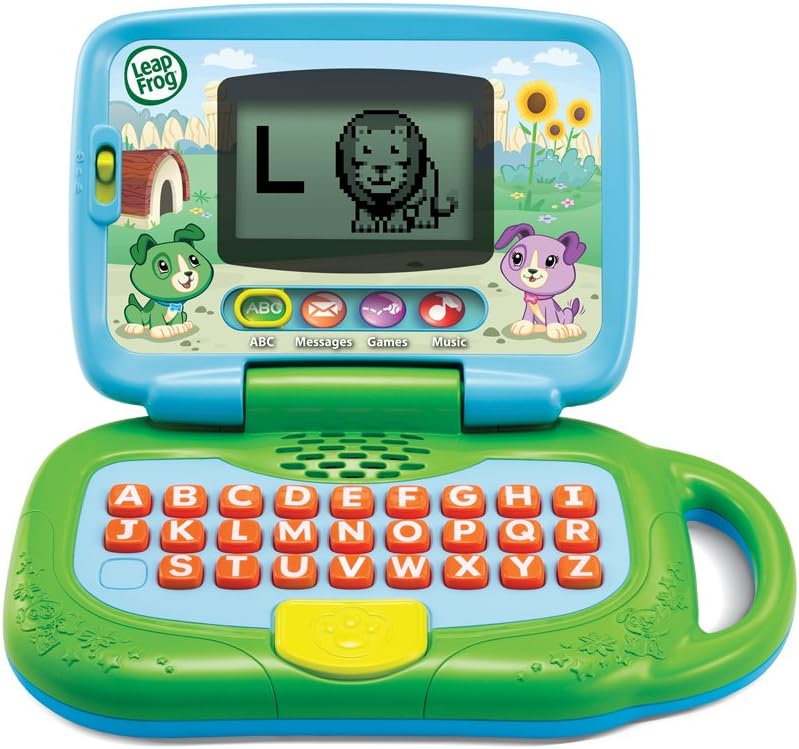
Figure 1: Front view of the LeapFrog My Own Leaptop.
The Leaptop features a durable, child-friendly design with a large screen for engaging animations. The keyboard includes all letters of the alphabet, along with dedicated buttons for different learning modes. A convenient handle allows for easy portability.
Controls and Features
- On/Off/Volume Switch: Located on the side, this switch controls power and adjusts the sound level.
- Alphabet Keyboard: Features large, easy-to-press buttons for each letter.
- Mode Buttons: Dedicated buttons for ABCs, Messages, Games, and Music modes.
- Screen: Displays letters, animations, and interactive content.
- Handle: Integrated for easy carrying.
Operating Modes

Figure 2: Child engaging with the Leaptop in learning mode.
The Leaptop offers four interactive learning modes to keep children engaged:
- ABCs Mode: Press any letter button to hear the letter name, its sound, and a word that starts with that letter. The screen displays corresponding animal animations (26 in total).
- Messages Mode: Engage in pretend email exchanges with characters like Scout or Violet. This mode encourages imaginative role-play and early communication skills.
- Games Mode: Play fun animal trivia and letter games designed to reinforce learning.
- Music Mode: Enjoy 16 songs and melodies. Children can bop along and explore musical sounds.

Figure 3: Child interacting with the Leaptop's keyboard.
Care and Maintenance
- Keep the Leaptop clean by wiping it with a slightly damp cloth. Do not immerse in water.
- Avoid exposing the device to extreme temperatures or direct sunlight.
- Remove batteries if the unit will not be used for an extended period to prevent leakage.
Troubleshooting
If the Leaptop does not function as expected, please try the following:
- Ensure batteries are correctly installed and are not depleted. Replace with fresh batteries if necessary.
- Turn the unit off and then on again to reset it.
- If issues persist, refer to the LeapFrog support website for further assistance.
Specifications
| Specification | Value |
|---|---|
| Product Dimensions | 3.8 x 11.5 x 11.4 inches |
| Item Weight | 1.56 pounds |
| Item Model Number | 80-19150E |
| Manufacturer Recommended Age | 24 months - 4 years |
| Batteries | 3 AA batteries required (included for demo) |
| Release Date | May 1, 2018 |
| Manufacturer | VTech |
Warranty and Support
For warranty information or technical support, please visit the official LeapFrog website or contact their customer service department. Keep your purchase receipt as proof of purchase.


