Introduction
This manual provides detailed instructions for the installation, operation, and maintenance of your Pioneer DEH-4200UB CD Receiver. This unit features an OEL display, USB iPod control, and playback of various audio formats, designed to enhance your in-car audio experience.
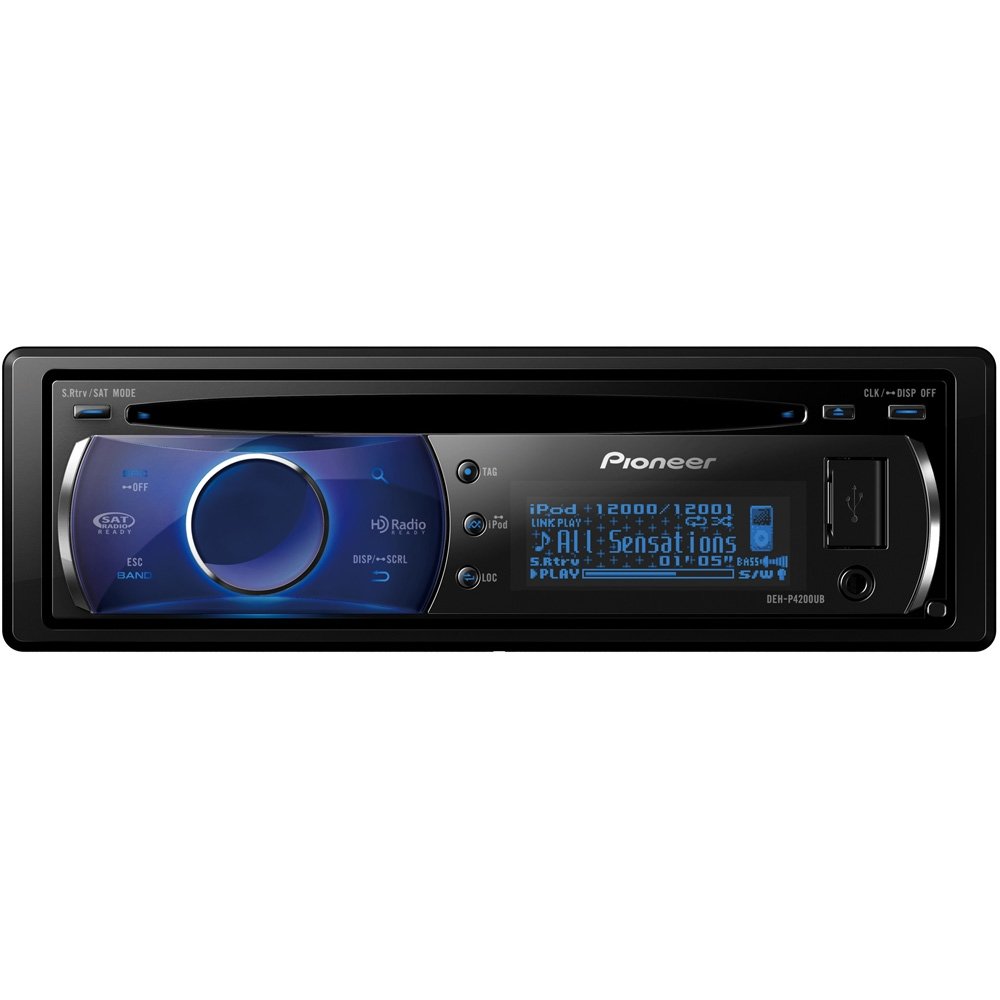
Image: Front view of the Pioneer DEH-4200UB CD Receiver, showcasing its OEL display and control buttons.
Setup
1. Unpacking
Carefully remove all components from the packaging. Ensure the following items are present:
- Pioneer DEH-4200UB In-Dash CD Receiver
- Wiring Harness
- Installation Hardware
- Owner's Manual (this document)
2. Installation
Refer to the included installation hardware and wiring harness for proper connection to your vehicle's electrical system. Professional installation is recommended to ensure correct wiring and functionality.
3. Connecting iPod/USB Devices
The DEH-4200UB features a front USB input for connecting your iPod or other USB devices. For iPod control, an optional CD-IU50 iPod cable is required.
- Locate the USB input on the front panel of the receiver.
- Connect your iPod (using the CD-IU50 cable) or USB thumb drive directly into the front panel USB input.
- The unit will automatically detect the device and begin playback or allow for browsing.
4. Adding Bluetooth (Optional)
To enable Bluetooth functionality, the optional CD-BTB200 Bluetooth Adapter is required. This adapter allows for hands-free operation with Bluetooth-enabled cellular phones.
Video: Demonstrates how to add Bluetooth to Pioneer CD Players and pair a phone.
- Connect the CD-BTB200 Bluetooth Adapter to your DEH-4200UB (refer to the adapter's manual for specific connection points).
- Turn the source to "Telephone" on the receiver.
- Push the rotary commander to access the function menu.
- Select "Search and Connect".
- Ensure your phone is in a discoverable state.
- The head unit will display a list of found phones. Use the rotary commander to select your phone.
- Push and hold the rotary commander to initiate the pairing process.
- On your phone, enter the pass code (usually "0000") when prompted.
- The head unit will confirm successful connection.
Operating Instructions
1. Basic Controls and Display
The DEH-4200UB features a Large Full-Dot OEL display for clear visibility and blue key illumination. The 7-way rotary commander is the primary interface for navigation and selection.
- OEL Display: Provides vibrant and clear information, including 3-Line list mode for easier iPod navigation and 3D full motion screen savers.
- 7-Way Rotary Commander: Used for navigating menus, selecting options, and adjusting volume. Push to select, turn to scroll.
- SRC (Source) Button: Press to cycle through available audio sources (Tuner, CD, USB/iPod, AUX, Bluetooth).
- ESC (Escape) / BAND Button: Press to go back in menus or change radio bands.
2. CD/USB Playback
The unit supports playback of audio CDs, CD-R/RW discs, and MP3/WMA/AAC files from discs or USB devices.
- Insert an audio CD or a data CD/USB with compatible audio files.
- The unit will automatically begin playback.
- Use the rotary commander to navigate tracks or folders.
3. iPod Control
With your iPod connected via the front USB input (and optional CD-IU50 cable), you have full control over your music library directly from the receiver.
Video: Guide on browsing iPod content on Pioneer CD Players.
- Direct Search:
- Press the Search button (magnifying glass icon).
- Turn the 7-way rotary commander to select categories like "Playlists", "Artists", or "Albums". Push to select.
- Turn the rotary commander to scroll through the list. Push to select your desired artist, album, or song.
- Alphabet Search:
- Press the Search button (magnifying glass icon) twice to bring up the alphabet list.
- Turn the rotary commander to select the desired starting letter. Push to confirm.
- The list will filter to show entries starting with that letter. Turn and push the rotary commander to select your content.
- iTunes Tagging: When listening to the radio, you can "tag" songs to remember them for later purchase on iTunes.
4. Radio Operation
The unit features a Supertuner IIID AM/FM tuner for excellent reception and performance.
Video: Instructions on setting radio presets on Pioneer CD Players.
- Tuning: Use the rotary commander to manually tune frequencies or seek for stations.
- Setting Presets:
- Tune to the desired station.
- Press the Search button (magnifying glass icon).
- Turn the rotary commander to select a preset number (1-6).
- Press and hold the rotary commander until you hear an audible beep, confirming the station is saved.
- HD Radio: The unit is HD Radio Ready, requiring an optional adapter for HD Radio reception.
- SAT Radio: The unit is SAT Radio Ready, requiring an optional adapter for satellite radio reception.
5. Setting the Clock
Video: Demonstrates how to set the clock on Pioneer CD Players.
To set the clock, typically you will need to access the system settings menu. Consult the full owner's manual for precise steps, as this can vary slightly by model. Generally, it involves:
- Pressing and holding the SRC button or a dedicated MENU button to enter system settings.
- Navigating to the "Clock" or "Time" setting using the rotary commander.
- Adjusting the hour and minute using the rotary commander and confirming each setting.
6. Audio Settings
Customize your sound experience with the following features:
- 3-Band Graphic EQ: Adjust bass, mid, and treble frequencies to your preference.
- Loudness: Enhances low and high frequencies at lower volume levels for a fuller sound.
- Advanced Sound Retriever: Improves the sound quality of compressed audio files (MP3, WMA, AAC) by restoring data lost during compression.
- Balance/Fader: Adjust the audio output between left/right and front/rear speakers.
7. Auxiliary Input
A built-in AUX input on the front panel allows for easy connection of any portable audio player or external auxiliary devices using a 3.5mm stereo mini-jack cable.
Maintenance
To ensure optimal performance and longevity of your DEH-4200UB CD Receiver, follow these maintenance guidelines:
- Cleaning the Unit: Use a soft, dry cloth to wipe the unit's surface. For stubborn dirt, dampen the cloth with water. Never use abrasive cleaners, solvents, or strong detergents.
- CD Care: Handle CDs by their edges. Keep them clean and free of scratches. Use a CD cleaning kit if necessary.
- Detachable Faceplate: The faceplate is detachable for security. Store it in a protective case when removed to prevent damage.
- USB Port: Keep the USB port free of dust and debris.
Troubleshooting
If you encounter issues with your DEH-4200UB, try the following common solutions:
- No Power: Check all wiring connections, especially the power and ground wires. Ensure the vehicle's ignition is on.
- No Sound: Verify speaker connections. Check the volume level and mute settings. Ensure the correct audio source is selected.
- iPod/USB Not Recognized or "Error-16":
- Ensure the iPod/USB device is properly connected.
- Try disconnecting and reconnecting the device.
- Update your iPod's software to the latest version.
- Reset the receiver by removing the faceplate and pressing the reset button with a pointed object (like a paperclip).
- Ensure your iPod model is compatible with the unit (refer to Pioneer's website for a compatibility list).
- Radio Reception Poor: Check antenna connection. Ensure the antenna is fully extended (if applicable).
- Buttons Unresponsive: Try resetting the unit (see "iPod/USB Not Recognized" above).
For more detailed troubleshooting, refer to the complete owner's manual or contact Pioneer customer support.
Specifications
| Feature | Specification |
|---|---|
| Item Weight | 12 ounces (0.75 Pounds) |
| Product Dimensions | 7.2 x 5.19 x 4.41 inches |
| Model Number | DEH-P4200UB |
| Brand | PIONEER |
| Connectivity Technology | Bluetooth (with optional adapter) |
| Special Feature | Equalizer |
| Compatible Devices | Smartphones (Android phones) |
| Connector Type | RCA |
| Audio Output Mode | Stereo, Surround |
| Surround Sound Channel Configuration | 5.1 |
| Output Power | 50 Watts x 4 (MOSFET) |
| Wattage | 200 watts |
| RCA Pre-Outs | 3 sets (4V) - Front/Rear/Subwoofer |
| Display | Full-Motion OEL |
| Auxiliary Input | Built-In (Front) |
Warranty and Support
The Pioneer DEH-4200UB CD Receiver comes with a one-year warranty.
For technical assistance, product registration, or warranty claims, please visit the official Pioneer website or contact their customer support directly.
Online Resources: Pioneer Electronics Official Website


