1. Introduction
This manual provides detailed instructions for the operation, maintenance, and troubleshooting of your Sony TCM-200DV Portable Cassette Recorder. Please read this manual thoroughly before using the device to ensure proper functionality and longevity.
The Sony TCM-200DV is designed for convenient and reliable audio recording and playback using standard cassette tapes. Its features include voice-operated recording, double recording time, and clear voice enhancement.
2. Key Features
- Double Recording Time: Allows recording on a standard cassette at either normal speed or half the normal speed for extended recording sessions.
- Voice Operated Recording (VOR): Activates recording only when audible sound is present, conserving tape and eliminating silent passages.
- Long Battery Life: Advanced technology extends battery power for extended use (up to 20 hours).
- Playback Speed Control: Adjusts playing speed by +30% or -15% for easier review of recorded information.
- Battery Indicator with Alert LED: Confirms battery operation and alerts you of low battery power.
- Built-in Flat Mic: Provides convenient recording versatility.
- Microphone Jack: Allows connection of an external microphone.
- Clear Voice Recording System: Enhances voice quality during recording and playback for greater clarity.
- 3-Digit Tape Counter: Helps in finding specific locations on the tape for rapid access and editing.
- One-Touch Recording: Simplifies quick play/record operation.
- Cue and Review: Provides sound during fast forward and rewind modes to help locate specific passages.
- Sony-Matic Automatic Recording Level Control: Ensures correct recording level automatically.
- 3V DC-in Jack: For 2-way operation using replaceable batteries or an optional AC adapter.
- Monaural Earphone Jack: Provides sound in both ears when using an optional stereo headset.
- Automatic Shut-off: Conserves battery and prevents tape damage.
- Two Tape Speeds: 4.8cm/s (normal) and 2.4cm/sec (double recording time).
3. Setup
3.1. Battery Installation
The Sony TCM-200DV requires two (2) AA batteries for operation. Follow these steps to install them:
- Locate the battery compartment cover on the back or side of the unit.
- Slide or lift the cover to open the compartment.
- Insert two AA batteries, ensuring the positive (+) and negative (-) terminals align correctly with the indicators inside the compartment.
- Close the battery compartment cover securely.
The Battery Indicator LED will confirm operation. If the LED flashes, battery power is low and replacement is needed.
3.2. Powering the Unit
The unit can be powered by the installed AA batteries or an optional 3V DC AC adapter (not included). Connect the AC adapter to the 3V DC-in jack on the unit and plug it into a standard wall outlet.
4. Operating Instructions
4.1. Loading a Cassette Tape
- Press the STOP/EJECT button to open the cassette compartment.
- Insert a standard cassette tape with the open edge facing the tape heads. Ensure the tape is fully seated.
- Gently close the cassette compartment until it clicks shut.
4.2. Recording
Before recording, ensure the cassette tape's erase-prevention tabs are intact. If a tab is broken off, the tape cannot be recorded on. You can cover the tab opening with adhesive tape to enable recording.
- Select Recording Speed: Use the REC TIME switch to select NORMAL (4.8cm/s) or DOUBLE (2.4cm/sec) for extended recording time.
- One-Touch Recording: Press the RECORD button (red) and the PLAY button simultaneously. The unit will begin recording.
- Voice Operated Recording (VOR): To activate VOR, slide the V-O-R switch to the ON position. Recording will automatically start when sound is detected and pause during silence.
- Monitoring Recording: The built-in flat microphone captures audio. For external audio input, connect an external microphone to the MIC jack. The Sony-Matic Automatic Recording Level Control will adjust the recording level automatically.
- To Stop Recording: Press the STOP/EJECT button.
4.3. Playback
- Insert a recorded cassette tape.
- Press the PLAY button. Audio will play through the built-in speaker.
- Playback Speed Control: Adjust the SPEED CONTROL dial to increase or decrease playback speed by up to +30% or -15%.
- Cue and Review: While playing, press and hold the FAST FORWARD or REWIND buttons to quickly scan through the tape with audible sound. Release the button to resume normal playback.
- Using Earphones: Connect a 3.5mm monaural or stereo earphone/headset to the EAR jack for private listening.
- To Stop Playback: Press the STOP/EJECT button.
4.4. Using the Tape Counter
The 3-digit tape counter helps you locate specific sections on the tape. Press the COUNTER RESET button to set the counter to "000" at the beginning of a recording or a desired point.
4.5. Automatic Shut-off
The unit features an automatic shut-off mechanism that stops the tape when it reaches the end, preventing unnecessary wear and conserving battery life.
5. Maintenance
5.1. Cleaning the Tape Heads
Regular cleaning of the tape heads, pinch roller, and capstan is essential for optimal sound quality and to prevent tape damage. Use a cotton swab lightly moistened with isopropyl alcohol. Clean these components after every 10-20 hours of use or if sound quality deteriorates.
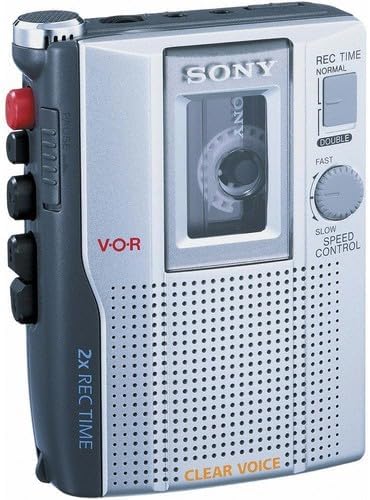
Figure 1: Front view of the Sony TCM-200DV Portable Cassette Recorder, showing the cassette window, controls, and speaker grille.
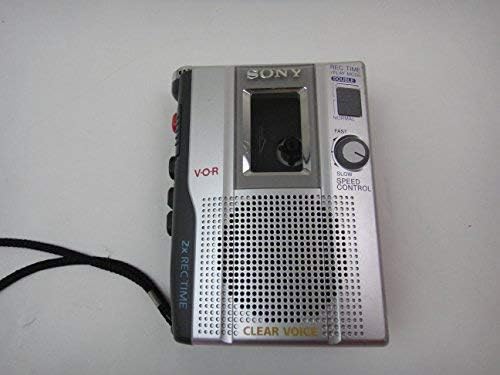
Figure 2: Top-down view of the Sony TCM-200DV Portable Cassette Recorder, highlighting the side controls and strap.
5.2. Battery Care
- Remove batteries if the unit will not be used for an extended period to prevent leakage.
- Do not mix old and new batteries, or different types of batteries.
- Dispose of used batteries responsibly according to local regulations.
5.3. General Care
- Keep the unit away from direct sunlight, heat sources, and excessive dust or moisture.
- Clean the exterior with a soft, dry cloth. Do not use abrasive cleaners or solvents.
- Avoid dropping or subjecting the unit to strong impacts.
6. Troubleshooting
If you experience issues with your Sony TCM-200DV, please refer to the following common problems and solutions:
- Unit does not power on:
- Check if batteries are inserted correctly and are not depleted. Replace if necessary.
- If using an AC adapter, ensure it is properly connected and the power outlet is functional.
- Cannot record:
- Ensure the cassette tape's erase-prevention tabs are intact. If a tab is broken, cover the opening with adhesive tape.
- Verify that the RECORD and PLAY buttons are pressed simultaneously.
- Check if the VOR function is enabled and if there is sufficient audible sound for it to activate.
- Poor sound quality during playback or recording:
- Clean the tape heads, pinch roller, and capstan as described in the Maintenance section.
- Ensure the cassette tape is not damaged or worn out. Try a different tape.
- Check battery level; low batteries can affect sound quality.
- Tape does not move or jams:
- Ensure the cassette tape is properly loaded and not tangled.
- Check for any foreign objects inside the cassette compartment.
- If the unit has been stored for a long time, the rubber belts might have deteriorated. Professional service may be required.
If the problem persists after trying these solutions, please contact Sony customer support.
7. Specifications
| Feature | Detail |
|---|---|
| Product Dimensions | 9.7 x 4.9 x 2.2 inches |
| Item Weight | 6.1 ounces (6.08 ounces) |
| Model Number | TCM-200DV |
| Manufacturer | Sony |
| Compatible Devices | Cassette Tape |
| Hardware Interface | 3.5mm Audio |
| Microphone Form Factor | Built-In |
| Format | Mono |
| Headphones Jack | 3.5 millimeters |
| Battery Life | 15 Hours (up to 20 hours with advanced technology) |
| Microphone Operation Mode | Mono |
| Tape Speeds | 4.8cm/s (Normal), 2.4cm/sec (Double) |
| Power Source | 2 AA Batteries or 3V DC AC Adapter (optional) |
8. Warranty and Support
For warranty information and customer support regarding your Sony TCM-200DV Portable Cassette Recorder, please refer to the documentation included with your purchase or visit the official Sony support website. You can also contact Sony customer service directly for assistance with product inquiries, technical support, or service requests.
For the latest support information, please visit the Sony Store on Amazon or the official Sony website.


