
1. Product Overview
The Sennheiser SET 840-TV is an RF stereo TV listening system designed for wireless audio transmission in your home. This system allows users to enjoy TV programs or music with enhanced clarity and personalized sound preferences. It is particularly beneficial for individuals seeking an assistive listening solution.
Key features include:
- Wireless RF Technology: Provides mobility within a range of up to 100 feet, with the ability to transmit through walls, offering flexible listening throughout your home.
- Optimized Speech Clarity: Three selectable hearing settings on the transmitter allow for customization to improve speech intelligibility.
- Comfortable Receiver: The lightweight under-chin receiver features flexible ear pads for extended wear comfort.
- Broad Compatibility: Connects directly to various audio sources such as TVs, hi-fi systems, and radios. Ideal for use with older plasma TVs.
- Long-Lasting Performance: Equipped with a rechargeable battery for extended listening enjoyment.
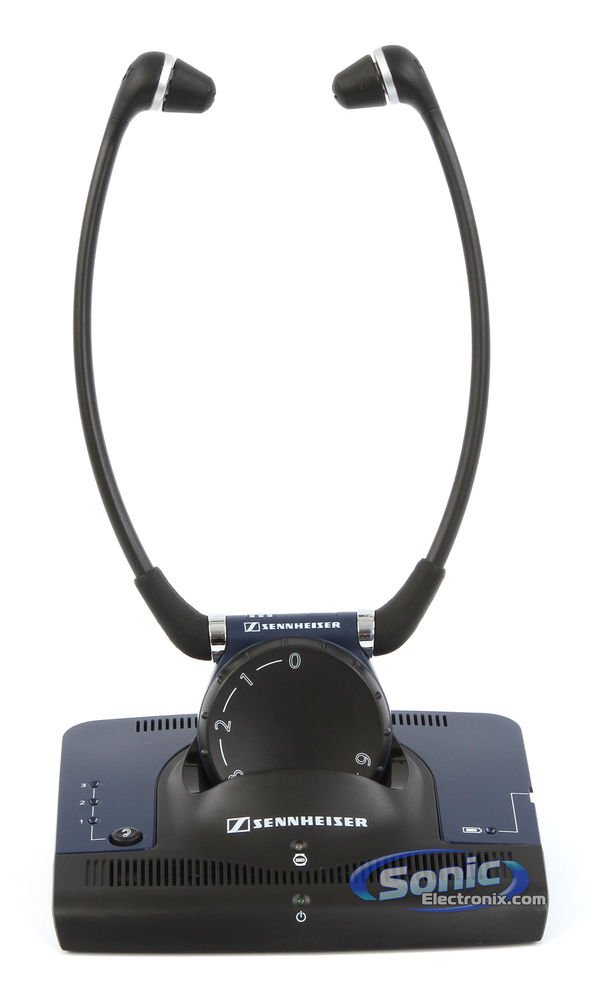
Image 1.1: The Sennheiser SET 840-TV RF Stereo TV Assistive Listening Headphones System, showing the under-chin receiver and transmitter unit.
2. Package Contents
Please check that all items are present in your package:
- TR 840 Transmitter
- RR 840 Receiver (under-chin headphones)
- Power supply unit
- TV connection cable (3.5 mm stereo jack plugs)
- Adapter for 1/4 inch (6.3 mm) jack socket
- Rechargeable battery (BA 300)
- Ear pads (various sizes for comfort)
- Instruction Manual (this document)
3. Setup
3.1 Connecting the Transmitter (TR 840)
The transmitter connects to your audio source (TV, hi-fi system, radio) to send the audio signal wirelessly to the receiver.
- Power Connection: Connect the power supply unit to the TR 840 transmitter and plug it into a wall outlet. The power indicator LED on the transmitter will illuminate.
- Audio Connection:
- For TVs/Audio Devices with 3.5mm Headphone Output: Use the provided TV connection cable (3.5 mm stereo jack plugs) to connect the transmitter's audio input to the headphone output of your TV or audio device.
- For TVs/Audio Devices with RCA Audio Output: If your TV has red and white RCA audio output jacks, you will need an RCA to 3.5mm adapter (not always included, may need to be purchased separately) to connect to the transmitter.
- For Audio Devices with 1/4 inch (6.3 mm) Jack: Use the provided 3.5 mm to 1/4 inch adapter with the TV connection cable.
Note: Ensure your TV's audio output is active. Some TVs require you to enable the audio output in their settings menu. If connecting to a TV's headphone jack, the TV's internal speakers may be muted.
- Channel Selection: The transmitter has a channel selector switch (usually 1, 2, or 3). Select a channel that provides the clearest reception without interference. You may need to try different channels during initial setup.
3.2 Charging the Receiver (RR 840)
Before first use, fully charge the receiver's battery.
- Insert the rechargeable battery (BA 300) into the battery compartment of the RR 840 receiver. Ensure correct polarity.
- Place the RR 840 receiver onto the charging contacts of the TR 840 transmitter. The charging indicator LED on the transmitter will show the charging status (e.g., red for charging, green for fully charged).
- Allow approximately 3 hours for a full charge. A fully charged battery provides up to 9 hours of operation.
4. Operating Instructions
4.1 Wearing the Receiver
The RR 840 receiver is designed to be worn under the chin.
- Gently spread the ear pads apart and place the receiver under your chin, positioning the ear pads comfortably in your ears.
- The receiver automatically switches on when the ear pads are spread apart and switches off when they are brought together.
4.2 Adjusting Volume
The volume control is located on the receiver unit.
- Rotate the large dial on the front of the receiver to increase or decrease the listening volume to your preference.
4.3 Selecting Hearing Settings
The TR 840 transmitter offers three selectable hearing settings to optimize speech intelligibility.
- Locate the hearing setting switch on the transmitter.
- Switch between settings 1, 2, and 3 to find the audio profile that best suits your hearing needs. These settings typically adjust compression and treble boost.
- For fine-tuning, some models may have an additional adjustment knob on the rear of the transmitter for treble boost (min to max).
4.4 Balance Control
The receiver may include a balance control to adjust the sound level between the left and right ears, useful for individuals with uneven hearing loss.
- Adjust the balance control (if present) on the receiver to achieve a comfortable and balanced sound experience.
5. Maintenance
5.1 Cleaning
- Wipe the transmitter and receiver with a soft, dry cloth.
- Do not use cleaning agents or solvents, as they may damage the surfaces.
- The ear pads can be gently cleaned with a damp cloth. Ensure they are completely dry before use.
5.2 Battery Care
- Always place the receiver on the transmitter's charging contacts when not in use to ensure it is charged for the next use.
- If the system will not be used for an extended period, remove the rechargeable battery from the receiver.
- Only use genuine Sennheiser replacement batteries (BA 300).
5.3 Storage
- Store the system in a cool, dry place away from direct sunlight and extreme temperatures.
6. Troubleshooting
| Problem | Possible Cause | Solution |
|---|---|---|
| No sound or low volume |
|
|
| Static or interference |
|
|
| Receiver not charging |
|
|
7. Specifications
| Feature | Detail |
|---|---|
| Brand | Sennheiser |
| Model Number | Set 840-TV |
| Connectivity Technology | Wireless (RF) |
| Wireless Range | Up to 100 feet (approx. 30 meters) |
| Ear Placement | In Ear (under-chin style) |
| Form Factor | In Ear Stethoset |
| Impedance | 32 Ohms |
| Frequency Range | 500 Hz - 4 kHz |
| Audio Driver Type | Balanced Armature Driver |
| Control Type | Media Control (Push Button, Rotary Dial) |
| Headphone Jack Compatibility | 3.5 mm Jack, 6.35 mm Jack (with adapter) |
| Item Weight | 1 Kilogram (approx. 2.2 lbs) |
| Enclosure Material | Plastic |
| Color | Black |
| Specific Uses For Product | Home TV listening, Assistive Listening |
8. Warranty Information
The Sennheiser SET 840-TV system comes with a 2-year coverage for labor and 2-year coverage for parts from the date of purchase. This warranty covers defects in materials and workmanship under normal use. Please retain your proof of purchase for warranty claims.
For detailed warranty terms and conditions, please refer to the official Sennheiser website or contact customer support.
9. Customer Support
If you encounter any issues not covered in the troubleshooting section or require further assistance, please contact Sennheiser customer support.
- Online Support: Visit the official Sennheiser website for FAQs, product registration, and support resources.
- Contact Information: Refer to the contact section on the Sennheiser website for phone numbers or email support in your region.
Always provide your product model number (SET 840-TV) and serial number (if applicable) when contacting support for faster service.