
Introduction
The NETGEAR XAV2001 Powerline AV 200 Adapter provides a simple solution for extending your home network using existing electrical wiring. It allows you to connect devices such as HDTVs, Blu-ray players, DVRs, PCs, and game consoles to your network and the Internet through any power outlet.
This adapter is designed for ease of use, offering a compact form factor and push-button security for a secure connection.
Setup Instructions
To establish a Powerline network, a minimum of two Powerline AV 200 adapters are required. If you have a single adapter, you will need to acquire a second unit or a compatible kit (e.g., XAVB2001).
Step 1: Connect the First Adapter
Locate your internet router or modem. Plug one NETGEAR XAV2001 adapter directly into a wall electrical outlet near your router. Avoid using power strips or surge protectors, as these can interfere with the Powerline signal.
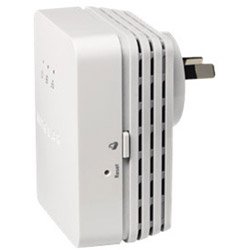
Image Description: A NETGEAR XAV2001 Powerline AV 200 Adapter is shown plugged into a wall outlet, with an Ethernet cable connecting it to a router.
Use an Ethernet cable to connect the adapter's Ethernet port to an available LAN port on your router.
Step 2: Connect the Second Adapter
Go to the room where you want to extend your network. Plug the second NETGEAR XAV2001 adapter directly into a wall electrical outlet. Again, avoid power strips.
Use an Ethernet cable to connect the adapter's Ethernet port to the device you wish to connect to the network (e.g., HDTV, PC, game console).
Step 3: Establish Secure Connection (Pairing)
The adapters should automatically detect each other and establish a connection. The Powerline LED on both adapters should turn solid green, indicating a successful connection.
For enhanced security, press the "Security" or "Pair" button on the first adapter for 2 seconds. Within 2 minutes, press the "Security" or "Pair" button on the second adapter for 2 seconds. The Powerline network connection will now be encrypted.
Operating Your Powerline Network
Once both adapters are connected and paired, your devices will have a high-speed internet connection through your home's electrical wiring. The Powerline network operates transparently, allowing your connected devices to access the internet as if they were directly connected to your router via an Ethernet cable.
The Powerline AV 200 Adapter supports data transfer rates of up to 200 Megabits Per Second, providing a stable connection for streaming, gaming, and general internet use.
Maintenance and Care
To ensure optimal performance and longevity of your NETGEAR XAV2001 Powerline AV 200 Adapters, follow these guidelines:
- Placement: Always plug the adapters directly into a wall electrical outlet. Avoid plugging them into power strips, surge protectors, or extension cords, as these can degrade performance or block the Powerline signal.
- Cleaning: Keep the adapters clean and free from dust. Use a soft, dry cloth for cleaning. Do not use liquid or aerosol cleaners.
- Ventilation: Ensure the adapters are placed in well-ventilated areas to prevent overheating. Do not cover the ventilation holes.
- Environmental Conditions: Operate the adapters within their specified temperature and humidity ranges. Avoid extreme conditions.
Troubleshooting Common Issues
No Connection or Slow Speed
- Check Power Outlets: Ensure both Powerline adapters are plugged directly into wall outlets, not power strips or surge protectors. Power strips can filter out the Powerline signal.
- Verify Pairing: If the Powerline LED is not solid green, re-attempt the pairing process as described in the "Setup Instructions" section.
- Electrical Circuit: Powerline performance can be affected by the electrical circuit. Try plugging the adapters into outlets on the same electrical circuit if possible. Large appliances (e.g., refrigerators, washing machines) on the same circuit can cause interference.
- Adapter Distance: While Powerline works through electrical wiring, very long distances or complex wiring can reduce performance.
- Reset Adapters: Disconnect both adapters from the power outlet for a few seconds, then plug them back in. This can resolve temporary communication issues.
Device Not Accessing Internet
- Ethernet Cable: Ensure the Ethernet cables connecting the adapters to your router and device are securely plugged in and undamaged.
- Router Functionality: Verify that your router is working correctly and providing internet access to other devices.
- Device Settings: Check the network settings on your connected device to ensure it is configured to obtain an IP address automatically (DHCP).
Product Specifications
| Feature | Detail |
|---|---|
| Brand | NETGEAR |
| Model Number | XAV2001-100NAS |
| Product Dimensions | 4.88 x 1 x 5.66 inches |
| Item Weight | 4.6 ounces (130 Grams) |
| Hardware Interface | Ethernet |
| Data Link Protocol | Ethernet |
| Data Transfer Rate | 200 Megabits Per Second |
| Compatible Devices | Desktop, Smart TV |
| Color | Black, Silver |
| Manufacturer | Netgear |
| Date First Available | February 1, 2010 |
| Is Discontinued | Yes |
Warranty and Support
Warranty Information
This product may come with a limited warranty. Please refer to the original purchase documentation or the manufacturer's official website for specific warranty terms and conditions. A 1-month refund warranty was offered by a previous seller.
Technical Support
For technical assistance, please visit the official NETGEAR support website or contact their customer service. Ensure you have your product model number (XAV2001-100NAS) available when seeking support.
For additional information and resources regarding Powerline technology, you may visit the MoCA Alliance website.

