
Ergotron ERG45245026
Contents
Ergotron LX Dual Side-By-Side Arm User Manual
Model: ERG45245026
1. Product Overview
The Ergotron LX Dual Side-By-Side Arm is designed to enhance your workspace by providing flexible positioning for two monitors. Its durable polished aluminum construction ensures stability and longevity. This arm allows you to create a productive side-by-side configuration, lifting screens to an ergonomic viewing height and reclaiming valuable desk space.
Key Features:
- Extends LCDs up to 25" (64 cm) with an adjustment range of 18" (46 cm).
- Allows monitors to be pushed out of the way when not in use.
- Frees up desktop space to increase workspace efficiency.
- Simple installation and effortless operation.
- Desk clamp attaches to edges up to 2.6 inches (66 mm) thick.
- Grommet mount attaches through holes 5/16 inches to 2 inches (7–51 mm) wide and up to 3 inches (80 mm) thick.
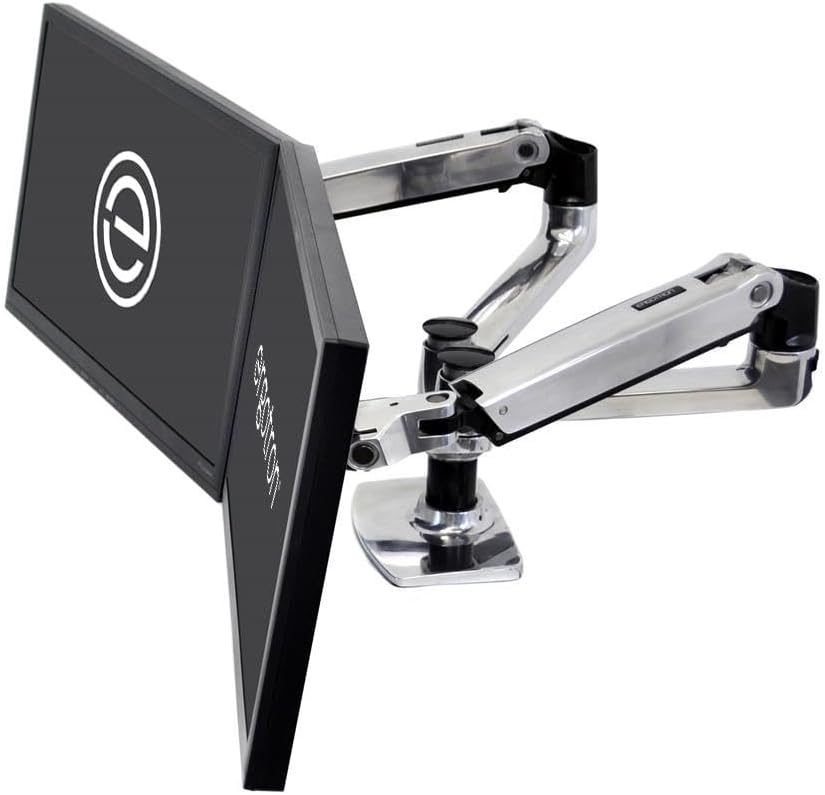
Figure 1.1: Ergotron LX Dual Side-By-Side Arm with two monitors in a typical setup.
2. What's in the Box
Verify that all components are present before beginning installation.
- Mounting Hardware
- LCD Arms (2)
- Extensions (2)
- Pole
- Desk Clamp
- Grommet Mount

Figure 2.1: Contents of the Ergotron LX Dual Side-By-Side Arm package.
3. Setup and Installation
The Ergotron LX Dual Side-By-Side Arm offers versatile mounting options to suit your desk configuration. You can choose between a desk clamp or a grommet mount.
Mounting Options:
- Desk Clamp: Securely attaches to the edge of your desk, suitable for surfaces up to 2.6 inches (66 mm) thick.
- Grommet Mount: Utilizes an existing hole in your desk, fitting holes 5/16 inches to 2 inches (7–51 mm) wide and desks up to 3 inches (80 mm) thick.
For detailed step-by-step instructions, please refer to the official Installation Manual (PDF).
Monitor Attachment:
Once the arm is securely mounted, attach your monitors to the VESA-compatible plates on each arm. Ensure all screws are tightened to secure the monitors firmly.

Figure 3.1: Cable management routing through the arm for a clean setup.
Installation Video:
Video 3.1: Official video demonstrating the top features and benefits of the LX Side-by-Side Dual Monitor Arm, including aspects of its installation and adjustability.
4. Operating Instructions
The Ergotron LX Dual Side-By-Side Arm allows for dynamic adjustment of your monitors to achieve optimal viewing comfort and productivity.
Adjusting Monitor Position:
- Height Adjustment: Gently push or pull the monitors up or down to your desired height. The constant force technology allows for smooth, effortless movement.
- Tilt and Pan: Tilt your monitors forward or backward to reduce glare and optimize viewing angles. Pan them left or right to share your screen with others.
- Rotation: Rotate monitors from landscape to portrait mode for different tasks, such as coding or document review.
- Extension/Retraction: Extend the arms to bring screens closer for focused work, or retract them to free up desk space when not in use.

Figure 4.1: User demonstrating the ergonomic benefits of the monitor arm.
Cable Management:
Integrated cable management clips along the arms help route and conceal cables, maintaining a tidy and organized workspace. Ensure cables have enough slack for full range of motion.
5. Maintenance
To ensure the longevity and optimal performance of your Ergotron LX Dual Side-By-Side Arm, follow these simple maintenance guidelines:
- Cleaning: Wipe down the arm and base regularly with a soft, damp cloth. Avoid abrasive cleaners or solvents that could damage the finish.
- Inspection: Periodically check all mounting points and connections to ensure they remain secure. Tighten any loose fasteners as needed.
- Lubrication: The arm's internal mechanisms are designed for maintenance-free operation. Do not attempt to lubricate any moving parts unless specifically instructed by Ergotron support.
6. Troubleshooting
If you encounter any issues with your Ergotron LX Dual Side-By-Side Arm, consider the following common solutions:
- Arm Drifts or Sags: This usually indicates that the tension adjustment needs to be recalibrated for the weight of your monitors. Refer to the installation manual for instructions on adjusting the tension.
- Monitors Not Level: Ensure that both monitors are securely attached to their respective VESA plates and that the arm's horizontal alignment is correct. Minor adjustments can often be made at the monitor attachment point.
- Difficulty Moving Arm: Check if any cables are snagged or if the arm's joints are overly tightened. Adjust tension if the movement is too stiff.
- Unstable Setup: Verify that the desk clamp or grommet mount is securely fastened to a stable surface and that the desk itself is not wobbly.
If the problem persists, please contact Ergotron customer support for further assistance.
7. Specifications
| Attribute | Detail |
|---|---|
| Brand | Ergotron |
| Model Number | ERG45245026 |
| Item Weight | 7.2 ounces |
| Product Dimensions | 19.29 x 18.11 x 6.69 inches |
| Color | Aluminum |
| Material Type | Metal |
| Mounting Type | Desk Mount, Desktop |
| Movement Type | Tilt |
| Maximum Compatible Size | 27 Inches |
| Minimum Compatible Size | 27 Inches |
| Maximum Tilt Angle | 70 Degrees |
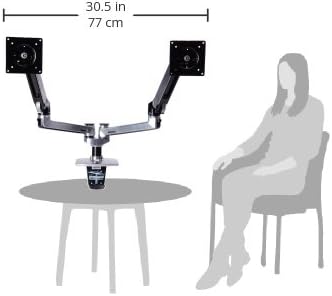
Figure 7.1: Dimensional overview of the Ergotron LX Dual Side-By-Side Arm.
8. Warranty Information
Ergotron products are manufactured to high-quality standards and are backed by a manufacturer's warranty. Specific warranty terms and conditions may vary by region and product. Please retain your proof of purchase for warranty claims.
For detailed warranty information, please visit the official Ergotron website or refer to the documentation included with your product.
Extended protection plans may also be available for purchase separately, offering additional coverage beyond the standard manufacturer's warranty.
9. Support
For further assistance, product registration, or to access additional resources, please use the following contact information and links:
- Official User Manual (PDF): Download Here
- Official Installation Manual (PDF): Download Here
- Visit the Ergotron Store: Ergotron Amazon Store
- Ergotron Official Website: Search online for "Ergotron" to find their official support page and contact information.
Documents and downloads
Ask a question about this manual
Ask about setup, troubleshooting, compatibility, parts, safety, or missing instructions. Manuals+ will review the question and use this page’s manual context to help answer it.