
Introduction
This manual provides comprehensive instructions for the installation, operation, and maintenance of the Emerson 16E09-101 Electronic Temperature Control. This device is designed for precise temperature management in both refrigeration and heating applications. It offers a wide multiple voltage operating range (24/120/208/240 VAC) for versatile use and is engineered to replace most mechanical and electronic single-stage controls utilizing an SPDT output relay.
Safety Information
Please read all instructions carefully before installation and operation. Failure to follow these instructions could result in property damage, injury, or death. All wiring must comply with local and national electrical codes. Installation should be performed by a qualified technician. Disconnect power before servicing the unit.
- Ensure power is disconnected before installation or maintenance.
- Verify correct voltage supply matches the unit's specifications.
- Do not operate the control with damaged wiring.
- Keep the unit dry and away from excessive moisture.
Product Overview
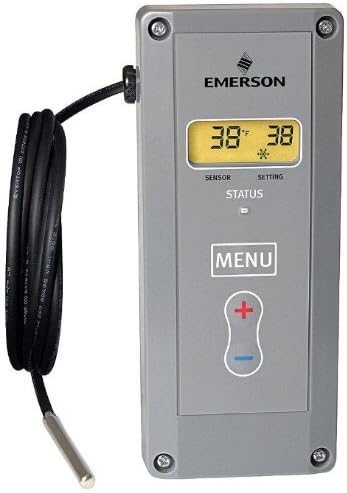
The Emerson 16E09-101 is an electronic temperature control unit designed for precise environmental regulation. Key features include:
- Universal Voltage Compatibility: Operates on 24/120/208/240 VAC.
- High Accuracy: Provides superior temperature control and accuracy for various applications.
- Simplified Wiring: No common wire required when the electrical load exceeds 2.5 amps.
- Alarm Output: Features an alarm output with a selectable delay to prevent false alarms.
- Integrated Sensor: Includes a temperature sensor with 7.5-foot leads for flexible placement.

Setup and Installation
Proper installation is crucial for the optimal performance of the temperature control. Refer to the detailed wiring diagrams provided with the product packaging for specific connections.
- Mounting: Select a suitable location for mounting the control unit. Ensure it is protected from direct moisture and excessive vibration. Use appropriate fasteners for secure installation.
- Power Connection: Connect the control unit to a power source within the 24/120/208/240 VAC range. Ensure the power supply is off during wiring.
- Load Connection: Connect the refrigeration or heating load to the appropriate output terminals. For loads greater than 2.5 amps, a common wire may not be required.
- Sensor Placement: Position the included temperature sensor (with 7.5-foot leads) in the area where temperature is to be monitored and controlled. Ensure the sensor is not directly exposed to heat sources or drafts that could provide inaccurate readings.
- Initial Power-Up: Once all connections are secure, restore power to the unit. The display should illuminate, indicating the current sensor temperature.


Operating Instructions
The control unit features an intuitive interface for setting and monitoring temperatures.
- Display: The LED display shows the current sensor temperature and the set point.
- MENU Button: Press the MENU button to access programming parameters.
- '+' and '-' Buttons: Use the + and - buttons to adjust set points and navigate through menu options.
- Setting Temperature: To adjust the desired temperature, press the MENU button, then use the + or - buttons to change the set point. Press MENU again to confirm and exit.
- Alarm Function: The unit includes an alarm output with a selectable delay. This feature helps prevent false alarms by allowing a brief period for temperature fluctuations before triggering an alert. Refer to the full product manual for detailed alarm configuration.
Maintenance
The Emerson 16E09-101 is designed for reliable operation with minimal maintenance. Regular checks can help ensure longevity and accurate performance.
- Cleaning: Periodically wipe the exterior of the control unit with a soft, dry cloth. Do not use abrasive cleaners or solvents.
- Sensor Inspection: Ensure the temperature sensor and its leads are free from damage, kinks, or corrosion. Verify the sensor remains securely positioned.
- Connection Check: Annually, or as needed, inspect all electrical connections to ensure they are tight and free from corrosion. Ensure power is disconnected before performing this check.
Troubleshooting
If you encounter issues with your temperature control, refer to the following common troubleshooting steps:
| Problem | Possible Cause | Solution |
|---|---|---|
| Unit does not power on. | No power supply, incorrect wiring, or blown fuse/breaker. | Check power connections, verify voltage, inspect circuit breaker/fuse. |
| Inaccurate temperature reading. | Sensor improperly placed, damaged sensor, or calibration issue. | Relocate sensor away from drafts/heat sources, inspect sensor for damage, consult full manual for calibration procedures if applicable. |
| Load (heating/cooling) not activating. | Incorrect set point, wiring error to load, or control unit malfunction. | Verify set point, check load wiring, ensure load device is functional. |
| Alarm triggers frequently. | Temperature fluctuations, incorrect alarm delay setting. | Review alarm delay settings, ensure stable environment for sensor. |
If problems persist after attempting these steps, contact a qualified technician or Emerson customer support.
Specifications
- Model Number: 16E09-101
- Brand: Emerson
- Display Type: LED
- Operating Voltage: 24/120/208/240 VAC
- Operating Temperature: Up to 30 Degrees Celsius (specific range for control may vary, refer to product label)
- Product Dimensions: Approximately 3.75 x 3.75 x 7.5 inches
- Item Weight: Approximately 1.3 pounds
- Included Components: Electronic Temperature Control unit, Temperature Sensor with 7.5-foot leads, Instructions.
- UPC: 696498785132, 786710530593
Warranty and Support
Warranty information for the Emerson 16E09-101 Electronic Temperature Control is typically provided with the product at the time of purchase or can be obtained directly from the manufacturer. Please retain your proof of purchase for warranty claims.
For technical support, service, or further inquiries, please contact Emerson customer service or visit the official Emerson website. Contact details are usually available in the product packaging or on the manufacturer's website.


