
POWERTEC BS900
POWERTEC BS900 9-Inch Benchtop Bandsaw Instruction Manual
Model: BS900
1. Introduction
This manual provides essential instructions for the safe operation, maintenance, and setup of your POWERTEC BS900 9-Inch Benchtop Bandsaw. Please read this manual thoroughly before operating the tool to ensure proper usage and to prevent injury or damage.
The POWERTEC BS900 is designed for precision cutting, shaping irregular forms, and ripping lumber in woodworking applications.
2. Safety Information
Always prioritize safety when operating power tools. Failure to follow safety instructions can result in serious injury.
- Wear appropriate personal protective equipment (PPE), including safety glasses, hearing protection, and gloves.
- Ensure the work area is clean, well-lit, and free from obstructions.
- Keep hands clear of the blade at all times. Use push sticks or blocks when necessary.
- Disconnect power before performing any maintenance, adjustments, or blade changes.
- Do not operate the bandsaw if any parts are damaged or missing.
- Avoid using a miter gauge and rip fence simultaneously, as this can cause kickback.
WARNING: Cancer and Reproductive Harm - www.P65Warnings.ca.gov
WARNING: Drilling, sawing, sanding or machining wood products can expose you to wood dust, a substance known to the State of California to cause cancer. Avoid inhaling wood dust or use a dust mask or other safeguards for personal protection. For more information go to www.P65Warnings.ca.gov/wood
3. Product Components
The POWERTEC BS900 Benchtop Bandsaw includes the following main components:
- Bandsaw Unit (110 Volt, 9-inch)
- Miter Gauge
- 1/4-inch x 62-inch Bandsaw Blade
- Aluminum Die Cast Table (11-3/4-inch x 11-3/4-inch)
- 2-inch Dust Port

Figure 3.1: Overview of the POWERTEC BS900 9-Inch Benchtop Bandsaw with its main components visible.
4. Setup
4.1 Initial Assembly
The bandsaw comes mostly assembled. Attach the table and handle as per the included quick start guide. Ensure all fasteners are secure before proceeding.
4.2 Blade Installation and Tension Adjustment
Proper blade installation and tension are crucial for safe and accurate cutting.
- Disconnect Power: Always unplug the bandsaw before any adjustments or maintenance.
- Open Covers: Open the upper and lower wheel covers.
- Release Tension: Turn the blade tension knob counter-clockwise to release tension.
- Remove Table and Lower Guide: Remove the aluminum table and lower the blade guide completely using the adjusting knob.
- Inspect Blade: Before installing a new blade, carefully check it for any defects or damage. Use a new blade if any signs of damage are present.
- Install Blade: Carefully place the blade around the upper and lower wheels. Ensure the blade teeth point downwards towards the table.
- Apply Tension: Turn the blade tension knob clockwise to apply tension. The bandsaw automatically adjusts blade tension, but fine-tuning may be performed.
- Lock Tension: Lock the replacement blade in place by turning the blade tension lever back.
Video 4.2.1: This video demonstrates the process of replacing the bandsaw blade, including inspecting the blade for defects and correctly installing it with teeth pointing downwards. It also shows how to lock the blade tension lever.
Video 4.2.2: This video illustrates how to adjust the blade tension. It shows turning the tension knob clockwise to add tension and demonstrates checking for proper tension by pressing the blade, allowing for approximately 3/8 inch (1 cm) of movement.
4.3 Blade Tracking Adjustment
Correct blade tracking ensures the blade runs centered on the wheels, preventing wear and improving cut quality.
- Power On: Plug in the bandsaw.
- Manual Rotation: Manually rotate the drive wheel clockwise and observe the blade movement.
- Adjust Tracking: If the blade tilts to one side, adjust the tracking control knob until the blade is centered on the wheels.
Video 4.3.1: This video demonstrates how to adjust the blade tracking on the POWERTEC BS900 bandsaw. It shows manually rotating the drive wheel to observe blade movement and then adjusting the tracking control knob to center the blade on the wheels.
4.4 Blade Guide Adjustment
The blade guides prevent the blade from twisting during cuts. They must be properly spaced from the blade.
- Check Clearance: After tracking and tension are adjusted, ensure the blade has no contact with the upper or lower blade guides.
- Set Spacing: The blade guides should sit approximately 0.016 inches away from the blade. A folded dollar bill (folded twice) can be used as a gauge to achieve this spacing.
- Secure Guides: Tighten the guide pins or bearings to secure the spacing.
Video 4.4.1: This video demonstrates how to adjust the blade guides. It shows checking for blade contact with the guides and using a folded dollar bill to set the correct 0.016-inch spacing between the blade and the guide pins/bearings.
5. Operating Instructions
5.1 Basic Operation
Ensure all setup steps are completed before operating the bandsaw.
- Power On/Off: Use the red/yellow power switch located on the side of the unit to turn the bandsaw on or off.
- Workpiece Placement: Place the workpiece firmly on the aluminum table.
- Feed Rate: Feed the workpiece into the blade at a consistent, moderate rate. Do not force the material.

Figure 5.1.1: Close-up of the power switch on the POWERTEC BS900 bandsaw, showing the red and yellow buttons for operation.

Figure 5.1.2: A user operating the POWERTEC BS900 bandsaw to cut a piece of wood, demonstrating proper hand placement and material feeding.
5.2 Cutting Techniques
The BS900 bandsaw supports various cutting operations:
- Straight Sawing (Rip Fence): Use the rip fence for straight cuts.
- Angled Cutting (Miter Gauge): The miter gauge allows for precise angled cuts.
- Contour Cutting: Guide the workpiece free-handed for cutting irregular shapes.
- Beveled Cutting: Tilt the saw table to the desired degree for beveled cuts.
Video 5.2.1: This video demonstrates various cutting techniques using the POWERTEC BS900 bandsaw, including straight sawing with a rip fence, angled cuts with a miter gauge, contour cutting for irregular shapes, and beveled cutting by tilting the table.
CAUTION: Do not use a miter gauge and rip fence at the same time. This can cause the blade to bind, potentially injuring the operator or damaging the workpiece.
6. Maintenance
6.1 Cleaning
Regular cleaning extends the life of your bandsaw and ensures optimal performance.
- Dust Collection: Connect a shop vacuum to the 2-inch dust port to keep the workspace clear of dust and debris during operation.
- Post-Operation Cleaning: After each use, unplug the machine and use a brush or compressed air to remove sawdust from the blade, guides, and internal components.

Figure 6.1.1: Close-up of the 2-inch dust port on the POWERTEC BS900 bandsaw, designed for connecting to a shop vacuum for efficient dust collection.
6.2 Blade Replacement
Refer to Section 4.2 for detailed instructions on blade replacement. Always use the correct blade size (62-inch length, 1/8 to 3/8-inch width) for your POWERTEC BS900 bandsaw.
7. Troubleshooting
This section addresses common issues you might encounter with your bandsaw.
| Problem | Possible Cause | Solution |
|---|---|---|
| Blade not tracking correctly | Incorrect blade tracking adjustment | Refer to Section 4.3 for blade tracking adjustment. |
| Blade binding or poor cut quality | Incorrect blade tension, dull blade, or improper blade guide spacing | Check blade tension (Section 4.2), replace dull blade, and adjust blade guides (Section 4.4). |
| Excessive vibration or noise | Loose components, worn blade, or improper setup | Ensure all components are tightened. Inspect and replace the blade if worn. Re-check blade tension and tracking. |
| Motor not starting | No power, faulty switch, or motor issue | Check power connection. Ensure the power switch is fully engaged. If issues persist, contact customer support. |
8. Specifications
| Feature | Specification |
|---|---|
| Model | BS900 |
| Amperage | 2.5 Amps |
| RPM | 1725 RPM |
| Blade Size | 62-Inch x 1/8-Inch to 3/8-Inch |
| Throat Capacity | 9-Inch Max. |
| Max. Depth of Cut (90°) | 3-5/8-Inch |
| Max. Depth of Cut (45°) | 2-Inch |
| Table Size | 11-3/4-Inch x 11-3/4-Inch (Aluminum Die Cast) |
| Dust Port | 2-Inch |
| Item Weight | 42.1 Pounds |
| Voltage | 110 Volts |
9. Warranty and Support
The POWERTEC BS900 9-Inch Benchtop Bandsaw comes with a 1-year warranty. For warranty claims, technical support, or replacement parts, please contact POWERTEC customer service.
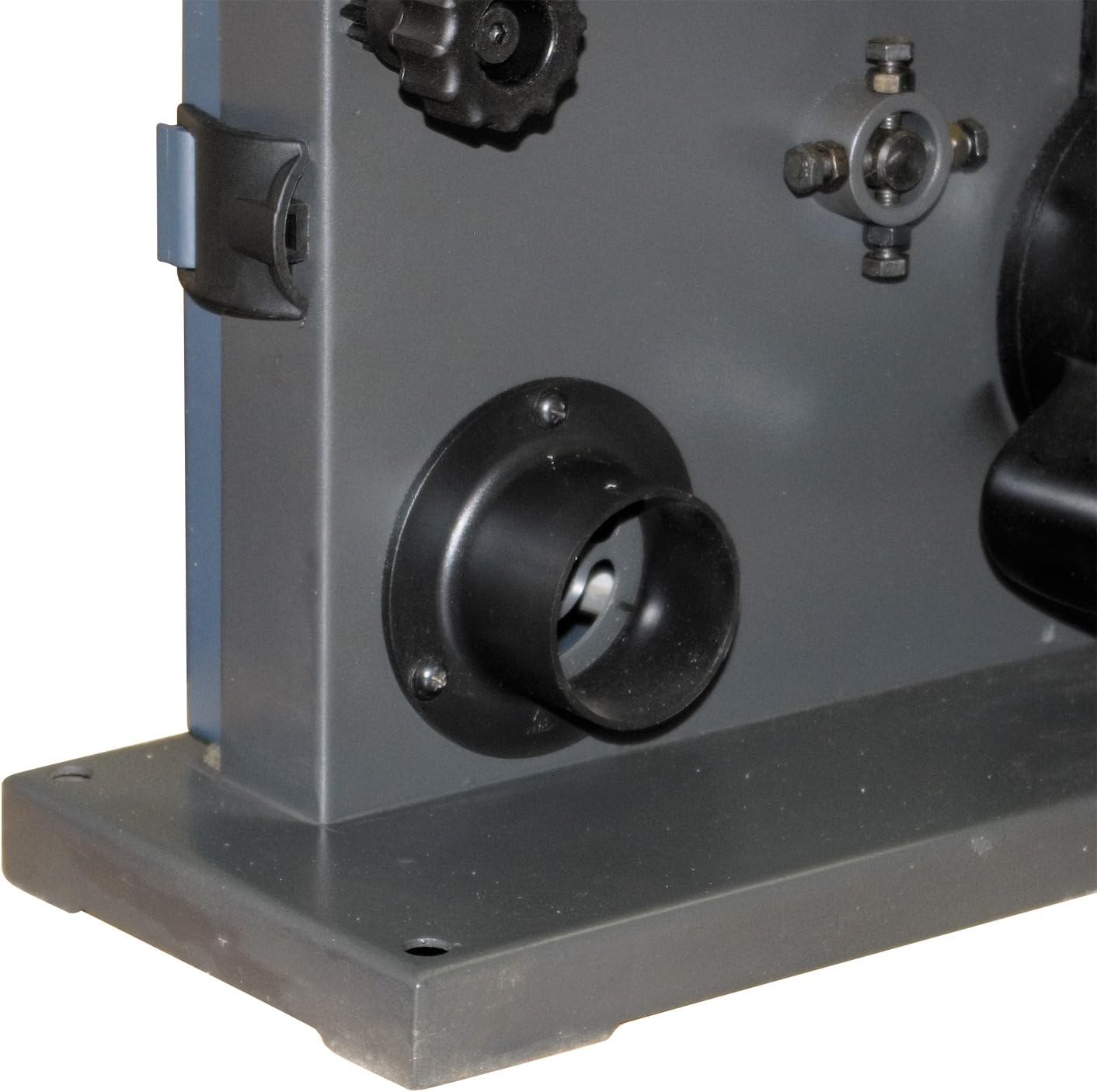

Figure 9.1: POWERTEC offers a 1-year warranty and guarantees satisfaction for their products.
Visit the official POWERTEC website or refer to your purchase documentation for contact information.
Related documentsBS900


Ask a question about this manual
Ask about setup, troubleshooting, compatibility, parts, safety, or missing instructions. Manuals+ will review the question and use this page’s manual context to help answer it.