
Patron PSS1700
Contents
Pro Audio PSS-1700 Single 15 Inch 2 Way Speaker
Model: PSS-1700
Brand: Patron
1. Introduction
Thank you for choosing the Patron Pro Audio PSS-1700 Single 15 Inch 2 Way Speaker. This manual provides essential information for the safe and efficient operation, setup, and maintenance of your speaker system. Please read this manual thoroughly before use to ensure optimal performance and longevity of your product.
2. Important Safety Instructions
- Read Instructions: Read all safety and operating instructions before operating the appliance.
- Retain Instructions: Retain the safety and operating instructions for future reference.
- Heed Warnings: Adhere to all warnings on the appliance and in the operating instructions.
- Follow Instructions: Follow all operating and use instructions.
- Water and Moisture: Do not use this apparatus near water.
- Cleaning: Clean only with a dry cloth.
- Ventilation: Do not block any ventilation openings. Install in accordance with the manufacturer's instructions.
- Heat: Do not install near any heat sources such as radiators, heat registers, stoves, or other apparatus (including amplifiers) that produce heat.
- Power-Cord Protection: Protect the power cord from being walked on or pinched, particularly at plugs, convenience receptacles, and the point where they exit from the apparatus.
- Accessories: Only use attachments/accessories specified by the manufacturer.
- Mounting: Use only with the cart, stand, tripod, bracket, or table specified by the manufacturer, or sold with the apparatus. When a cart is used, use caution when moving the cart/apparatus combination to avoid injury from tip-over.
- Lightning: Unplug this apparatus during lightning storms or when unused for long periods of time.
- Servicing: Refer all servicing to qualified service personnel. Servicing is required when the apparatus has been damaged in any way, such as power-supply cord or plug is damaged, liquid has been spilled or objects have fallen into the apparatus, the apparatus has been exposed to rain or moisture, does not operate normally, or has been dropped.
3. Key Features
- 1700 Watts Peak Momentary Power: Delivers high power output for robust audio performance.
- 2 Way LoudSpeaker: Designed for clear and balanced sound reproduction across a wide frequency range.
- Heavy Duty 3/4 Inch MDF Construction: Ensures durability and minimizes resonance for improved sound quality.
- 15 Inch Woofer: Provides deep and powerful bass response.
- 1.34 Inch Dome Driver: Offers crisp and clear high-frequency reproduction.
4. Package Contents
Upon opening the package, please ensure all items are present and in good condition:
- 1 x Patron Pro Audio PSS-1700 Single 15 Inch 2 Way Speaker
- 1 x Power Cord (attached or separate, depending on model variant)
- 1 x User Manual (this document)

Figure 4.1: Front view of the Patron PSS-1700 speaker, showcasing the 15-inch woofer and horn-loaded dome driver.
5. Setup
5.1 Placement
For optimal sound performance, place the speaker on a stable, flat surface. Ensure there is adequate ventilation around the speaker to prevent overheating. Avoid placing the speaker in direct sunlight or near heat sources.
5.2 Connections
- Power Connection: Connect the speaker's power cord to a standard AC power outlet. Ensure the outlet voltage matches the speaker's requirements.
- Audio Input: Connect your audio source (e.g., amplifier, mixer, media player) to the speaker's audio input jacks. Use appropriate audio cables (e.g., Speakon, 1/4-inch TS, XLR, depending on the specific model's connectors). Ensure secure connections to prevent signal loss or interference.
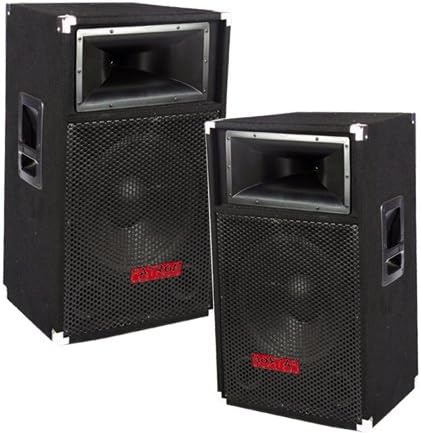
Figure 5.1: Two Patron PSS-1700 speakers, illustrating their robust construction and integrated side handles for portability.
6. Operating Instructions
- Power On: Once all connections are secure, turn on your audio source and then the speaker. Some models may have a power switch on the rear panel.
- Volume Control: Gradually increase the volume on your audio source and/or the speaker (if equipped with a volume control) to a comfortable listening level. Avoid setting the volume too high, which can cause distortion or damage to the speaker.
- Audio Source: Play audio from your connected device. Adjust equalization settings on your audio source or mixer for desired sound characteristics.
- Power Off: When finished, first turn down the volume, then power off the speaker, and finally power off your audio source.
Note: This speaker is designed for high-power audio output. Always be mindful of sound levels to prevent hearing damage and to comply with local noise regulations.
7. Maintenance
- Cleaning: Regularly wipe the speaker cabinet with a soft, dry cloth. Do not use liquid cleaners or abrasive materials, as they may damage the finish.
- Ventilation: Ensure that the ventilation openings are clear of dust and debris to maintain proper airflow and prevent overheating.
- Storage: If storing the speaker for an extended period, keep it in a cool, dry place, away from direct sunlight and extreme temperatures.
- Inspection: Periodically check all cables and connections for wear or damage. Replace any damaged cables immediately.
8. Troubleshooting
| Problem | Possible Cause | Solution |
|---|---|---|
| No sound output |
|
|
| Distorted sound |
|
|
| Intermittent sound or crackling |
|
|
If the problem persists after trying these solutions, please contact customer support or a qualified service technician.
9. Specifications
| Feature | Detail |
|---|---|
| Model Name | PATPSS1700 |
| Mounting Type | Floor Standing |
| Speaker Maximum Output Power | 1700 Watts (Peak Momentary) |
| Woofer Diameter | 15 Inches |
| Audio Driver Type | Dynamic Driver |
| Frequency Response | 20000 Hz (Upper limit, typical for full-range speakers) |
| Surround Sound Channel Configuration | 2.0 |
| Power Source | Corded Electric |
| Control Method | Touch (Refers to general interaction, not specific controls on speaker) |
| Compatible Devices | Smartphone, Tablet, MP3 Player, Laptop, Projector, Television |
| Product Dimensions (L x W x H) | 30 x 16 x 19 inches |
| Item Weight | 45.2 pounds |
| Manufacturer | Mr. Dj Inc. |
| UPC | 811234018804 |
| ASIN | B00367069Y |
10. Warranty and Support
10.1 Limited Warranty
This Patron Pro Audio PSS-1700 speaker comes with a limited warranty. Please refer to the warranty card included with your purchase or contact the manufacturer for specific terms and conditions. The warranty typically covers defects in materials and workmanship under normal use.
10.2 Customer Support
For technical assistance, troubleshooting beyond this manual, or warranty inquiries, please contact Patron customer support. Contact information can usually be found on the manufacturer's official website or on the product packaging.
Manufacturer: Mr. Dj Inc.
For the most up-to-date support information, please visit the official Patron website or the retailer's support page where you purchased the product.
Documents and downloads
Ask a question about this manual
Ask about setup, troubleshooting, compatibility, parts, safety, or missing instructions. Manuals+ will review the question and use this page’s manual context to help answer it.