
1. Introduction
This manual provides detailed instructions for the LG GW520 mobile phone. The LG GW520 features a 2.8-inch touchscreen, a slide-out QWERTY keyboard, and supports Quad-band GSM and dual-band 3G with HSDPA. It includes a 3-megapixel camera, Bluetooth 2.0, and a hot-swappable microSD card slot. This guide will assist you in setting up, operating, and maintaining your device.
2. Setup
2.1. Package Contents
Verify that your package contains the following items:
- LG GW520 Mobile Phone
- Original Battery (Lithium-Ion)
- Original Battery Door
- Original Stereo Headset
- Original Data Cable
- Original Software CD
- Original Charger
- Original Manual (this document)
2.2. Installing the SIM Card and Battery
- Remove the Battery Cover: Gently slide the battery door downwards or lift it from the designated notch to remove it.
- Insert the SIM Card: Locate the SIM card slot. Insert your SIM card with the gold contacts facing down and the cut corner aligned as shown in the diagram. Ensure it clicks into place.
- Insert the Battery: Align the battery's gold contacts with the terminals in the phone. Press the battery down gently until it is securely in place.
- Replace the Battery Cover: Place the battery door back onto the phone and slide it upwards or press it until it locks.

Figure 2.2.1: Side view of the LG GW520, illustrating the phone's profile and button placement, including the volume rocker and microUSB port.
2.3. Installing a MicroSD Card
The LG GW520 supports hot-swappable microSD cards up to 16GB. Locate the microSD card slot, usually on the side of the phone or under the battery cover. Insert the microSD card with the gold contacts facing down until it clicks into place. No need to power off the phone for installation or removal.
2.4. Charging the Battery
Connect the original charger to the microUSB port on your phone and plug it into a power outlet. The battery indicator on the screen will show the charging status. Fully charge the battery before first use.
2.5. Powering On/Off
- To Power On: Press and hold the Power/End key until the phone vibrates and the screen lights up.
- To Power Off: Press and hold the Power/End key, then select "Power off" from the options on the screen.
3. Operating Instructions
3.1. Touchscreen Navigation
The LG GW520 features a 2.8-inch 256K-color TFT touchscreen with a resolution of 240 x 400 pixels. Use your finger to tap, swipe, and drag elements on the screen. The phone includes an accelerometer for automatic screen rotation.
3.2. Using the QWERTY Keyboard
Slide the screen to the side to reveal the four-row QWERTY keyboard. This keyboard is designed for efficient text input, such as messaging and email. The physical keys provide tactile feedback for faster typing.

Figure 3.2.1: The LG GW520 with its slide-out QWERTY keyboard extended, showcasing the full physical keyboard for text input.
3.3. Making Calls and Sending Messages
- Making a Call: Tap the Phone icon on the homescreen, enter the number using the keypad, and press the Call button.
- Sending a Message: Tap the Messaging icon, select "New Message," enter the recipient's number or select from contacts, and type your message using either the touchscreen or the QWERTY keyboard.
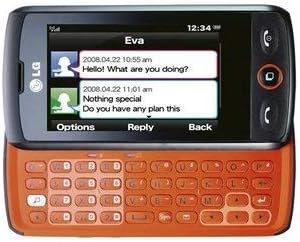
Figure 3.3.1: The LG GW520 displaying a message conversation on its screen, with the QWERTY keyboard extended for typing replies.
3.4. Camera Functions
The phone is equipped with a 3-megapixel fixed-focus camera. To access the camera, tap the Camera icon. You can take photos and record videos. Images are stored in the phone's internal memory or on the microSD card.
3.5. Connectivity
- Bluetooth: The GW520 supports Bluetooth 2.0 with A2DP for connecting to wireless headsets and transferring files. Enable Bluetooth in the settings menu.
- 3G HSDPA: The phone supports dual-band 3G with HSDPA for faster internet access. Ensure your SIM card and network provider support 3G services.
- USB Connection: Use the provided data cable to connect your phone to a computer. The phone supports Mass Storage mode for easy file transfer.
3.6. Widgets and Applications
The GW520 features a Widget interface with Live Square, allowing you to customize your homescreen with various widgets for quick access to functions like music players, photo slideshows, and social media updates. Pre-installed applications include push email and Facebook.
4. Maintenance
- Cleaning: Use a soft, dry cloth to clean the phone's screen and body. Avoid using liquid cleaners or abrasive materials.
- Battery Care: To prolong battery life, avoid exposing the phone to extreme temperatures. Do not leave the battery fully discharged for extended periods.
- Software Updates: Periodically check for software updates to ensure optimal performance and security. Refer to the LG website or your service provider for update instructions.
- Storage: Keep the phone in a dry, safe place away from direct sunlight and moisture.
5. Troubleshooting
| Problem | Possible Cause | Solution |
|---|---|---|
| Phone does not power on. | Battery is discharged or not properly installed. | Charge the battery. Ensure the battery is correctly inserted. |
| Cannot make or receive calls. | No network signal, SIM card not inserted correctly, or SIM card issue. | Check network signal strength. Reinsert SIM card. Contact your service provider. |
| Touchscreen is unresponsive. | Temporary software glitch or screen protector interference. | Restart the phone. Ensure screen is clean and free of debris. Remove and reapply screen protector if applicable. |
| Battery drains quickly. | Excessive background apps, high screen brightness, or old battery. | Close unused applications. Reduce screen brightness. Consider replacing the battery if it's old. |
| Cannot connect to Bluetooth device. | Bluetooth is off, device is out of range, or pairing issue. | Ensure Bluetooth is enabled on both devices. Move devices closer. Re-pair the devices. |
6. Specifications
| Feature | Detail |
|---|---|
| Brand | LG |
| Model Name | GW520 |
| Operating System | Android (Note: Product description features suggest a feature phone OS, not full Android. Please verify with LG for exact OS details.) |
| Screen Size | 2.8 Inches |
| Display Type | LCD |
| Resolution | 240 x 400 pixels |
| Memory Storage Capacity | 16 GB (Max supported microSD) |
| Cellular Technology | 3G |
| Wireless Network Technology | GSM |
| Wireless Carrier | Unlocked |
| Connectivity Technology | Bluetooth |
| Rear Camera Resolution | 3 MP |
| Human-Interface Input | Keyboard, Touchscreen |
| Form Factor | Slider |
| Battery Description | Lithium-Ion |
| Item Weight | 4.48 ounces |
| Additional Features | Quad-Band, smartphone, touchscreen, FM radio with RDS, Office document viewer |
7. Warranty and Support
For warranty information, please refer to the warranty card included with your product or visit the official LG website. For technical support, troubleshooting assistance beyond this manual, or service inquiries, please contact LG customer support through their official channels.
You can typically find contact information on the LG website or in the documentation provided with your phone.