1. Product Overview
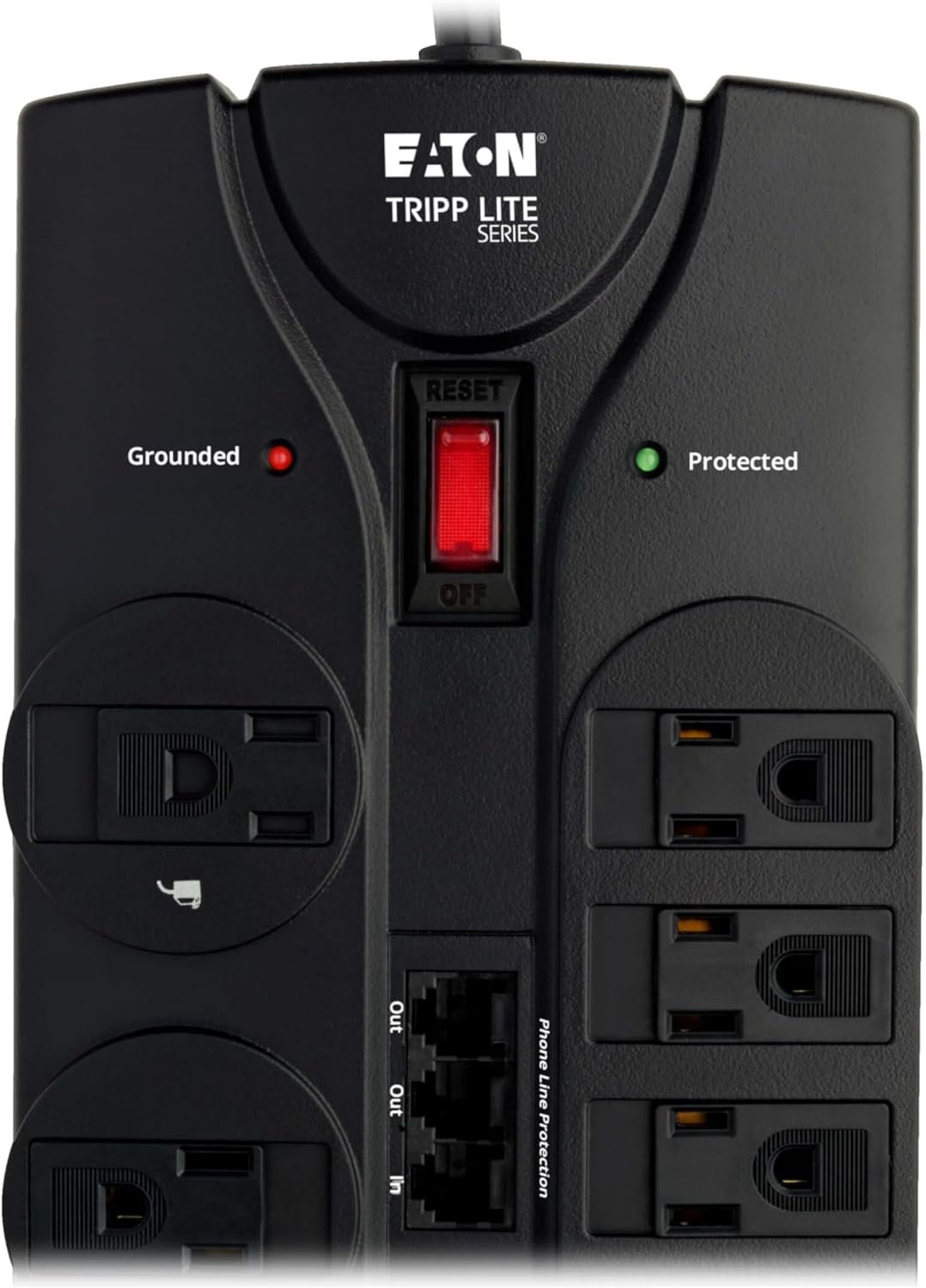
The Eaton Tripp Lite TLP1208TELTV is a 12-outlet surge protector designed to safeguard your home and office electronics from damaging power surges and spikes. It features a 2160 joule rating, an 8-foot extension cord with a flat plug for flexible placement, and a lighted on/off switch for convenient control. Diagnostic LEDs provide visual confirmation of proper grounding and surge protection status.
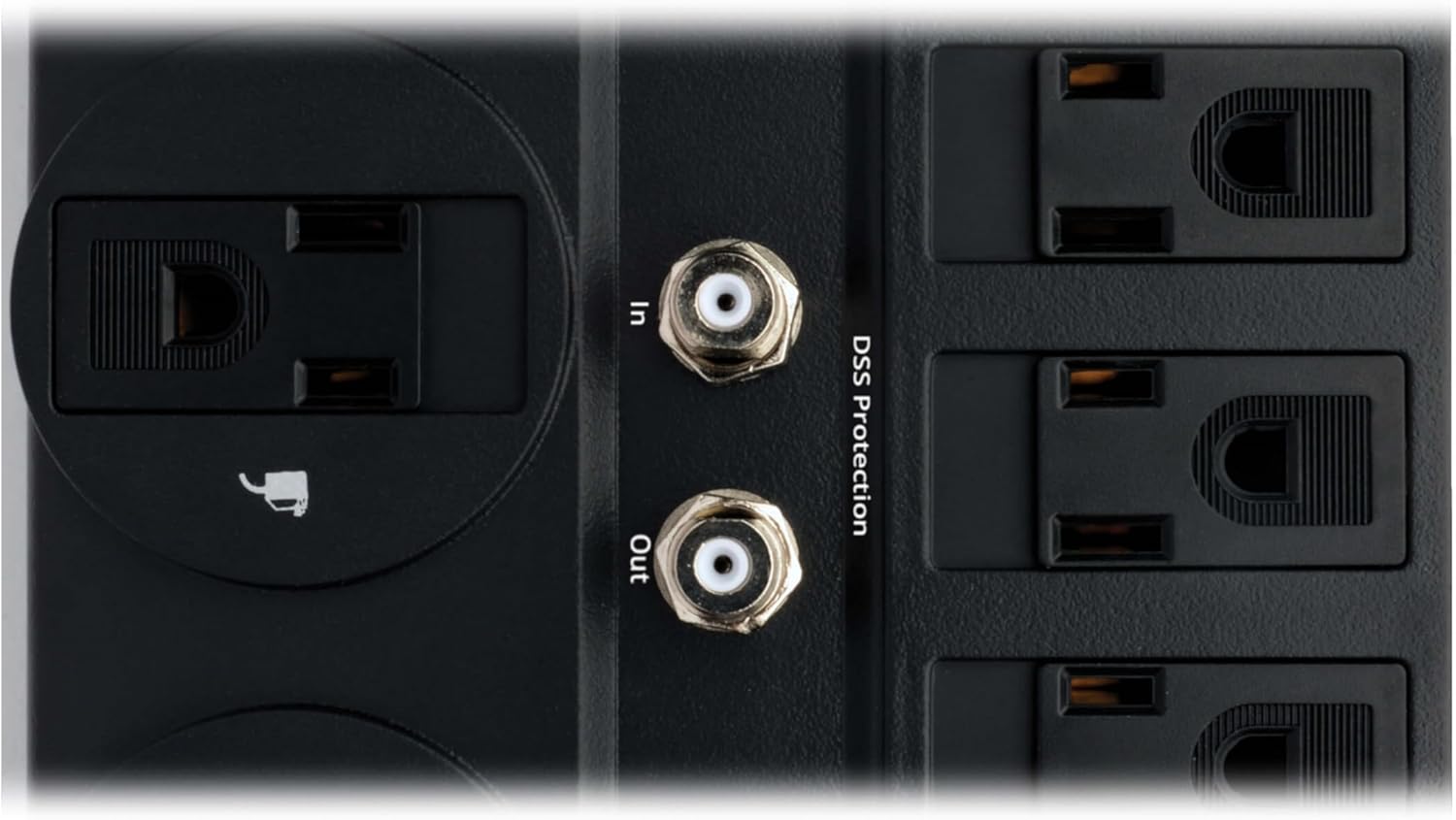
This model includes built-in phone line (RJ11) and coaxial ports, offering comprehensive protection for your home entertainment system, phone lines, fax machines, modems, WiFi routers, PCs, TVs, and satellite equipment against data line surges. Additionally, it incorporates EMI/RFI line noise filtering to ensure connected components operate efficiently and have a longer lifespan by suppressing electromagnetic and radio interference.
2. Safety Information
WARNING: This product contains chemicals known to the State of California to cause cancer and birth defects or other reproductive harm.
To reduce the risk of electrical shock, use this device only indoors. Do not use in wet conditions. Ensure the wall outlet is properly grounded before connecting the surge protector. Do not connect to an ungrounded outlet. Do not use with aquarium equipment. Do not use in life support applications. Do not daisy-chain surge protectors or extension cords.
3. Features
- 12 AC Outlets: Provides ample connectivity for multiple devices.
- 2160 Joule Rating: Offers robust surge protection for sensitive electronics.
- 8ft Extension Cord with Flat Plug: Allows for flexible placement and keeps furniture flush against walls.
- 4 Transformer-Friendly Outlets: Widely spaced outlets accommodate bulky power adapters without blocking other ports.
- RJ11 Phone Line Protection: 1-in/2-out phone port protects phone, fax, and modem lines.
- Coaxial Protection: Silver coaxial connectors safeguard cable TV, satellite, and antenna equipment.
- Diagnostic LEDs: Indicators confirm proper grounding and active surge protection.
- 15A Circuit Breaker: Prevents dangerous overloads.
- EMI/RFI Line Noise Filtering: Suppresses electromagnetic and radio frequency interference for optimal performance.
- UL Certified and UL Listed: Ensures product safety and reliability.

4. Setup and Installation
1. Placement: Position the surge protector in a convenient location near your electronic devices. The 8-foot cord and flat plug allow for placement behind furniture or equipment without obstruction.
2. Mounting (Optional): The surge protector features keyhole slots on its bottom panel for wall or desk mounting. Use appropriate screws (not included) to secure the unit in your desired location.

3. Power Connection: Plug the surge protector's flat plug into a standard, grounded 120V AC wall outlet. Ensure the outlet is properly grounded for optimal protection.
4. Device Connection: Plug your electronic devices into the 12 AC outlets. Utilize the four widely spaced outlets for bulky power adapters. Connect your phone line to the RJ11 'IN' port and your phone/fax/modem to the 'OUT' ports. Similarly, connect your coaxial cable to the 'IN' port and your TV/satellite equipment to the 'OUT' port.


5. Operating Instructions
Once connected to a grounded outlet, press the lighted on/off switch to the 'ON' position. The diagnostic LEDs will illuminate to indicate the status of your surge protector:
- 'Protected' LED (Green): Indicates that your connected equipment is protected from surges. If this LED is off, the surge protection has been compromised, and the unit should be replaced.
- 'Grounded' LED (Red): Confirms that the wall outlet is properly grounded. If this LED is off, there is a grounding issue with your wall outlet, and you should consult a qualified electrician.

For a visual guide on the product, please watch the official information video:
6. Maintenance
Regularly inspect the surge protector and its connected cables for any signs of damage. Keep the unit clean and free from dust. Ensure proper ventilation around the unit. If the 'Protected' LED is off, the surge protection components have absorbed a significant surge and the unit should be replaced to maintain protection for your devices.
7. Troubleshooting
- No Power to Devices: Check if the on/off switch is in the 'ON' position. Verify that the wall outlet is functioning by plugging in another device. If the 'Protected' LED is off, the unit may need replacement.
- 'Protected' LED is Off: This indicates that the surge protection components have been consumed by a power surge. The unit will no longer provide surge protection and should be replaced.
- 'Grounded' LED is Off: This indicates a problem with the building's electrical grounding. Consult a qualified electrician to inspect and correct the wiring. The surge protector will still provide surge protection, but proper grounding is essential for complete safety.
- Circuit Breaker Tripped: If the red reset button on the side of the unit has popped out, it indicates an overload. Disconnect some devices, then press the button firmly to reset the circuit breaker.
8. Specifications
| Specification | Value |
|---|---|
| Product Dimensions | 2.72 x 10.3 x 0.1 inches |
| Item Weight | 2.2 pounds |
| Item Model Number | TLP1208TELTV |
| Brand | TRIPP LITE |
| Color | Black |
| Total Power Outlets | 12 |
| Voltage | 120 Volts |
| Special Features | Flat Plug, Mountable, On And Off Switch, Surge Protection, Wide Spaced Outlet |
| Surge Protection (Joules) | 2160 |
| Cord Length | 8 feet |
9. What's in the Box
- 12-outlet Surge Protector
- 6ft Phone Line (RJ11) Cable
- 6ft Coax Cable

10. Warranty and Support
The TLP1208TELTV is protected by a Lifetime Limited Manufacturer's Warranty. Additionally, it includes $150,000 of Ultimate Lifetime Insurance for any connected components damaged by a power surge (U.S., Canada and Puerto Rico only).
For technical assistance or any concerns, Eaton's expert technical team is available via phone, web, or email. Please refer to the product packaging or the official Tripp Lite website for contact details.


