
Introduction
This manual provides important instructions for the safe operation, assembly, maintenance, and troubleshooting of your Westpointe HVF14-SP 14-inch High Velocity Fan. Please read this manual thoroughly before using the product and retain it for future reference.
The Westpointe HVF14-SP is designed to provide powerful air circulation with its 3-speed settings and durable aluminum blades. It features a rotary knob switch for easy control and a powder-coated finish for longevity.
Important Safety Instructions
WARNING: To reduce the risk of fire or electric shock, do not use this fan with any solid-state speed control device.
- Always unplug the fan before cleaning or servicing.
- Do not immerse the fan in water or other liquids.
- Keep the fan away from children and pets.
- Ensure the fan is placed on a stable, level surface to prevent tipping.
- Do not operate the fan with a damaged cord or plug. If the cord or plug is damaged, contact qualified service personnel.
- Avoid placing objects through the fan grilles while in operation.
- This fan is for indoor and outdoor usage, but protect it from direct exposure to rain or excessive moisture.
- The fan has a polarized plug (one blade is wider than the other). This plug will fit in a polarized outlet only one way. If the plug does not fit fully in the outlet, reverse the plug. If it still does not fit, contact a qualified electrician. Do not attempt to defeat this safety feature.
Package Contents
Please check the package contents to ensure all parts are present and undamaged:
- Westpointe HVF14-SP Fan Unit
- Fan Base Assembly
- Instruction Manual
Setup and Assembly
The Westpointe HVF14-SP fan requires minor assembly of the base before use. Follow these steps:
- Carefully remove all components from the packaging.
- Attach the fan unit to the base assembly. Align the mounting holes on the fan unit with those on the base.
- Secure the fan unit to the base using the provided screws and nuts. A Phillips screwdriver and an adjustable wrench may be required for this step. Ensure all connections are tight and secure.
- Place the assembled fan on a firm, level surface.
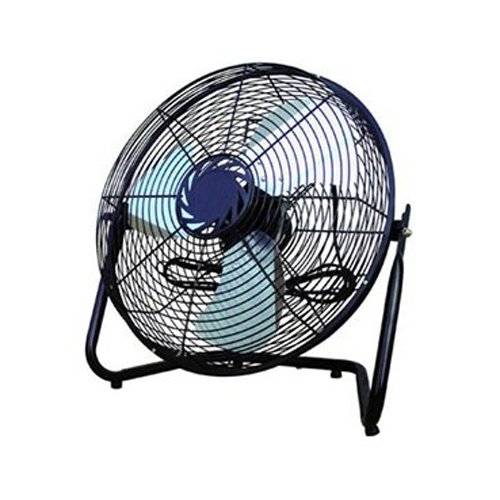
Image: Westpointe HVF14-SP 14-inch High Velocity Fan. This image shows the fan fully assembled, ready for use, with its sturdy base and protective grille.
Operating Instructions
To operate your Westpointe HVF14-SP fan, follow these simple steps:
- Ensure the fan is properly assembled and placed on a stable surface.
- Plug the power cord into a standard 120V AC electrical outlet.
- Locate the rotary knob switch, typically found on the back or side of the fan unit.
- Turn the rotary knob to select your desired speed setting:
- 0 (Off): Fan is off.
- 1 (Low): Provides a gentle airflow.
- 2 (Medium): Offers moderate air circulation.
- 3 (High): Delivers maximum air velocity.
- To turn off the fan, rotate the knob back to the "0" (Off) position.
- Unplug the fan from the outlet when not in use for extended periods.
Maintenance and Cleaning
Regular cleaning and maintenance will help ensure the longevity and optimal performance of your fan.
- Always unplug the fan before cleaning.
- Use a soft, damp cloth to wipe the exterior surfaces of the fan. Do not use abrasive cleaners or solvents.
- To clean the fan blades and grilles, use a vacuum cleaner with a brush attachment or a soft cloth to remove dust and debris. Ensure the fan is completely dry before plugging it back in.
- Do not allow water to drip into the motor housing.
- Store the fan in a cool, dry place when not in use for extended periods.
Troubleshooting
If you experience issues with your Westpointe HVF14-SP fan, refer to the following common problems and solutions:
| Problem | Possible Cause | Solution |
|---|---|---|
| Fan does not turn on. |
|
|
| Fan makes unusual noise (e.g., humming). |
|
|
| Airflow is weak. |
|
|
Specifications
- Model: HVF14-SP
- Brand: Westpointe
- Fan Type: High Velocity Floor Fan
- Blade Diameter: 14 inches
- Number of Blades: 3 (Aluminum)
- Speed Settings: 3 (Low, Medium, High)
- Control Type: Rotary Knob Switch
- Power Source: Corded Electric
- Voltage: 120V AC (Standard US)
- Wattage: 14 watts
- Finish: Powder Coated
- Weight: Approximately 7.9 pounds
- Safety Certification: UL Listed
- Usage: Indoor, Outdoor
Warranty and Support
Westpointe products are manufactured to high-quality standards. For information regarding warranty coverage, please refer to the warranty card included with your purchase or visit the official Westpointe website.
If you require technical assistance, have questions about your product, or need to report a defect, please contact Westpointe Customer Support. Contact details can typically be found on the product packaging or the official brand website.
Please have your model number (HVF14-SP) and purchase date available when contacting support.