
Introduction
The Technoline WS 9130 IT Wireless Weather Station provides accurate indoor and outdoor temperature readings, weather forecasts, and a radio-controlled clock. This manual will guide you through the setup, operation, and maintenance of your device, ensuring optimal performance and longevity.
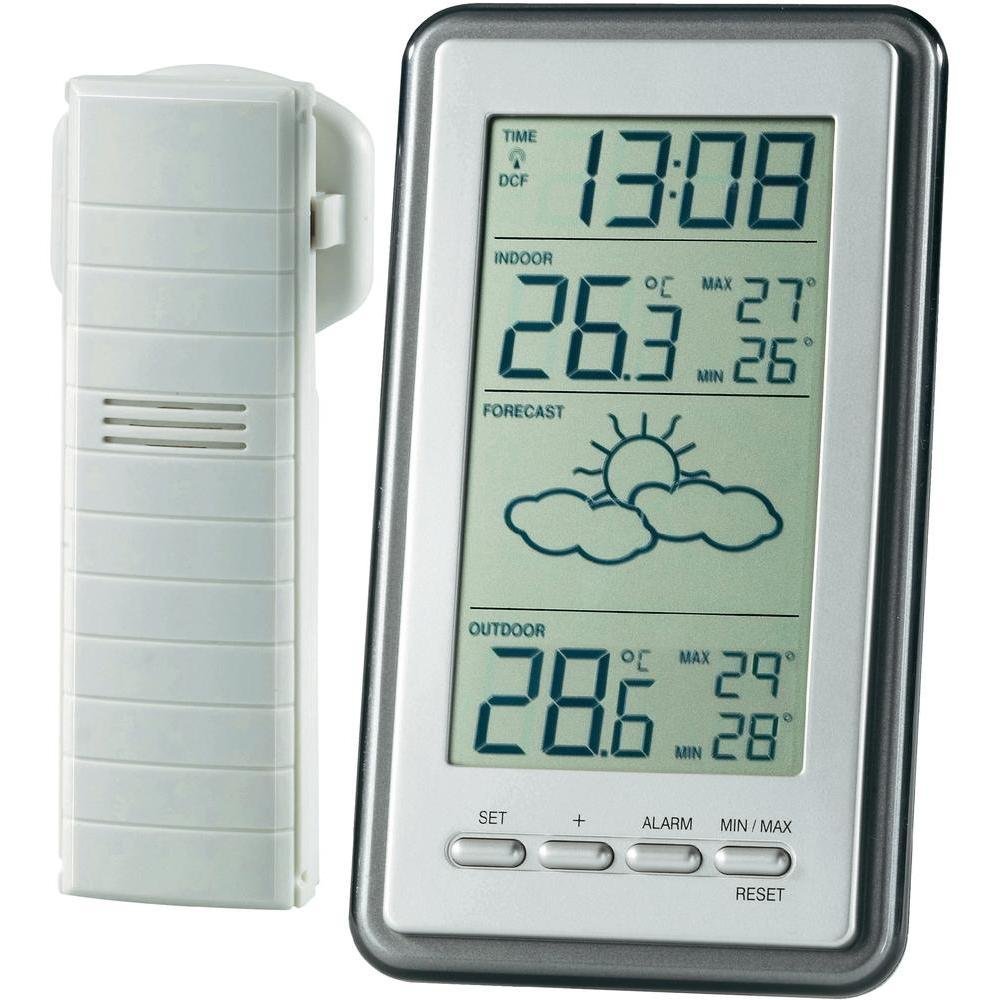
Image: The Technoline WS 9130 IT Wireless Weather Station, showing the main display unit on the right and the outdoor sensor on the left. The main unit displays the time (13:08), indoor temperature (26.3°C with max/min), a weather forecast icon (partly cloudy with sun), and outdoor temperature (28.6°C with max/min). Control buttons for SET, +, ALARM, MIN/MAX, and RESET are visible below the display.
Setup
- Battery Installation:
- Outdoor Sensor (TX37-IT): Insert batteries into the outdoor sensor first.
- Main Unit: Insert 2 x AAA Micro LR03 batteries (not included) into the main display unit immediately after installing batteries in the outdoor sensor. This sequence ensures proper synchronization between the units.
- Sensor Placement: Place the outdoor sensor in a location protected from direct sunlight and precipitation, ensuring good air circulation. The maximum wireless transmission range is approximately 100 meters in an open environment. Avoid placing it near large metal objects or sources of electromagnetic interference.
- Time Synchronization: The station will automatically attempt to synchronize with the DCF-77 radio signal. This process may take a few minutes. If automatic synchronization is not desired or successful, the time can be set manually.
- Time Zone Adjustment: Adjust the time zone by ± 12 hours as needed to match your local time.
Operating Instructions
- Display Overview: The large display shows the current time, indoor temperature, outdoor temperature, weather forecast, and minimum/maximum recorded temperatures.
- Temperature Display: View current indoor and outdoor temperatures. The unit displays both current and recorded maximum/minimum temperatures.
- MIN/MAX Temperature: The device records the minimum and maximum indoor and outdoor temperatures. To reset these values, press and hold the "MIN/MAX" button for a few seconds.
- Weather Forecast: The station provides a weather forecast and trend indication based on atmospheric pressure changes.
- Alarm Function: Set an alarm with a snooze feature using the dedicated ALARM button.
- Battery Indicator: An icon on the display indicates when the battery level is low, prompting replacement.
- Mounting Options: The main unit can be placed on a table using its integrated stand or mounted on a wall using the designated hanging slot.
Maintenance
- Battery Replacement: Replace batteries in both the main unit and outdoor sensor when the low battery indicator appears. Ensure correct polarity during installation.
- Cleaning: Clean the display and casing with a soft, dry cloth. Avoid abrasive cleaners, solvents, or harsh chemicals, as these can damage the device.
- Outdoor Sensor Care: Periodically check the outdoor sensor for debris, dust, or obstructions that might affect its performance. Ensure its protective casing remains intact.
Troubleshooting
- No Outdoor Temperature Reading:
- Check batteries in both units and replace if necessary.
- Ensure the outdoor sensor is within the 100m range and not obstructed by thick walls or electronic interference.
- Re-synchronize by removing and reinserting batteries in the outdoor sensor first, then the main unit.
- Incorrect Time:
- Verify the DCF-77 signal reception. Ensure the unit is not near sources of interference.
- Check time zone settings and adjust if incorrect.
- Manually set the time if automatic synchronization consistently fails.
- Inaccurate Readings:
- Ensure the outdoor sensor is not in direct sunlight or near heat sources, which can skew temperature readings.
- Verify proper ventilation around the sensor for accurate ambient temperature measurement.
Specifications
| Feature | Detail |
|---|---|
| Model | Technoline WS 9130 IT |
| Main Unit Dimensions | Approx. 84 x 23 x 150 mm |
| Power Supply (Main Unit) | 2 x AAA Micro LR03 batteries (not included) |
| Power Supply (Outdoor Sensor) | Batteries (type not specified, typically AA or AAA) |
| Connectivity | Wireless, 868 MHz |
| Wireless Range | Up to 100 meters (open field) |
| Clock | DCF-77 Radio-controlled with manual setting and ±12h time zone adjustment |
| Temperature Measurement | Indoor and Outdoor |
| Temperature Accuracy | 0.5 °C |
| Material | Plastic |
| Special Features | Weather-resistant outdoor sensor, Large display, MIN/MAX temperature recording, Weather forecast with trend, Alarm with snooze, Battery indicator, Wall mount or table stand |
Warranty and Support
Specific warranty and support information is not provided in the product data. Please refer to the manufacturer's official website or contact your retailer for details regarding warranty coverage and customer support for your Technoline WS 9130 IT Wireless Weather Station.


