Introduction
The Taco SR504 Four Zone Switching Relay is designed to provide reliable control for hydronic heating systems. This unit integrates multiple heating zones, allowing for efficient management of your system. It features clearly labeled PC board layouts and advanced functionalities for customization.
This manual provides detailed instructions for the installation, operation, maintenance, and troubleshooting of the Taco SR504. Please read all instructions carefully before proceeding with installation or operation.
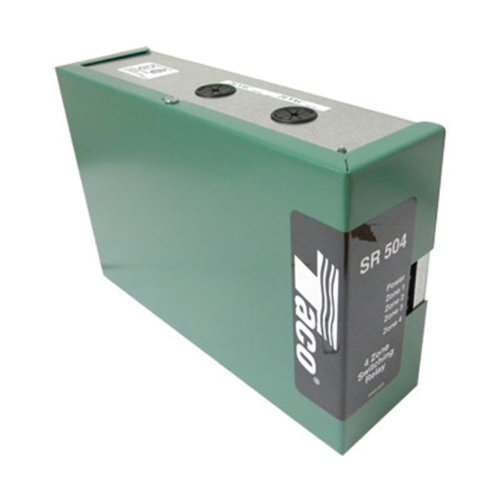
Image: The Taco SR504 Four Zone Switching Relay, showing its compact design and terminal connections.
Safety Information
WARNING: Installation and servicing must be performed by qualified personnel only. Failure to follow these instructions could result in electric shock, fire, or property damage.
- Disconnect power supply before making any wiring connections to prevent electrical shock and equipment damage.
- Ensure all wiring complies with local electrical codes and regulations.
- Do not operate the unit with damaged wiring or components.
- Keep the unit dry and away from moisture.
Setup and Installation
Mounting
The SR504 is designed for surface mounting. Choose a dry, accessible location near the boiler or heating system, away from direct heat sources or excessive vibration.
- Securely mount the relay to a wall or suitable surface using appropriate fasteners.
- Ensure adequate clearance for wiring and ventilation.
Wiring Connections
Refer to the wiring diagram provided with the unit and follow these general guidelines:
- Power Input: Connect the 24 Volt power supply to the designated terminals.
- Thermostat Connections: Connect each zone thermostat to its respective zone terminals (T-T). The SR504 supports four zones.
- Circulator Pump Connections: Connect the circulator pumps for each zone to the corresponding pump terminals.
- Boiler Connections: Connect the boiler control terminals to the boiler's thermostat input.
- Isolated End Switch: Utilize the isolated end switch for boiler enable or other auxiliary functions as required by your system design.
Note: The PC board layout is clearly labeled to simplify wiring. Always double-check all connections before applying power.
Operating Instructions
Initial Power-Up
Once all wiring is complete and verified, restore power to the unit. The external indicator lights will provide diagnostic feedback.
Zone Operation
When a thermostat calls for heat in a specific zone:
- The corresponding zone indicator light on the SR504 will illuminate.
- The circulator pump for that zone will activate.
- The boiler will be enabled via the boiler control terminals (if configured).
Priority Switching
The SR504 features switchable priority. This allows one designated zone (typically the domestic hot water zone) to take precedence over other heating zones when calling for heat.
- To enable priority, set the priority switch on the PC board to the ON position for the desired zone.
- When the priority zone calls for heat, all other heating zones will be temporarily suspended until the priority demand is satisfied.
Maintenance
The Taco SR504 is designed for minimal maintenance. However, periodic checks can ensure optimal performance.
- Annual Inspection: Annually, inspect all wiring connections for tightness and signs of corrosion.
- Relay Replacement: The SR504 uses standard "ice cube" replaceable relays. If a relay fails (e.g., a zone circulator does not activate despite the thermostat calling for heat and the indicator light being off), it can be easily replaced by a qualified technician.
- Cleaning: Keep the unit free from dust and debris. Use a soft, dry cloth for cleaning. Do not use liquid cleaners.
Always disconnect power before performing any maintenance.
Troubleshooting
This section provides solutions to common issues. For problems not listed here, contact a qualified HVAC technician.
| Problem | Possible Cause | Solution |
|---|---|---|
| No power to the unit. | Blown fuse, disconnected power supply. | Check the fuse and power connections. Ensure 24V AC is present. |
| Zone circulator not running, but thermostat is calling for heat. | Faulty thermostat, wiring error, failed zone relay. | Verify thermostat operation. Check wiring. Replace the specific zone relay if faulty. |
| Boiler not firing when any zone calls for heat. | Wiring error to boiler, boiler safety lockout, faulty end switch. | Check boiler wiring. Reset boiler if locked out. Test end switch continuity. |
| Priority zone not overriding other zones. | Priority switch set incorrectly. | Ensure the priority switch for the desired zone is in the ON position. |
Specifications
| Feature | Detail |
|---|---|
| Model | SR504 |
| Number of Zones | 4 |
| Coil Voltage | 24 Volts AC |
| Mounting Type | Surface Mount |
| Contact Type | Normally Open |
| Contact Material | Silver Alloy |
| Connector Type | Plug-In |
| Operation Mode | Manual |
| Certifications | UL, CSA Approved |
| Item Weight | 7 pounds (approx.) |
| Features | External Indicator Lights, Switchable Priority, Simplified Wiring, Fully Enclosed Snap-Out Relays, Compact Design, Fuse Protected, Isolated End Switch, Universal Thermostat Compatibility. |
Warranty and Support
Warranty Information
The Taco SR504 Four Zone Switching Relay comes with an Extended 3 Year Warranty from the date of purchase. This warranty covers defects in materials and workmanship under normal use and service. For warranty claims, please retain your proof of purchase and contact Taco customer support.
This warranty does not cover damage resulting from improper installation, misuse, abuse, accident, or unauthorized repairs or modifications.
Customer Support
For technical assistance, troubleshooting guidance beyond this manual, or warranty inquiries, please contact Taco customer support. Visit the official Taco website for the most current contact information and additional resources.
Official Website: www.tacocomfort.com
Please have your model number (SR504) and date of purchase available when contacting support.


