
Introduction
Welcome to the Chicco Baby Control Video Digital Monitor. This device is designed to provide continuous audio and video surveillance of your baby, ensuring peace of mind. Please read this manual carefully before use to ensure proper operation and safety.
Important Safety Information
- Keep all components out of reach of children.
- Do not place the baby unit within reach of the baby's crib or play area to prevent strangulation hazards from cords.
- Use only the provided power adapters.
- Do not expose units to water or excessive moisture.
- Ensure proper ventilation for both units.
- This product is not a substitute for responsible adult supervision.
Package Contents
- 1 x Baby Unit (Camera)
- 1 x Parent Unit (Receiver with 2-inch screen)
- 2 x Power Adapters
- Rechargeable batteries for Parent Unit (pre-installed or separate)
Product Overview
Baby Unit (Camera)
The baby unit is equipped with an IR video camera for clear viewing, even in low light conditions. It transmits audio and video to the parent unit.

Image Description: A close-up view of the Chicco Baby Unit, featuring the camera lens surrounded by infrared LEDs for night vision, and a power indicator light.
Parent Unit (Receiver)
The parent unit features a 2-inch screen to display live video from the baby unit. It allows you to monitor your baby and adjust settings.
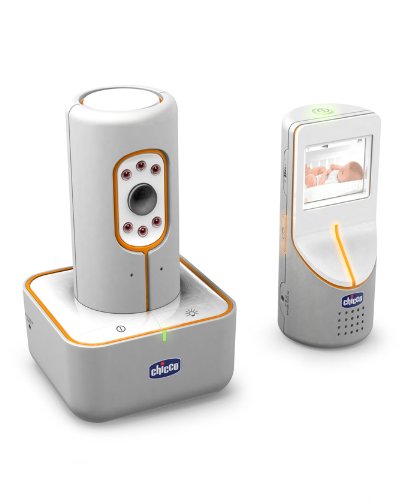
Image Description: The Chicco Parent Unit, a handheld device with a 2-inch display screen, showing a baby in a crib.
Complete System
Both units work together to provide a comprehensive monitoring solution.

Image Description: Both the Chicco Baby Unit (camera) and Parent Unit (receiver) displayed together, illustrating the complete baby monitor system.
Setup Instructions
Step 1: Powering the Units
- Connect one power adapter to the Baby Unit and plug it into a wall outlet.
- Connect the second power adapter to the Parent Unit. The Parent Unit can operate on rechargeable batteries or directly from the mains. Ensure the rechargeable batteries are fully charged before initial use.
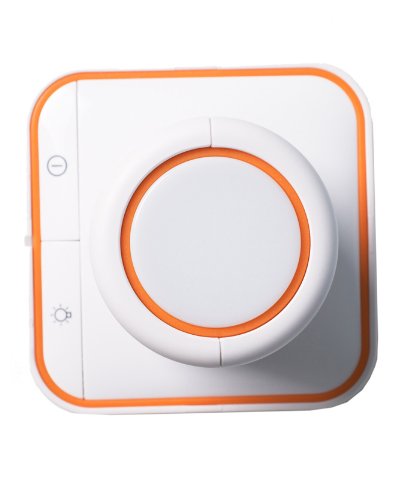
Image Description: A top-down view of the base of one of the Chicco monitor units, showing the power input area and control buttons.
Step 2: Positioning the Baby Unit
Place the Baby Unit in your baby's room, ensuring a clear view of the crib or play area. Position it at a safe distance from the baby, out of reach of curious hands. The camera angle can be adjusted for optimal focus.
Step 3: Activating the Units
Turn on both the Baby Unit and the Parent Unit. The units should automatically connect using Hopping digital technology.
Operating the Monitor
Video Monitoring
The Parent Unit's 2-inch screen will display live video from the Baby Unit. The IR camera automatically activates in low light for night vision.
Audio Monitoring
Listen to your baby through the Parent Unit. Adjust the volume as needed.
Range
The monitor has an operating range of approximately 150 meters in open spaces. Walls and other obstructions may reduce this range.
Alerts
The system provides motion-only alerts, notifying you of activity in the baby's room.
Care and Maintenance
- Clean the units with a soft, dry cloth. Do not use abrasive cleaners or solvents.
- Ensure camera lens is free of dust for clear image quality.
- When not in use for extended periods, disconnect from power and store in a dry place.
Troubleshooting
| Problem | Solution |
|---|---|
| No image or sound on Parent Unit |
|
| Poor image quality |
|
| Short battery life on Parent Unit |
|
Technical Specifications
| Feature | Detail |
|---|---|
| Model Number | 61775100000 |
| Screen Size | 2 Inches |
| Operating Range | Approximately 150 meters (open space) |
| Connectivity | Wireless (Hopping Digital Technology) |
| Power Input | 230 Volts AC (Mains) |
| Battery (Parent Unit) | Rechargeable batteries included |
| Night Vision | Infrared (IR) |
| Alert Type | Motion Only |
| Dimensions (L x W x H) | 26.5 x 13.5 x 26.5 cm |
| Item Weight | 998 g |
| Recommended Age | 0 - 3 years |
| Manufacturer | Artsana |
Warranty and Customer Support
For warranty information or technical assistance, please refer to the contact details provided with your purchase documentation or visit the official Chicco website. Keep your proof of purchase for warranty claims.


