
1. Introduction
Thank you for choosing the Pronomic DM-59 Dynamic Microphone. This manual provides essential information for the proper setup, operation, and maintenance of your microphone. The DM-59 is designed for vocal applications, particularly suitable for stage use, offering optimized frequency response for clear voice reproduction and a stable polar pattern for effective feedback protection.
Its robust die-cast body and metal housing ensure durability, protecting the internal components from physical impact. An integrated windscreen helps to minimize plosive sounds and wind noise, ensuring a cleaner audio signal.

Image 1.1: Close-up view of the Pronomic DM-59 microphone head and logo.
2. Package Contents
Please verify that all the following items are included in your package:
- Pronomic DM-59 Dynamic Microphone
- Stand Adapter (with 5/8" thread)
- 5-meter XLR Cable
- Padded Molded Case
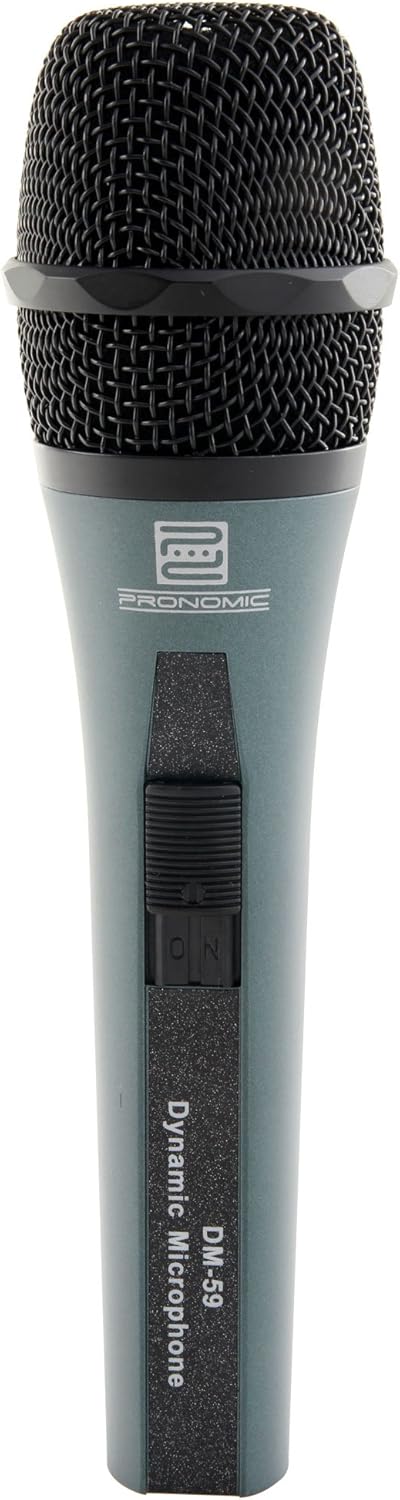
Image 2.1: The Pronomic DM-59 Dynamic Microphone.

Image 2.2: The DM-59 microphone and included accessories stored in its padded case.

Image 2.3: The included 5-meter XLR cable.

Image 2.4: The microphone stand adapter.
3. Setup
- Attach Stand Adapter: Screw the provided stand adapter onto a microphone stand. The adapter features a 5/8" thread for compatibility with standard microphone stands.
- Mount Microphone: Carefully insert the Pronomic DM-59 microphone into the stand adapter. Ensure it is securely seated.
- Connect XLR Cable: Plug one end of the 5-meter XLR cable into the XLR connector at the base of the microphone. The XLR connector is designed for a secure, balanced audio connection.
- Connect to Audio Device: Plug the other end of the XLR cable into an appropriate input on your mixer, audio interface, or amplifier. Ensure the input is compatible with dynamic microphones.

Image 3.1: The XLR connector at the base of the DM-59 microphone.
4. Operation
- Power On/Off: The DM-59 features an integrated ON/OFF switch on its body. Slide the switch to the 'ON' position to activate the microphone. Slide it to 'OFF' when not in use to prevent unwanted noise or conserve power if connected to a battery-powered device.
- Microphone Placement: For optimal vocal performance, hold or position the microphone approximately 2-6 inches (5-15 cm) from your mouth. Experiment with distance to achieve the desired vocal presence and to control plosives.
- Polar Pattern: The DM-59 has a unidirectional (cardioid) polar pattern. This means it is most sensitive to sounds coming from the front and rejects sounds from the sides and rear. This characteristic helps to minimize feedback from stage monitors and isolate the desired sound source.
- Gain Staging: Adjust the input gain on your mixer or audio interface to an appropriate level. Avoid setting the gain too high, which can lead to distortion, or too low, which can result in a weak signal and increased noise.

Image 4.1: Proper microphone usage for vocal performance.

Image 4.2: The ON/OFF switch located on the microphone body.
5. Maintenance
- Cleaning: To clean the microphone body, use a soft, dry cloth. For the grille, a soft brush can be used to gently remove dust or debris. Do not use liquid cleaners directly on the microphone, as moisture can damage internal components.
- Storage: When not in use, store the DM-59 in its padded molded case to protect it from dust, moisture, and physical damage. Avoid storing in extreme temperatures or high humidity.
- Cable Care: Always coil the XLR cable neatly after use. Avoid sharp bends or kinks, which can damage the internal wiring. When disconnecting, grasp the connector, not the cable itself, to prevent strain on the connections.
6. Troubleshooting
If you encounter issues with your Pronomic DM-59 microphone, please refer to the following common troubleshooting steps:
- No Sound Output:
- Ensure the microphone's ON/OFF switch is in the 'ON' position.
- Check that the XLR cable is securely connected at both the microphone and the audio device.
- Verify that the input gain on your mixer or audio interface is turned up.
- Test with a different XLR cable or audio input if possible.
- Feedback (High-pitched Squeal):
- Reposition the microphone further away from speakers or monitors.
- Reduce the volume of the monitor speakers.
- Ensure the microphone is pointed away from speakers, utilizing its unidirectional pattern.
- Distorted Sound:
- Reduce the input gain on your mixer or audio interface.
- Ensure you are not speaking or singing too loudly directly into the microphone.
- Intermittent Sound:
- Check for loose cable connections.
- Inspect the XLR cable for any visible damage.
7. Specifications
| Feature | Specification |
|---|---|
| Model | DM-59 (Part No. 00021803) |
| Microphone Type | Dynamic |
| Polar Pattern | Unidirectional |
| Connectivity Technology | XLR |
| Audio Sensitivity | 72 Decibels |
| Signal to Noise Ratio | 74 dB |
| Power Source | Corded Electric |
| Microphone Form Factor | Handheld |
| Manufacturer | Pronomic |
| Parcel Dimensions | 25 x 19.8 x 7.1 cm |
| Item Weight | 1.01 kg |
| Included Components | Microphone, Stand Adapter, XLR Cable, Padded Case |
8. Warranty and Support
For warranty information or technical support regarding your Pronomic DM-59 Dynamic Microphone, please refer to the documentation provided at the time of purchase or contact your retailer. You may also visit the official Pronomic website for further assistance and contact details.


