
Introduction
The Westek TMSW15MI is a hardwire indoor in-wall mechanical countdown timer designed to automatically turn off lights and motors after a selected time, up to 15 minutes. This device replaces a standard single-pole, single-throw wall switch, providing convenient timed control for various electrical loads.
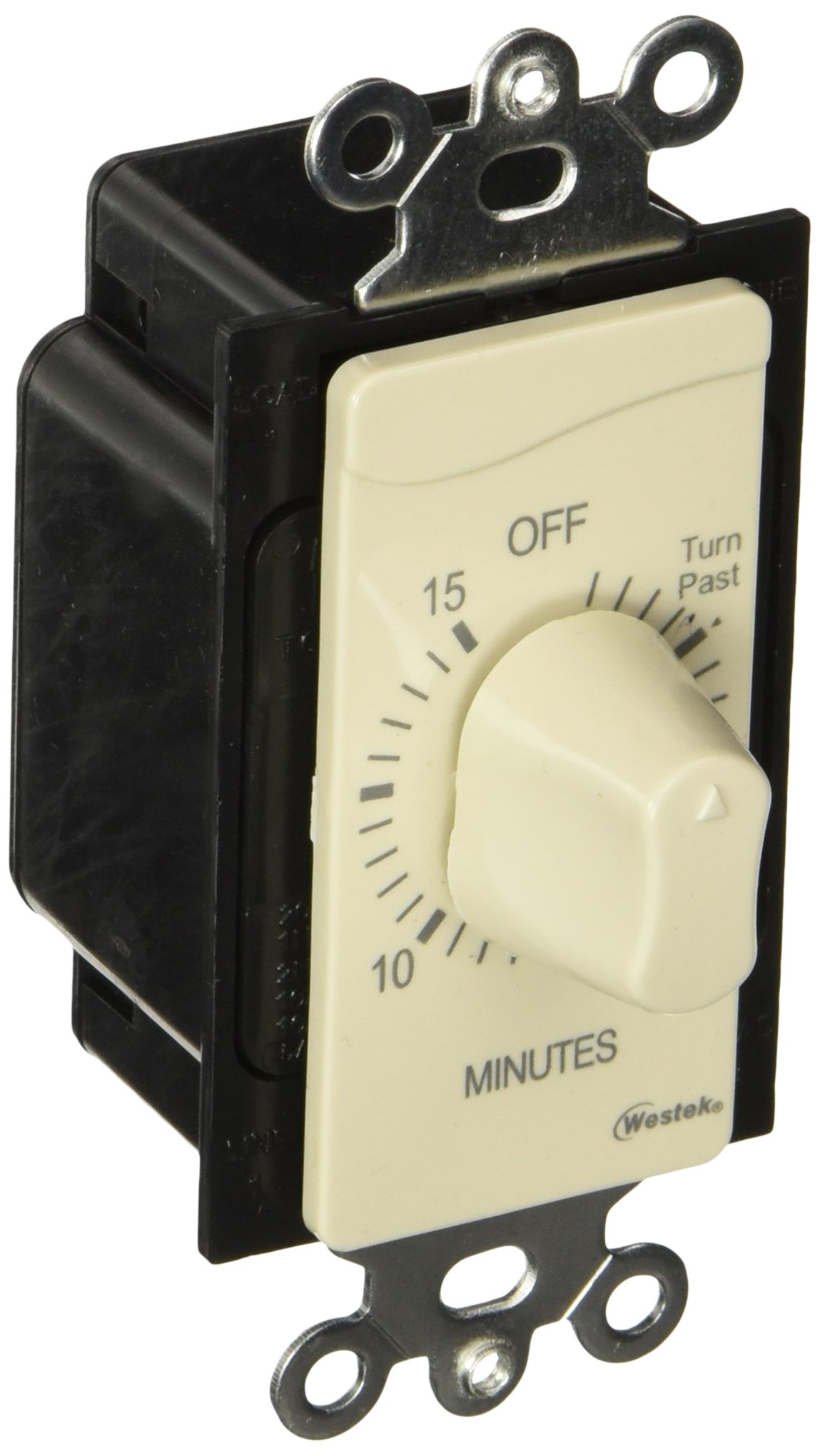
Image: Front view of the Westek TMSW15MI In-Wall Mechanical Countdown Timer, showing the ivory finish and the twist knob for setting the countdown time.
Safety Information
WARNING: RISK OF ELECTRIC SHOCK. Improper installation can result in serious injury or death. Always consult a qualified electrician if you are unsure about any part of the installation process.
- TURN OFF POWER at the circuit breaker or fuse box before installing or servicing the timer.
- Verify that power is off before proceeding with installation.
- This timer is for indoor use only.
- Do not exceed the maximum electrical ratings of the device.
- Ensure all wire connections are secure and properly insulated.
- This device must be installed in accordance with all national and local electrical codes.
Package Contents
- 1 x Westek TMSW15MI In-Wall Mechanical Countdown Timer
- Mounting Screws
- Wire Nuts (typically included, but may vary)
- Instruction Sheet
Specifications
| Model | TMSW15MI |
| Operation Mode | Automatic |
| Switch Type | Mechanical Countdown (Push Button Actuator) |
| Countdown Time | Up to 15 minutes |
| Circuit Type | Single-pole / Single-throw (1-way) |
| Mounting Type | Wall Mount (replaces single gang switch) |
| Connector Type | Screw Terminals |
| Material | Metal (internal components), Plastic (housing) |
| Color | Ivory |
| Dimensions (L x W x H) | 6.2 x 2.9 x 2.1 inches |
| Electrical Ratings | 1 HP 125 VAC, 2HP 250 VAC, 20 Amp 125 VAC, 10 Amp 277 VAC, 5 Amp 125 VAC Tungsten |
| International Protection Rating | IP00 |
Installation
Replacing an Existing Wall Switch
- Turn off power: Locate the circuit breaker or fuse that controls the switch you are replacing and turn it OFF. Verify the power is off by attempting to operate the switch or using a voltage tester.
- Remove wall plate: Unscrew and remove the existing wall plate.
- Remove old switch: Unscrew the old switch from the electrical box and carefully pull it out.
- Disconnect wires: Note the wiring configuration of the old switch. Typically, there will be two load/line wires connected to the switch and a ground wire. Disconnect these wires.
- Connect new timer: The Westek TMSW15MI timer has screw terminals. Connect the two load/line wires from the electrical box to the two terminals on the timer. If a ground wire is present in the box, connect it to the green ground screw on the timer (if available) or to the box's ground. Ensure all connections are tight and secure.
- Mount timer: Carefully push the wired timer back into the electrical box. Secure it with the provided mounting screws.
- Install wall plate: Attach the new or existing wall plate over the timer.
- Restore power: Turn the power back ON at the circuit breaker or fuse box.
Important: This timer is designed for single-pole applications only. Do not attempt to install it in a 3-way or 4-way switch configuration unless you are certain of the wiring and have consulted a qualified electrician.
Operating Instructions
The Westek TMSW15MI mechanical countdown timer is simple to operate:
- To activate the timer: Rotate the knob clockwise to the desired countdown time (up to 15 minutes).
- The connected device (light, motor, etc.) will turn ON immediately.
- The timer will begin counting down.
- Once the set time has elapsed, the timer will automatically turn OFF the connected device by breaking the electrical circuit.
- To turn the device ON again, simply rotate the knob to the desired time.
Maintenance
- Cleaning: To clean the timer, wipe the surface with a soft, damp cloth. Do not use abrasive cleaners or solvents. Ensure power is off before cleaning.
- No user-serviceable parts: The internal mechanism of the timer contains no user-serviceable parts. Do not attempt to open or repair the unit.
Troubleshooting
- Timer does not turn ON:
- Check if the circuit breaker is ON.
- Ensure all wire connections are secure.
- Verify the load is within the timer's electrical ratings.
- Timer does not turn OFF:
- Ensure the knob is set to a specific time and not stuck.
- The internal mechanism may be faulty. If so, the unit may need replacement.
- Timer makes a ticking sound:
- This is normal for mechanical timers as the internal gears operate.
Warranty
This Westek product is covered by a 1-Year Limited Warranty from the date of purchase. This warranty covers defects in materials and workmanship under normal use. It does not cover damage resulting from misuse, abuse, improper installation, or unauthorized repairs. For warranty service, please retain your proof of purchase and contact Westek customer support.
Customer Support
For further assistance, technical support, or warranty inquiries, please visit the official Westek website or contact their customer service department. Refer to the packaging or the Westek website for the most current contact information.
Westek Official Website: Visit the Westek Store on Amazon


