
1. Introduction
The ES 328 EZ Tach Plus is a versatile digital tachometer designed for accurate RPM measurement across a wide range of engines. This instrument is suitable for use on outboards, snowmobiles, motorcycles, small engines, generators, lawn equipment, ATVs, and automotive applications. It provides precise readings up to 20,000 RPM, assisting in engine diagnostics and tuning.
Key Features:
- Measures engine revolutions up to 20,000 RPM.
- Operates wirelessly or with the supplied inductive pickup.
- Features a built-in LED flashlight for use during measurements.
- Equipped with a backlit LCD display for clear visibility.
- Provides an accuracy of ±10 RPM.
2. Product Overview
Familiarize yourself with the components and design of your ES 328 EZ Tach Plus.

Figure 1: The ES 328 EZ Tach Plus digital tachometer, showing the main unit and the inductive pickup cable.
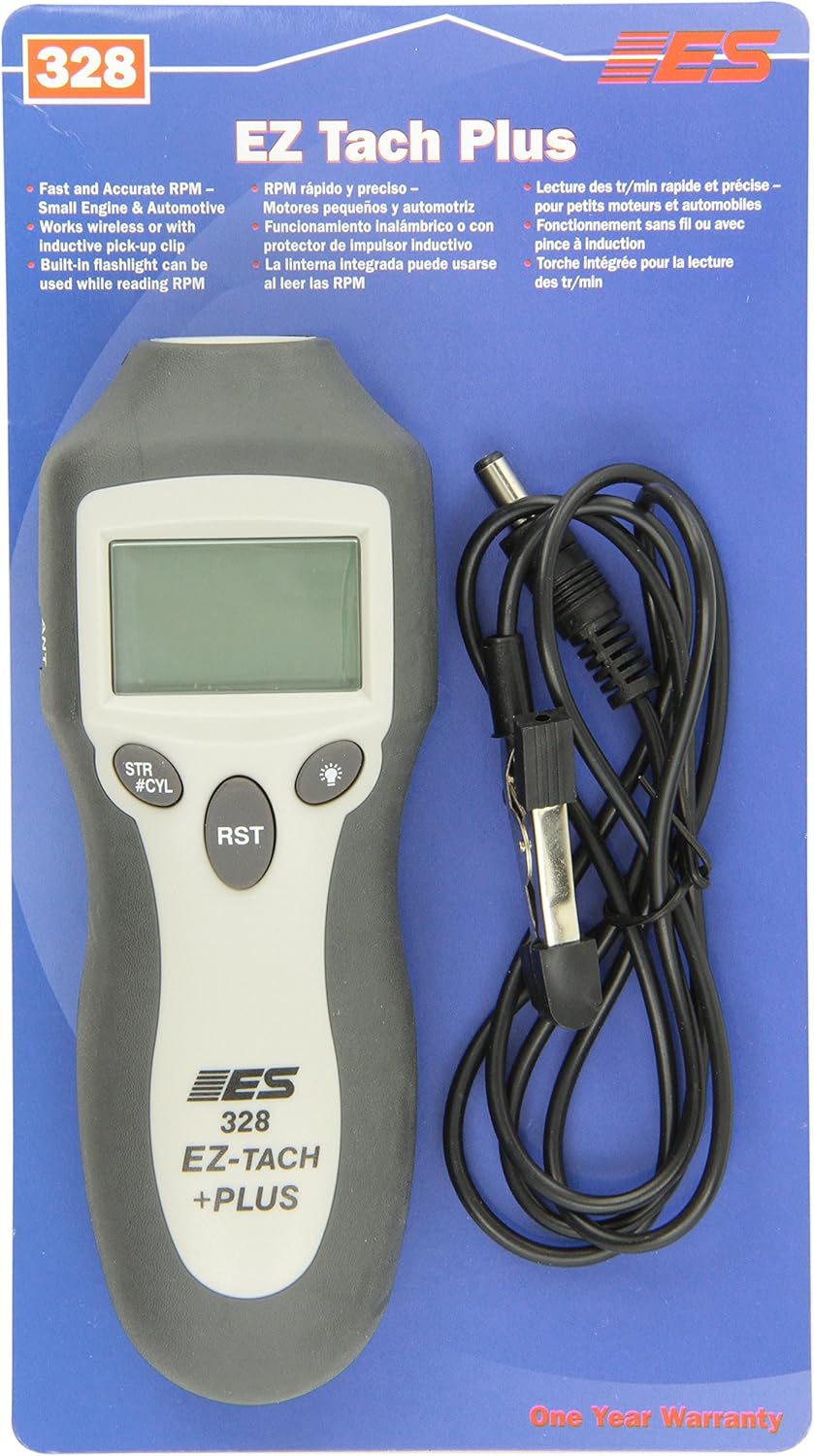
Figure 2: Front view of the tachometer, highlighting the LCD display, 'STR/#CYL' button for stroke/cylinder selection, 'RST' button for reset, and flashlight button.

Figure 3: Back view of the tachometer, displaying additional product information and specifications.

Figure 4: Side view of the tachometer, showing the antenna port for the inductive pickup connection.
3. Setup
3.1 Battery Installation
The ES 328 EZ Tach Plus is powered by a 9-volt battery. Ensure the battery is correctly installed in the designated compartment, observing polarity. Replace the battery when the display indicates low power or becomes dim.
3.2 Connecting Inductive Pickup
For direct measurement, connect the supplied inductive pickup cable to the 'ANT' port on the side of the tachometer. Securely attach the clamp of the inductive pickup to the spark plug wire of the engine you wish to measure. Ensure a firm connection for accurate readings.
3.3 Setting Stroke/Cylinder
Before taking measurements, configure the tachometer for your engine type:
- Press the 'STR/#CYL' button to cycle through the available engine settings.
- Select the appropriate stroke and cylinder count for your engine (e.g., 2-stroke, 4-stroke, 1-cylinder, 2-cylinder, etc.). The selected setting will be displayed on the LCD.
- Refer to your engine's manual for the correct stroke and cylinder configuration.
4. Operating Instructions
4.1 Wireless Measurement
For wireless RPM measurement, simply hold the tachometer near the engine's ignition system. The device will detect the ignition pulses and display the RPM on the backlit LCD. Ensure there are no significant obstructions between the tachometer and the engine for optimal signal reception.
4.2 Inductive Pickup Measurement
For more precise or challenging measurement environments, use the inductive pickup:
- Connect the inductive pickup as described in Section 3.2.
- Start the engine.
- The RPM reading will be displayed on the LCD.
4.3 Using the Flashlight
The ES 328 EZ Tach Plus includes a built-in LED flashlight. Press the flashlight button (typically marked with a light bulb icon) to turn it on or off. This feature is useful for illuminating engine compartments or work areas while taking measurements.
4.4 Resetting Readings
To clear the current RPM reading or reset the device, press the 'RST' button. This will typically reset the display to zero or prepare it for a new measurement cycle.
5. Maintenance
5.1 General Care
Keep the tachometer clean and free from dirt, dust, and moisture. Wipe the unit with a soft, dry cloth. Avoid using abrasive cleaners or solvents, as these can damage the casing or display. Store the device in a dry, safe place when not in use.
5.2 Battery Replacement
When the battery power is low, replace the 9-volt battery. To do so, open the battery compartment cover, remove the old battery, and insert a new 9-volt battery, ensuring correct polarity. Dispose of old batteries responsibly.
6. Troubleshooting
If you encounter issues with your ES 328 EZ Tach Plus, consider the following:
- No Reading or Inaccurate Reading: Check battery level. Ensure the inductive pickup is securely clamped to the spark plug wire (if used). Verify the correct stroke/cylinder setting for your engine. For wireless mode, ensure the device is close enough to the ignition system and free from interference.
- Dim Display: Replace the 9-volt battery.
- Buttons Unresponsive: Try resetting the device by removing and reinserting the battery.
If problems persist, contact customer support.
7. Specifications
| Feature | Detail |
|---|---|
| Manufacturer | Electronic Specialties |
| Brand | ES |
| Model | 328 EZ Tach Plus |
| Item Weight | 1.76 ounces |
| Product Dimensions | 10 x 5 x 3 inches |
| RPM Range | Up to 20,000 RPM |
| Accuracy | ±10 RPM |
| Display | Backlit LCD |
| Power Source | 9-volt battery |
8. Warranty and Support
8.1 Warranty Information
The ES 328 EZ Tach Plus comes with a One Year Warranty from the date of purchase. This warranty covers defects in materials and workmanship under normal use. Please retain your proof of purchase for warranty claims. The warranty does not cover damage resulting from misuse, accident, unauthorized service, or modifications.
8.2 Contact Information
For technical support, warranty service, or general inquiries, please contact Electronic Specialties, Inc. at:
Electronic Specialties, Inc.139 Elizabeth Lane
Corona, CA, 91720
Phone: 1-800-200-5000
Fax: 262-279-1300
Website: www.ESI-TEST.COM


