
Introduction
The Starlights SL-1000 is a 12-volt exterior motion-activated light designed for recreational vehicles (RVs), enhancing safety and security around your vehicle. This unit integrates a daylight sensor, a battery voltage monitor (Star Monitor), and motion detection capabilities. Its casing is specifically angled downward to direct light effectively without disturbing neighboring coaches. The SL-1000 can function as a standard entry light while also providing advanced motion-sensing features.
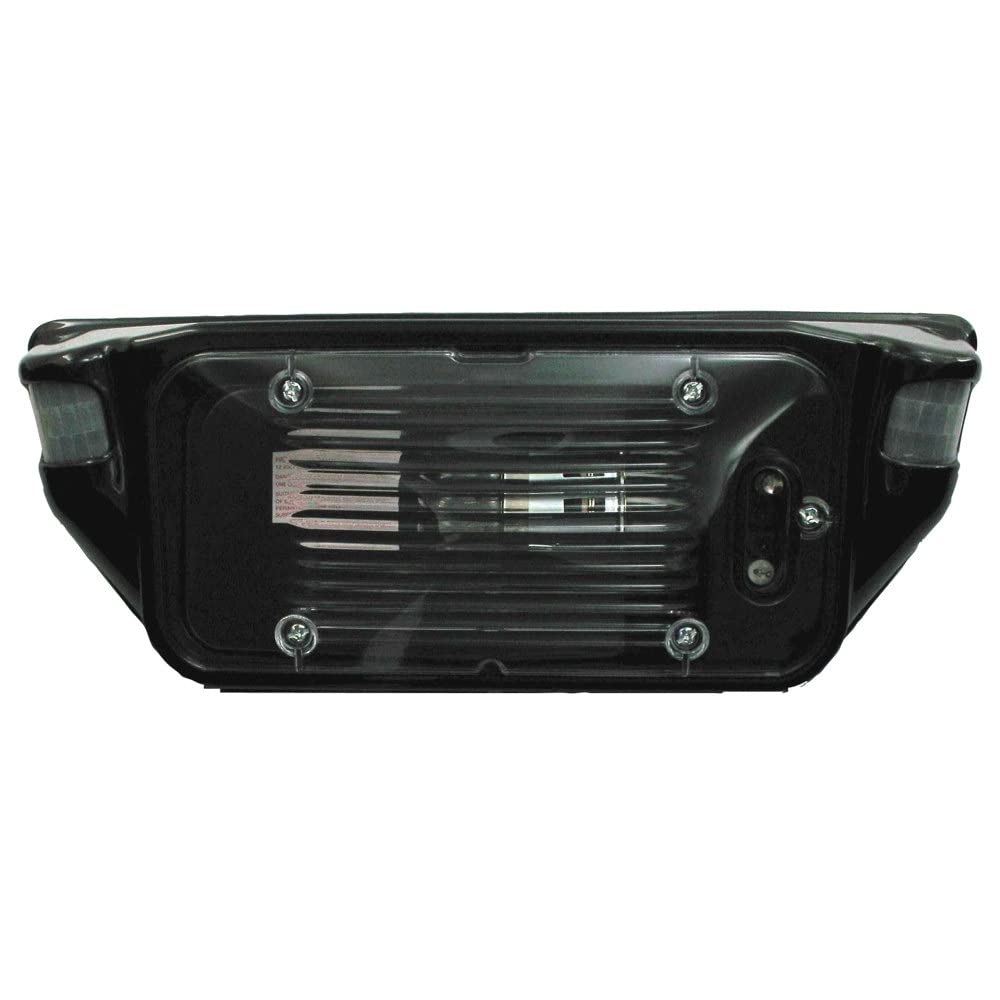
Image of the Starlights SL-1000 12-Volt Exterior Motion Light in black, showcasing its design and compact form factor.
Safety Information
WARNING: This product can expose you to chemicals which are known to the State of California to cause cancer and birth defects or other reproductive harm. For more information, go to www.P65Warnings.ca.gov.
Always ensure that the power supply to the installation area is disconnected before attempting any installation, maintenance, or repair procedures. Improper wiring or handling of electrical components can result in electric shock, damage to the unit, or damage to your vehicle's electrical system. Consult a qualified electrician if you are unsure about any steps.
Package Contents
Verify that all components are present before beginning installation:
- One (1) AP Products 016-SL1000B Star Lights Motion Activated Lighting Fixture - Black (Dimensions: 4.25"H x 10"W x 2"D)
Specifications
| Brand | AP Products |
| Model Name | SL-1000B |
| Voltage | 12 Volts |
| Light Source Type | LED |
| Brightness | 1000 Lumens |
| Special Feature | Motion Sensor |
| Product Dimensions | 6"L x 0.1"W x 4"H |
| Item Weight | 1.27 pounds |
| Material | Metal |
| Color | Black |
| Indoor/Outdoor Usage | Outdoor |
| Water Resistance Level | Water Resistant |
Setup and Installation
- Preparation: Before beginning installation, ensure the power supply to the existing light fixture is completely disconnected.
- Polarity Check: The SL-1000 requires proper wiring polarity for its sensor functions to operate correctly. Before mounting, it is highly recommended to test the polarity of your RV's wiring using a multi-tester. Alternatively, the light itself can be used to test polarity as detailed in the included instructions. Reversed polarity will prevent the motion sensor from working.
- Mounting: The SL-1000 is designed to replace most standard RV porch lights. Securely mount the fixture to the desired exterior location on your RV.
- Sealing: To prevent water penetration, apply marine-grade silicone sealant around the perimeter of the mounted fixture and around the lamp seal. It is advisable to leave a small opening at the bottom of the fixture's seal to allow for any potential moisture drainage.
- Motion Sensor Adjustment: The motion detection range can be adjusted between 10 and 25 feet. Access to the adjustment controls is typically located under the light lens. For accurate calibration, perform adjustments during low-light conditions to verify the effective range.
Operating Instructions
- Standard Operation: The Smart Light 1000 functions as a conventional entry light when switched on.
- Activating Motion Detection: To enable the motion detection mode, perform a quick 'On-Off-On' sequence using your RV's light switch. A blue LED flash during daylight hours or a green LED flash at night will indicate that the motion sensor is active.
- Daylight Sensor: The integrated daylight sensor prevents the motion-activated light from turning on during sufficient ambient light conditions, conserving power.
- Battery Voltage Sensor (Star Monitor): The unit includes a battery voltage sensor. If your RV's house battery voltage drops to 11.5 volts, the Smart Light will automatically disable its motion detection functions. This feature is designed to conserve battery life and prevent excessive drain. The light will resume full functionality once the battery voltage returns to an adequate level.
Maintenance
- Regular Inspection: Periodically inspect the light's lens and all seals for any signs of wear, cracking, or damage. The white plastic lens may degrade over time due to environmental exposure, potentially compromising water resistance.
- Seal Integrity: If degradation of the lens or seals is observed, consider reinforcing the seals with marine-grade silicone or replacing the unit to maintain its water-resistant properties.
- Sensor Clarity: Ensure the motion sensor lens remains clean and free from dirt, debris, or obstructions to guarantee optimal performance and accurate motion detection.
- Cleaning: Clean the exterior of the light with a soft, damp cloth. Avoid using abrasive cleaners or solvents that could damage the finish or plastic components.
Troubleshooting
- Light Not Functioning or Motion Sensor Not Working:
- Check Wiring Polarity: Verify that the wiring polarity is correct. Reversed polarity will prevent the motion sensor functions from operating. Correct wiring if necessary.
- Activate Motion Mode: Ensure the quick 'On-Off-On' sequence has been performed to activate the motion detection mode.
- Verify Battery Voltage: Check your RV's house battery voltage. If it is below 11.5 volts, the motion sensor will be automatically disabled to conserve power. Charge your battery if needed.
- Inspect Bulb Connection: In some instances, the internal bulb may become disconnected from its base during transit or handling. Carefully open the fixture (if accessible) and reconnect or replace the bulb if necessary.
- Water Penetration:
- Inspect all seals around the fixture and the lens for any gaps or damage. Reapply marine-grade silicone sealant as needed, especially during initial installation, to enhance water resistance.
- Motion Sensor Too Sensitive or Not Sensitive Enough:
- Adjust the motion sensor range settings located under the light lens. Perform adjustments in low-light conditions to accurately gauge the effect of changes.
Warranty and Support
This product is manufactured by AP Products. For specific warranty inquiries or technical support, it is recommended to contact AP Products directly. Please note that some retailers or distributors may not handle warranty claims directly, and the manufacturer typically works through authorized channels.
Optional protection plans may be available for purchase, offering extended coverage beyond the manufacturer's standard warranty. These plans can provide additional peace of mind for 3 or 4 years, or through a monthly 'Complete Protect' plan, covering various product issues.