
1. Introduction
The Velleman DVM810 is a compact and economical 3 1/2 digit digital multimeter designed for measuring DC and AC voltages, DC currents, resistance, and for performing diode and transistor (hFE) tests. It features overload protection and automatic polarity indication, making it suitable for hobbyists, field use, and workshops. This manual provides essential information for the safe and effective operation of your DVM810 multimeter.
2. Product Features
- Automatic polarity indication
- Voltage measurements: AC 500V and DC 500V maximum
- Current measurements: DC 10A maximum (0.2A fused, 10A unfused)
- Resistance measurements: Up to 2MΩ
- Diode and transistor (hFE) test functions
- Overload protection
- Compact design with 3 1/2 digit LCD display
3. Package Contents
Please check the package contents to ensure all items are present:
- Velleman DVM810 Digital Multimeter
- Test Leads (one red, one black)
- Instruction Manual
4. Important Safety Information
Read all safety warnings and instructions carefully before using this product. Failure to follow these instructions may result in electric shock, fire, or serious injury.
- Always ensure the multimeter is set to the correct function and range before making any measurements.
- Never exceed the maximum input limits for any range. The maximum voltage for AC/DC is 500V.
- Do not attempt to measure current on circuits with voltages exceeding 250V.
- Inspect test leads for damaged insulation or exposed metal before each use. Replace damaged leads immediately.
- Do not use the multimeter if it appears damaged or if the case is open.
- Exercise extreme caution when working with live circuits. Use appropriate personal protective equipment.
- Always disconnect power to the circuit and discharge high-voltage capacitors before measuring resistance or performing diode/transistor tests.
- Replace the battery when the low battery indicator appears on the display to ensure accurate readings.
5. Product Overview
Familiarize yourself with the components of your Velleman DVM810 multimeter:
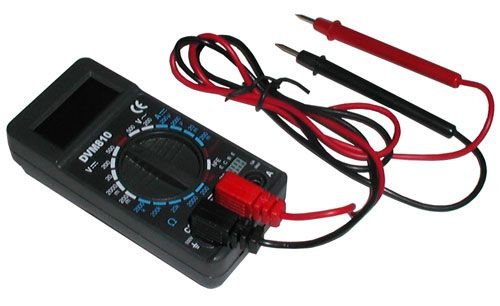
Figure 1: Velleman DVM810 Digital Multimeter. This image displays the front view of the compact multimeter, highlighting its liquid crystal display (LCD), the central rotary function switch, and the input jacks for test leads at the bottom.
- LCD Display: Shows measurement readings, units, and polarity.
- Rotary Switch: Used to select the desired measurement function and range.
- Input Jacks:
- COM Jack: Common (negative) input for all measurements. Connect the black test lead here.
- VΩmA Jack: Positive input for voltage, resistance, and current measurements up to 200mA. Connect the red test lead here.
- 10A Jack: Positive input for high current measurements (up to 10A). Connect the red test lead here for 10A measurements.
- Test Leads: Red and black leads used to connect the multimeter to the circuit under test.
6. Setup
6.1 Battery Installation
The DVM810 multimeter requires a 9V battery (not always included). To install or replace the battery:
- Ensure the multimeter is turned OFF (rotary switch set to OFF).
- Locate the battery compartment cover on the back of the unit.
- Remove the screw(s) securing the cover and carefully lift it off.
- Connect a new 9V battery to the battery clip, observing correct polarity.
- Place the battery into the compartment and replace the cover, securing it with the screw(s).
6.2 Connecting Test Leads
Always connect the test leads correctly for accurate and safe measurements:
- Insert the black test lead into the COM (common) jack.
- For most measurements (voltage, resistance, diode, hFE, and current up to 200mA), insert the red test lead into the VΩmA jack.
- For high current measurements (up to 10A), insert the red test lead into the 10A jack.
7. Operating Instructions
Before making any measurement, ensure the test leads are correctly connected and the rotary switch is set to the appropriate function and range.
7.1 Measuring DC Voltage (V=)
- Insert the red lead into the VΩmA jack and the black lead into the COM jack.
- Set the rotary switch to the desired DC Voltage (V=) range. Start with the highest range if the voltage is unknown.
- Connect the test leads across the component or circuit to be measured (in parallel).
- Read the voltage value on the LCD display. The display will show the correct polarity.
7.2 Measuring AC Voltage (V~)
- Insert the red lead into the VΩmA jack and the black lead into the COM jack.
- Set the rotary switch to the desired AC Voltage (V~) range. Start with the highest range if the voltage is unknown.
- Connect the test leads across the component or circuit to be measured (in parallel).
- Read the voltage value on the LCD display.
7.3 Measuring DC Current (A=)
Caution: Never connect the multimeter in parallel with a voltage source when measuring current, as this can blow the fuse or damage the meter.
- Determine the expected current. For currents up to 200mA, insert the red lead into the VΩmA jack. For currents up to 10A, insert the red lead into the 10A jack. Always insert the black lead into the COM jack.
- Set the rotary switch to the appropriate DC Current (A=) range. Start with the highest range if the current is unknown.
- Turn off power to the circuit. Open the circuit where the current is to be measured.
- Connect the multimeter in series with the circuit.
- Restore power to the circuit and read the current value on the LCD display.
7.4 Measuring Resistance (Ω)
Caution: Ensure the circuit is completely de-energized and all capacitors are discharged before measuring resistance.
- Insert the red lead into the VΩmA jack and the black lead into the COM jack.
- Set the rotary switch to the desired Resistance (Ω) range. Start with a higher range if the resistance is unknown.
- Connect the test leads across the component to be measured.
- Read the resistance value on the LCD display.
7.5 Diode Test
Caution: Ensure the diode is disconnected from the circuit or the circuit is de-energized before testing.
- Insert the red lead into the VΩmA jack and the black lead into the COM jack.
- Set the rotary switch to the Diode symbol (→|).
- Connect the red lead to the anode and the black lead to the cathode of the diode. The display will show the forward voltage drop (typically 0.5V to 0.8V for silicon diodes).
- Reverse the leads. The display should show 'OL' (Overload) for a good diode. If it shows a reading in both directions or 'OL' in both directions, the diode may be faulty.
7.6 Transistor (hFE) Test
Caution: Ensure the transistor is disconnected from the circuit before testing.
- Insert the red lead into the VΩmA jack and the black lead into the COM jack.
- Set the rotary switch to the hFE position.
- Identify if the transistor is NPN or PNP. Insert the transistor's emitter, base, and collector leads into the corresponding holes in the hFE socket on the multimeter.
- Read the hFE (DC current gain) value on the LCD display.
8. Specifications
| Parameter | Value |
|---|---|
| Brand | Velleman |
| Model Number | DVM810 |
| Measurement Type | Multimeter |
| DC Voltage Range | Up to 500V |
| AC Voltage Range | Up to 500V |
| DC Current Range | Up to 10A (0.2A fused, 10A unfused) |
| Resistance Range | Up to 2MΩ |
| Diode Test | Yes |
| Transistor (hFE) Test | Yes |
| Display | 3 1/2 Digit LCD |
| Power Source | 9V Battery (not included) |
| Dimensions | Approximately 3.70" x 1.81" x 1.03" |
| Item Weight | Approximately 3.2 ounces (0.2 lbs) |
| UPC | 836479002272 |
9. Maintenance
9.1 Battery Replacement
When the low battery indicator appears on the LCD, replace the 9V battery as described in Section 6.1. A weak battery can lead to inaccurate readings.
9.2 Cleaning
To clean the multimeter, wipe the case with a damp cloth and a mild detergent. Do not use abrasives or solvents. Ensure the unit is completely dry before use.
9.3 Test Lead Inspection
Regularly inspect the test leads for any signs of damage, such as cracked insulation, exposed wires, or loose connections. Replace damaged leads immediately to prevent electric shock hazards.
10. Troubleshooting
- No display or faint display: Check the battery. Replace if necessary.
- Incorrect readings:
- Ensure the rotary switch is set to the correct function and range.
- Check battery voltage; replace if low.
- Ensure test leads are properly connected and not damaged.
- For resistance measurements, ensure the circuit is de-energized.
- 'OL' (Overload) displayed: The measured value exceeds the selected range. Select a higher range or ensure the circuit is within the meter's capabilities.
- Fuse blown (during current measurement): If the meter stops measuring current, the internal fuse may have blown. Refer to a qualified technician for fuse replacement.
11. Warranty and Support
Warranty information for the Velleman DVM810 Digital Multimeter is typically provided with your purchase documentation or can be found on the official Velleman website. For technical support, service, or further inquiries, please refer to the contact information provided by your retailer or the manufacturer's official support channels.


