
TONE 4130MP
TONE 4130MP 1/2-inch Drive Socket Wrench Set User Manual
1. Introduction
This manual provides essential information for the safe and effective use of your TONE 4130MP 1/2-inch Drive Socket Wrench Set. Please read these instructions carefully before operating the tools and retain this manual for future reference. This set is designed for various fastening and unfastening tasks requiring a 1/2-inch drive system.
2. Product Overview
The TONE 4130MP is a 17-piece socket wrench set housed in a durable hard shell case (TBP010). It includes a variety of 12-point sockets, a 72-teeth ratchet handle, and essential accessories for versatile applications.
2.1 Components Included:
- 1/2-inch Drive Ratchet Handle (RH4H) with 72 teeth
- 1/2-inch Drive 12-Point Sockets: 10, 12, 13, 14, 16, 17, 18, 19, 21, 22, 24, 26, 27 mm
- Short Spinner Handle (NS4S)
- Extension Bar (321) - 150mm
- Ball Joint (BJ40)
- Hard Shell Case (TBP010)
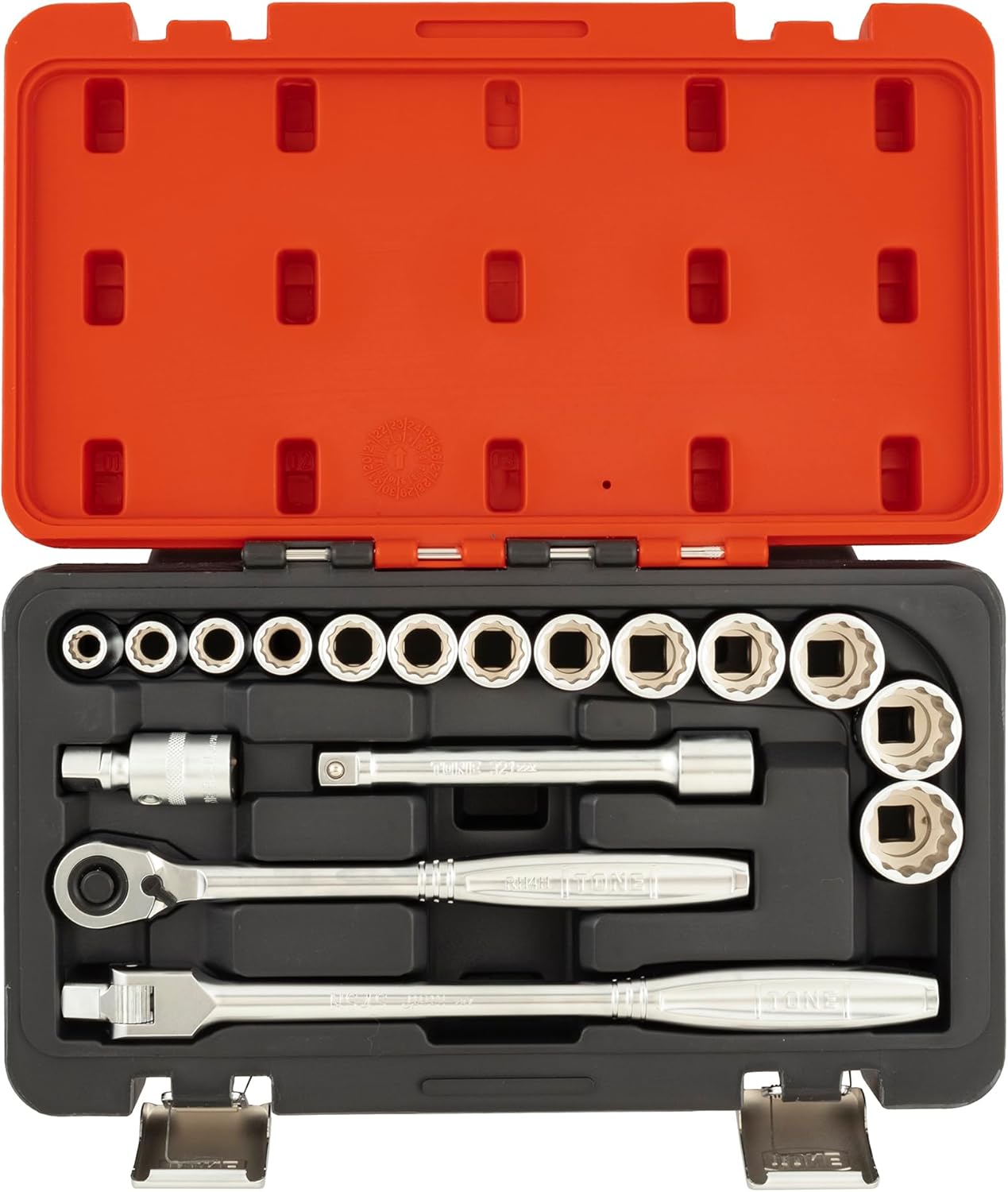
Image 2.1: The TONE 4130MP 1/2-inch Drive Socket Wrench Set, showcasing all 17 components neatly organized within its protective hard case.
3. Setup
Your TONE 4130MP set comes pre-organized in its hard shell case, ready for immediate use. No assembly is required for the individual tools.
3.1 Unpacking and Inspection:
- Open the latches on the hard shell case (TBP010).
- Carefully remove all components from their designated slots.
- Inspect each tool for any signs of damage or manufacturing defects. If any issues are found, contact customer support immediately.
- Familiarize yourself with each tool and its function as described in Section 2.1.

Image 3.1: The TONE 4130MP hard shell case (TBP010) in its closed state, featuring the TONE brand logo.
4. Operating Instructions
Always wear appropriate personal protective equipment (PPE), such as safety glasses, when using hand tools. Ensure the work area is well-lit and stable.
4.1 Using the Ratchet Handle (RH4H):
- Direction Selection: Locate the direction switch on the ratchet head. Move the switch to the desired direction for tightening (clockwise) or loosening (counter-clockwise).
- Attaching a Socket: Press the quick-release button on the ratchet head, align the square drive of the socket with the ratchet's drive, and push firmly until it clicks into place. Ensure the socket is securely seated.
- Operation: Place the socket onto the fastener. Apply steady, even pressure to the handle to turn the fastener. The 72-teeth mechanism allows for fine adjustments and operation in confined spaces.
- Removing a Socket: Press the quick-release button and pull the socket off the ratchet.
4.2 Using Sockets:
- Selection: Choose the correct size socket that precisely fits the fastener. Using an ill-fitting socket can damage both the fastener and the socket.
- Engagement: Ensure the socket fully engages the fastener head before applying torque. The 12-point design provides multiple contact points for secure grip.
4.3 Using the Extension Bar (321):
- Attachment: Connect the extension bar between the ratchet handle and the socket. Ensure both connections are secure.
- Purpose: Use the 150mm extension bar to reach fasteners in deep or obstructed locations where the ratchet and socket alone cannot reach.
4.4 Using the Short Spinner Handle (NS4S):
- Attachment: Attach a socket directly to the spinner handle.
- Purpose: The spinner handle is ideal for quickly threading or unthreading fasteners that are not excessively tight, allowing for rapid rotation.
4.5 Using the Ball Joint (BJ40):
- Attachment: Insert the ball joint between the ratchet/extension and the socket.
- Purpose: The ball joint allows the socket to pivot at an angle, providing access to fasteners that are not perfectly aligned with the drive tool. Use with caution and reduced torque to avoid damage.
4.6 Safety Precautions:
- Do not use damaged tools.
- Do not use pipes or other extensions on the handle to increase leverage, as this can overload and damage the tool or fastener.
- Ensure sockets are fully seated on fasteners to prevent slipping and injury.
- Keep tools clean and free of grease or oil to maintain a secure grip.
5. Maintenance
Proper maintenance ensures the longevity and reliable performance of your TONE socket wrench set.
5.1 Cleaning:
- After each use, wipe down all tools with a clean, dry cloth to remove dirt, grease, and debris.
- For stubborn grime, use a mild degreaser and then wipe dry immediately. Avoid harsh chemicals that may damage the finish.
5.2 Lubrication:
- Periodically apply a small amount of light machine oil to the ratchet mechanism to ensure smooth operation. Do not over-lubricate.
- Avoid lubricating the square drive ends of the ratchet or sockets, as this can reduce friction and lead to slippage.
5.3 Storage:
- Always store the tools in their original hard shell case (TBP010) when not in use. This protects them from damage, corrosion, and loss.
- Store the case in a dry environment, away from direct sunlight and extreme temperatures.
6. Troubleshooting
This section addresses common issues you might encounter during the use of your socket wrench set.
6.1 Socket Slipping or Rounding Fastener:
- Cause: Incorrect socket size, worn socket, or improper engagement.
- Solution: Ensure you are using the correct size socket for the fastener. Verify the socket is fully seated on the fastener head. Replace any worn or damaged sockets.
6.2 Ratchet Mechanism Sticking or Not Engaging:
- Cause: Dirt, debris, or lack of lubrication in the ratchet head.
- Solution: Clean the ratchet head thoroughly and apply a small amount of light machine oil as described in Section 5.2. If the issue persists, the ratchet may require professional servicing or replacement.
6.3 Difficulty Removing Socket from Ratchet:
- Cause: Debris in the quick-release mechanism or a stiff detent ball.
- Solution: Ensure the quick-release button is fully depressed. Clean any visible debris from the mechanism. A small amount of penetrating oil might help free a stiff detent ball, followed by wiping clean.
7. Specifications
| Feature | Specification |
|---|---|
| Model Number | 4130MP |
| Drive Size | 1/2 inch |
| Socket Type | 12-point |
| Ratchet Teeth Count | 72 teeth |
| Number of Pieces | 17 |
| Material | Metal |
| Finish | Powder Coated |
| Case Type | Hard Shell (TBP010) |
| Product Dimensions | 40.6 x 21.3 x 6.4 cm |
| Item Weight | 2.72 kg |
| Manufacturer | TONE CO., LTD |

Image 7.1: Detailed specification diagram for the TONE 4130MP set, listing socket sizes and component model numbers.
8. Warranty and Support
TONE products are manufactured to high-quality standards. For information regarding warranty coverage, claims, or technical support, please refer to the official TONE website or contact your authorized TONE distributor. Keep your purchase receipt as proof of purchase.
Ask a question about this manual
Ask about setup, troubleshooting, compatibility, parts, safety, or missing instructions. Manuals+ will review the question and use this page’s manual context to help answer it.