1. Introduction
Thank you for purchasing the Playfect PSP 3-in-1 Prestige Kit. This kit is designed to provide essential protection and convenience for your PSP 2000 and PSP 3000 series portable gaming console. Please read this manual carefully to ensure proper use and maintenance of your new kit.
2. Product Components
The Playfect PSP 3-in-1 Prestige Kit typically includes the following items:
- Prestige Carrying Case: A durable case designed to protect your PSP console from scratches, dust, and minor impacts.
- Screen Protector: A clear film to guard your PSP's screen against scratches and smudges.
- Cleaning Accessory: A small tool, often a cleaning cloth or stylus, for maintaining your PSP and its screen.
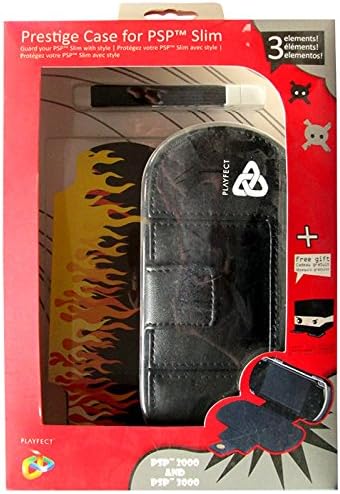
Figure 2.1: Playfect PSP 3-in-1 Prestige Kit. This image displays the retail packaging of the Playfect PSP 3-in-1 Prestige Kit. The kit includes a durable black carrying case designed for PSP 2000 and PSP 3000 models, a clear screen protector, and a small cleaning accessory, possibly a stylus or cleaning cloth. The packaging highlights the '3 elements' included and mentions compatibility with PSP Slim models.
3. Setup and Installation
3.1. Installing the Screen Protector
- Ensure your PSP screen is clean and free of dust, fingerprints, and smudges. Use the provided cleaning accessory or a soft, lint-free cloth.
- Carefully peel off a small section of the protective film from the screen protector, exposing the adhesive side.
- Align the screen protector with the edges of your PSP screen.
- Slowly apply the screen protector, pressing down gently from one end to the other, using a credit card or similar flat object to smooth out any air bubbles.
- Once applied, remove the remaining protective film from the top surface of the screen protector.
3.2. Placing PSP in the Carrying Case
- Open the Prestige Carrying Case.
- Gently slide your PSP 2000 or PSP 3000 console into the designated compartment within the case. Ensure it fits snugly without excessive force.
- Close the case securely using its fastening mechanism (e.g., zipper, snap, or Velcro).
4. Operating Instructions
4.1. Using the Carrying Case
The Prestige Carrying Case is designed for portable protection. When transporting your PSP, always ensure it is securely placed inside the case and the case is fully closed. This will protect your console from scratches, minor drops, and dust accumulation during travel or storage.
4.2. Using the Screen Protector
The screen protector provides a sacrificial layer over your PSP's display. It helps prevent scratches from keys, coins, or other objects when the PSP is in a bag or pocket. While it offers protection, avoid sharp objects or excessive pressure on the screen.
4.3. Using the Cleaning Accessory
Use the cleaning accessory (e.g., cloth or stylus) to gently wipe down your PSP screen and case. For the screen, use light, circular motions to remove smudges and dust. If it's a stylus, use it for precise input on compatible PSP applications or games.
5. Maintenance
5.1. Cleaning the Case
To clean the exterior of the carrying case, wipe it with a soft, damp cloth. For stubborn dirt, a mild soap solution can be used, but ensure the case is thoroughly dried afterward. Do not use harsh chemicals or abrasive cleaners, as these may damage the material.
5.2. Cleaning the Screen Protector
The screen protector can be cleaned with the provided cleaning accessory or a microfiber cloth. For smudges, a very slightly damp cloth (water only) can be used, followed by immediate drying. Avoid spraying liquids directly onto the screen.
6. Troubleshooting
- Case does not close properly: Ensure your PSP is correctly seated within the case and no foreign objects are obstructing the closure mechanism.
- Air bubbles under screen protector: During installation, use a flat edge (like a credit card) to push air bubbles towards the edges. If bubbles persist after installation, they may dissipate over a few days, or the protector may need to be re-applied.
- Screen protector peeling: Ensure the screen was clean and dry before application. If edges are peeling, gently press them down. If peeling continues, the protector may need replacement.
7. Specifications
| Brand | Playfect |
| Model Number | ACP0026 |
| ASIN | B002W4FCBO |
| Compatibility | PSP 2000 series, PSP 3000 series (PSP Slim) |
8. Warranty and Support
Specific warranty information for the Playfect PSP 3-in-1 Prestige Kit is not provided in this manual. For details regarding warranty coverage, returns, or technical support, please refer to the product packaging or contact the manufacturer, Playfect, directly through their official website or customer service channels.
