
1. Introduction
Thank you for choosing the Drive Medical Semi Electric Ultra Light Plus Hospital Bed. This manual provides essential information for the safe and effective use, setup, operation, and maintenance of your new hospital bed. Designed for comfort and ease of use, this bed is ideal for individuals requiring adjustable positioning and enhanced safety features. Please read this manual thoroughly before assembly or operation.

Figure 1: Drive Medical Semi Electric Ultra Light Plus Hospital Bed with half side rails.
2. Safety Information
Your safety is paramount. Please adhere to all safety warnings and instructions to prevent accidents and ensure proper operation.
- Includes safety warnings for proper assembly, use, and maintenance to prevent accidents and ensure user safety, particularly for children.
- Statements regarding dietary supplements have not been evaluated by the FDA and are not intended to diagnose, treat, cure, or prevent any disease or health condition.
- Always ensure the bed is on a stable, level surface before use.
- Do not exceed the maximum weight capacity of 450 lbs.
- Keep all electrical cords and components away from water and sharp objects.
- Regularly inspect all parts for wear and tear. Do not use if any components are damaged.
3. Product Features
- Bed frame can be used with Drive's and most other manufacturers' bed ends, old and new; New and improved hand pendant has large, easy-to-use controls.
- The transition box allows you to change the rotation of the high/low shaft; Once installed, the high/low shaft will stay with the bed to eliminate loss or forgetting on future installations.
- Motor is completely self-contained to reduce weight and noise (Can be installed and removed with patient in bed); In the event of a power failure, a 9V battery located in the motor can lower the head and foot sections 9 times; UL approved.
- Channel frame construction provides superior strength and reduced weight (Weight Capacity 450 lbs); Wood grain panels are break and scratch resistant; Headboard is taller than footboard to better fit home décor.
- Labels and color-coded springs assure accurate installation of side rails for patient safety; Bed, side rails, and mattress safety-tested by SGS, a nationally recognized testing facility; Satisfies all applicable FDA entrapment guidelines.
4. Components
The Drive Medical Semi Electric Ultra Light Plus Hospital Bed consists of the following main components:
- Bed Frame: The main support structure, featuring channel frame construction and a zinc-coated spring deck.
- Head and Foot Boards: Universal style, interchangeable, high-impact composite end panels with a wood grain finish.
- Half Side Rails: Heavy-duty rails providing support for climbing in and out, and acting as safety barriers during sleep.
- Electric Motor and Junction Box: Self-contained unit for quiet and powerful adjustment of bed sections. Includes a 9V battery backup for power failures.
- Hand Pendant: New and improved design with large, easy-to-use controls for adjusting bed positions.
- Casters: Wheels for easy movement of the bed.

Figure 2: Detail of the half side rails.
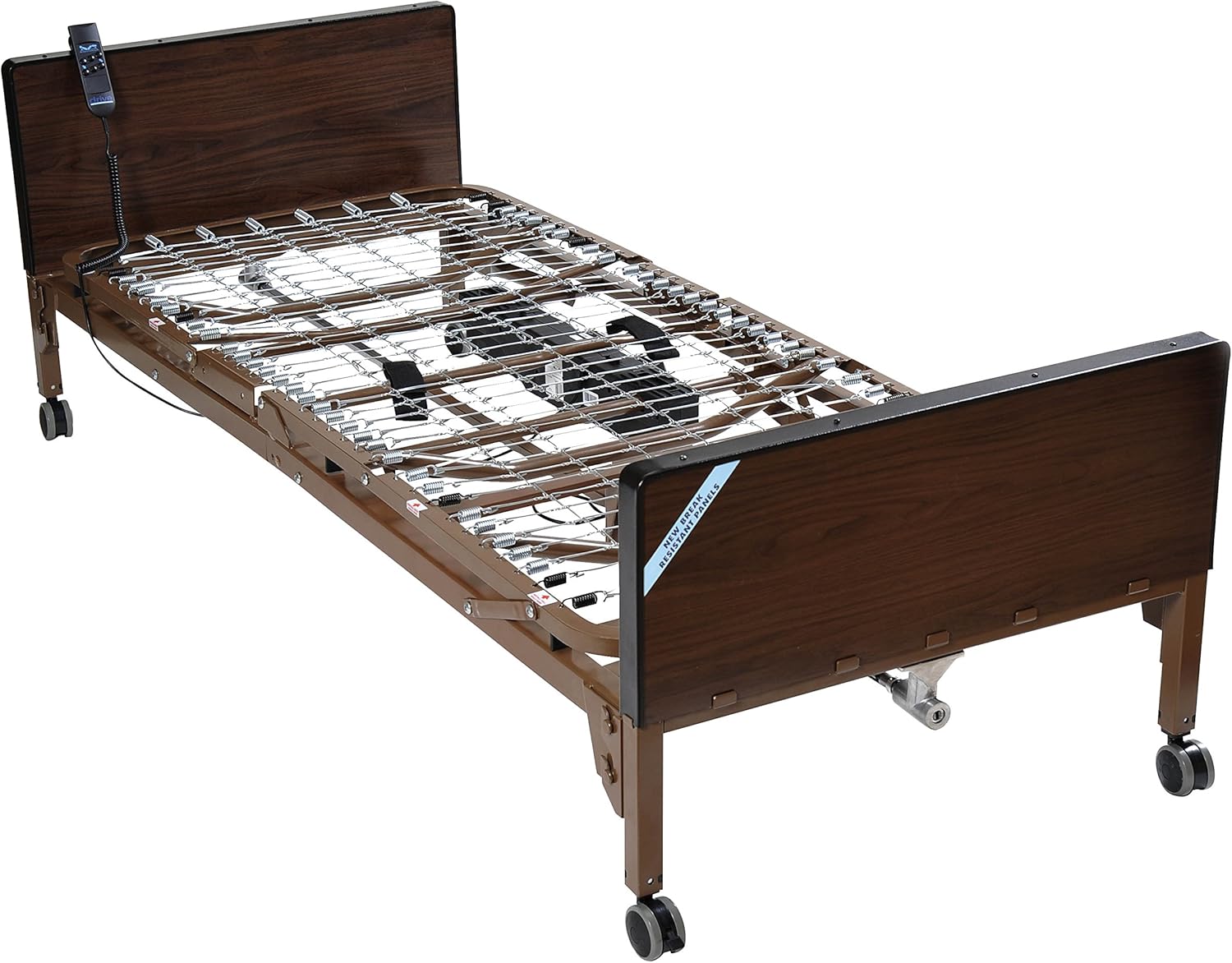
Figure 3: Manual crank for emergency height adjustment.
5. Setup
The assembly of the Drive Medical Semi Electric Ultra Light Plus Hospital Bed is designed to be straightforward, typically requiring only five main components. An instruction manual is included to guide you through the process.
- Unpack all components and verify against the packing list.
- Assemble the bed frame according to the provided instructions. Note that the foot section is significantly lighter for easier handling.
- Attach the head and foot boards. These are interchangeable.
- Install the half side rails, ensuring they are securely fastened. Color-coded springs and labels assist in accurate installation.
- Connect the electric motor and hand pendant. The motor assembly can be installed or removed tool-free, even with a patient in the bed.
- Plug the bed into a standard electrical outlet.
The entire setup process is designed to be completed in approximately one hour.
6. Operating Instructions
The bed's functions are controlled via the easy-to-use hand pendant. The electric mechanism is powerful yet quiet, allowing for adjustments without disturbing the user or others.
- Adjusting Head Section: Use the designated buttons on the hand pendant to raise or lower the head section of the bed. This allows for comfortable positioning for reading, eating, or resting.
- Adjusting Foot Section: Use the designated buttons on the hand pendant to raise or lower the foot section. This can help improve circulation or provide comfort for leg elevation.
- Adjusting Overall Bed Height: The hand pendant also controls the overall height of the bed frame. This feature is useful for caregivers to adjust the bed to a comfortable working height or for users to easily get in and out of bed.
- Power Failure Backup: In the event of a power outage, a 9-volt battery located in the motor allows for up to nine adjustments of the head and foot sections.

Figure 4: Bed with head section elevated for user comfort.

Figure 5: Bed in flat, resting position.
7. Maintenance
Regular maintenance ensures the longevity and safe operation of your hospital bed.
- Cleaning: Clean the bed frame and side rails regularly with a mild detergent and damp cloth. Avoid abrasive cleaners.
- Inspection: Periodically check all bolts, nuts, and connections to ensure they are tight and secure. Inspect electrical cords for any signs of damage.
- Lubrication: Moving parts, such as the high/low shaft and spring deck, may require occasional lubrication as per the detailed maintenance schedule in the full manual (if applicable).
- Battery Check: Ensure the 9V backup battery in the motor is functional and replace it as needed to ensure emergency lowering capability.
8. Troubleshooting
If you encounter any issues with your bed, refer to the following common troubleshooting steps:
| Problem | Possible Cause | Solution |
|---|---|---|
| Bed not responding to hand pendant. | Power cord unplugged, circuit breaker tripped, damaged pendant/motor. | Check power connection, reset circuit breaker, inspect pendant/motor for damage. |
| Motor making unusual noise. | Lack of lubrication, obstruction, internal motor issue. | Lubricate moving parts, remove obstructions, contact customer support if noise persists. |
| Bed sections not moving smoothly. | Obstruction, worn parts, motor strain. | Check for obstructions, inspect for worn parts, ensure bed is not overloaded. |
For issues not listed here or if troubleshooting steps do not resolve the problem, please contact Drive Medical customer support.
9. Specifications
| Specification | Value |
|---|---|
| Product Dimensions | 88.5 x 35.75 x 35.75 inches; 0.01 ounces |
| Item Model Number | 15030BV-HR |
| Manufacturer | Drive Medical |
| Weight Capacity | 450 lbs |
| Color | Brown |
| Country of Origin | China |
| First Available Date | July 26, 2009 |
10. Warranty and Support
Drive Medical is committed to providing high-quality products. For specific warranty details, please refer to the documentation included with your purchase or visit the Drive Medical official website. For customer support, assistance with assembly, troubleshooting, or parts replacement, please contact Drive Medical customer service. You can also find support options through Amazon.com, including 30-day easy returns and dedicated customer support channels.
For further assistance, please visit the Drive Medical Store on Amazon.


