
Introduction
This manual provides instructions for the proper setup, operation, maintenance, and troubleshooting of your Drive Medical Med-Aire Low Air Loss Mattress Replacement System, Model 14027. This system is designed to provide effective pressure management and enhanced comfort, helping to reduce the risk of pressure ulcers through alternating pressure therapy and low air loss technology.

Image: The Med-Aire system provides soft support for healthy circulation, pressure sore prevention, and a cool, dry sleeping environment.
Safety Information
WARNING: This product contains chemicals known to the State of California to cause cancer and birth defects or other reproductive harm. For more information, go to www.P65Warnings.ca.gov.
Always ensure the system is properly installed and maintained according to these instructions. Do not use the mattress if any part is damaged or appears to be malfunctioning. Consult a healthcare professional for specific medical advice regarding pressure ulcer prevention and treatment.
Setup Instructions
- Prepare the Bed Frame: Ensure the bed frame is clean and free of any sharp objects that could puncture the mattress.
- Place the Mattress: Position the Med-Aire mattress on the bed frame. Ensure the head section (with the built-in pillow feature) is at the head of the bed.
- Secure the Mattress: Use the integrated tie-down straps to securely fasten the mattress to the bed frame. This prevents shifting during use.
- Connect the Pump: Attach the air hoses from the mattress to the pump unit. Ensure a secure connection to prevent air leaks.
- Power On: Plug the pump into a standard electrical outlet and turn on the power switch. The pump will begin to inflate the mattress.
- Initial Inflation: Allow approximately 20-30 minutes for the mattress to fully inflate before placing a user on it.

Image: Securing the mattress with tie-down straps to ensure it stays in place.
Video: This video demonstrates the easy setup process, including connecting the quick-connector tubing for the Med-Aire 8" Alternating Pressure System.
Operating Instructions
The Med-Aire pump unit features intuitive controls for adjusting comfort and pressure settings.
- Pressure Adjustment Dial: Use the large dial on the pump to adjust the firmness of the mattress. Turn towards "SOFT" for a softer feel or "FIRM" for increased support. The dial typically indicates weight ranges (e.g., 50lbs to 350lbs) to guide appropriate pressure settings.
- Alternating Pressure Mode: The system automatically cycles air through the mattress cells to redistribute pressure. This cycle typically lasts 10 minutes. The mattress features 20 individually replaceable 8-inch air cells for consistent immersion and envelopment.
- Static Mode: Press the "STATIC" button to temporarily stop the alternating pressure function, providing a constant, firm surface. This can be useful during patient transfers or for specific care needs.
- Alarm Reset: If a "LOW PRESSURE" alarm sounds or illuminates, check all hose connections and ensure the mattress is not punctured. Press the "ALARM RESET" button to silence the alarm after addressing the issue.
- CPR Valve: In case of emergency requiring rapid deflation, pull the red CPR valve located at the head end of the mattress. This will quickly release air from the mattress.

Image: The pump control panel allows for adjustable firmness settings to optimize comfort.

Image: The 8-inch deep air cells provide effective pressure redistribution.
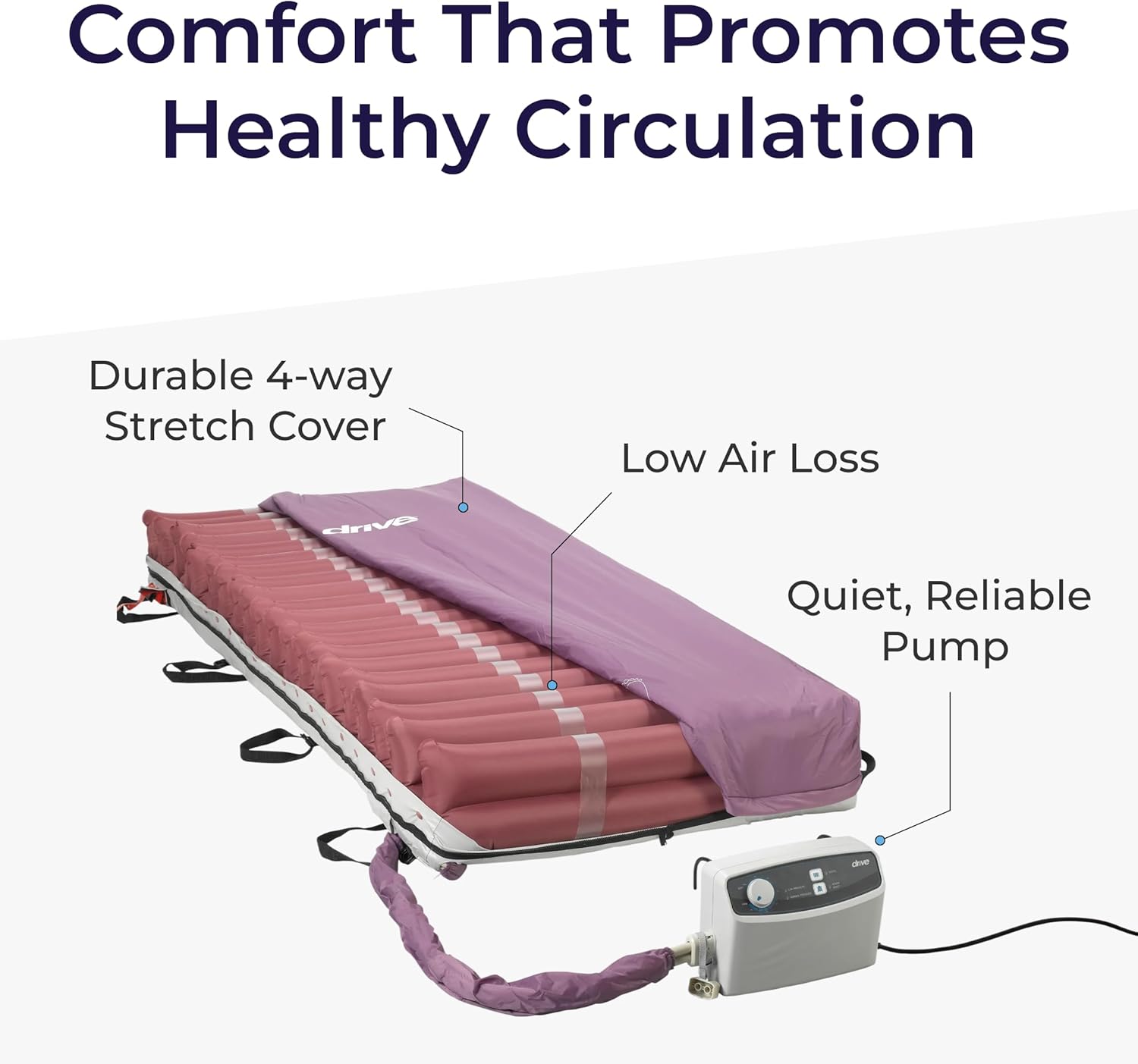
Image: The CPR valve provides a quick deflation option for emergencies.
Maintenance
- Cleaning the Cover: The removable four-way stretch polyurethane cover is fluid resistant, low shear, and vapor permeable. It can be spot cleaned with a mild detergent and water. Ensure the cover is completely dry before re-installing.
- Pump Filter: Regularly check the air filter on the pump unit for dust and debris. Clean or replace as necessary to maintain optimal pump performance.
- Hose Connections: Periodically inspect all air hose connections for secure fit and any signs of wear or damage.

Image: The fluid-resistant cover is easy to clean, promoting hygiene and durability.
Troubleshooting
| Problem | Possible Cause | Solution |
|---|---|---|
| Mattress not inflating or losing pressure. | Loose hose connection, power interruption, puncture in mattress, pump malfunction. | Check all hose connections. Ensure pump is plugged in and powered on. Inspect mattress for visible punctures. If problem persists, contact customer support. |
| "LOW PRESSURE" alarm sounds. | Low air pressure in the system. | Check for loose connections or punctures. Ensure the pressure setting is appropriate for the user's weight. Press "ALARM RESET" after resolving the issue. |
| Pump is noisy. | Loose hose connection, pump placed on an unstable surface. | Ensure hose connections are tight. Place pump on a stable, flat surface. If noise persists, contact customer support. |
Specifications
- Model Number: 14027
- Dimensions: 80 x 36 x 8 inches (Length x Width x Height)
- Weight Capacity: 350 lbs
- Material: Nylon (cover), Polycarbonate (fabric type)
- Air Cells: 20 individually replaceable 8-inch air cells
- Alternating Cycle Time: 10 minutes
- Pump Air Output: 8 liters per minute
- Special Features: Moisture-Wicking, Low Shear, Vapor Permeable Cover, Built-in Pillow

Image: The mattress dimensions are 80" L x 36" W x 8" H, designed to fit standard medical beds.
Warranty Information
The Drive Medical Med-Aire Low Air Loss Mattress Replacement System comes with a Limited Lifetime Warranty. For detailed terms and conditions, please refer to the warranty card included with your product or visit the official Drive Medical website.
Customer Support
For further assistance, technical support, or to order replacement parts, please contact Drive Medical customer service. Contact information can be found on the product packaging or the official Drive Medical website.


