
Drive Medical 10125
Contents
Drive Medical Walker Tray with Cup Holders Instruction Manual
Model: 10125

Product Overview
The Drive Medical Walker Tray with Cup Holders is designed to enhance the functionality of most 2-button walkers, allowing users to conveniently transport personal items, food, and beverages. Its thoughtful design includes two integrated cup holders and a folding mechanism for easy storage when not in use. Constructed from durable, easy-to-clean plastic, this accessory provides a practical solution for daily mobility needs.
Key Features
- Versatile Tray for Walker: Designed to keep drinks, food, and personal items within reach, this folding tray with two cup holders allows you to carry your belongings and bottles from room to room; can be easily folded down when not in use.
- Easy to Install: Walker tray for folding walker features a new and improved design that fits most 2-button walkers.
- Quality Construction: The ultimate walker accessory, our universal walker tray for seniors is made of durable, easy-to-clean, lightweight plastic.
- Dimensions: 12 inches in length x 16 inches in width x 2 inches in height; weight capacity: 250 pounds.

Figure 1: The Drive Medical Walker Tray securely attached to a standard walker, demonstrating its utility for carrying items.
Setup and Installation
The Drive Medical Walker Tray is designed for easy attachment to most standard 2-button walkers. Follow these steps for proper installation:
- Identify Attachment Points: Locate the vertical bars on the front of your 2-button walker where the tray's clamps will attach.
- Position the Tray: Hold the tray in front of the walker, aligning the attachment clamps with the walker's vertical bars. Ensure the tray is oriented correctly with the cup holders facing upwards.
- Secure the Clamps: Engage the tray's clamps onto the walker's bars. The design allows for a secure fit. Ensure both sides are firmly attached and the tray is level.
- Verify Stability: Gently push down on the tray to confirm it is securely fastened and does not wobble.
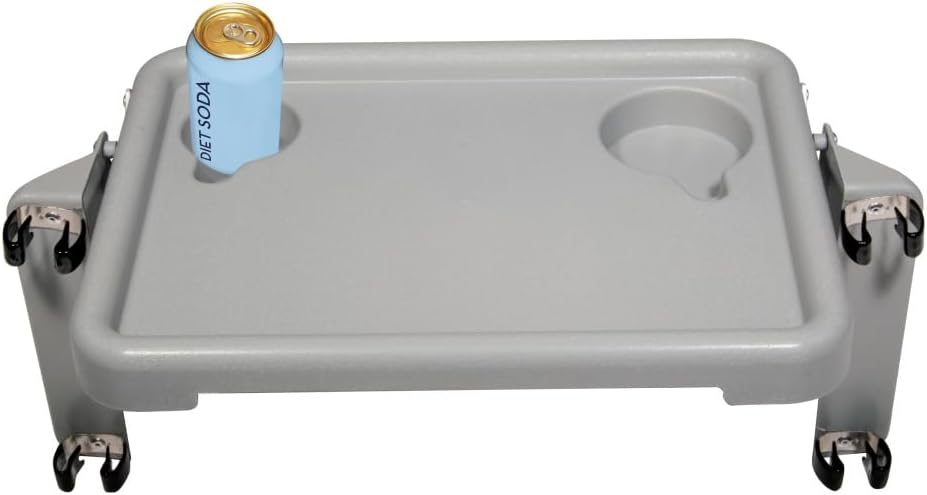
Figure 2: The attachment points of the walker tray, designed for compatibility with most 2-button walkers.
Note: While designed for broad compatibility, some walker models may have slight variations. Ensure a snug and level fit for optimal performance and safety.
Operation
The Drive Medical Walker Tray provides a convenient surface for carrying various items while using your walker. Its design allows for both active use and compact storage.
Using the Tray for Transport
- Place items such as plates, books, or personal belongings directly on the flat surface of the tray.
- Utilize the two integrated cup holders for beverages. The cup holders are designed to accommodate various sizes, providing stability for drinks during movement.
- Ensure items are placed securely on the tray before moving to prevent spills or falls.

Figure 3: The tray's surface with two distinct cup holder sizes for versatile beverage accommodation.
Folding the Tray
When not in use or for compact storage, the tray can be folded down. The specific folding mechanism may vary slightly based on your walker model, but generally involves releasing the tray from its upright position to allow it to hang vertically alongside the walker frame.
Important: Folding the walker itself may require detaching the tray or adjusting its position. Refer to your walker's manual for specific folding instructions when the tray is attached.
Care and Maintenance
To ensure the longevity and hygiene of your Drive Medical Walker Tray, follow these simple care instructions:
- Cleaning: The tray is made of easy-to-clean plastic. Wipe the surface with a damp cloth and mild soap or a general household cleaner. Avoid abrasive cleaners that may scratch the surface.
- Drying: Ensure the tray is completely dry before reuse to prevent water spots or residue buildup.
- Storage: When not in use, the tray can be folded down or detached and stored in a clean, dry place.
- Inspection: Periodically inspect the attachment points and the tray surface for any signs of wear or damage. If any damage is observed, discontinue use and contact customer support.
Troubleshooting
| Problem | Possible Cause | Solution |
|---|---|---|
| Tray does not sit level or is tilted. |
|
|
| Difficulty folding the walker with the tray attached. |
|
|
| Items slide off the tray easily. |
|
|
Specifications
| Model Number | 10125 |
| Product Dimensions | 16"L x 12"W x 2"H (40.64 cm L x 30.48 cm W x 5.08 cm H) |
| Weight Capacity | 250 pounds (113.4 kg) |
| Material | Durable Plastic |
| Color | Gray |
| Manufacturer | Drive Medical |
| Date First Available | June 23, 2006 |

Figure 4: Visual representation of the product dimensions.
Warranty and Support
For detailed warranty information, product support, or to purchase replacement parts, please contact Drive Medical directly or refer to the official user manual.
- Official User Manual (PDF): Download PDF
- Manufacturer: Drive Medical
- Visit the Drive Medical Store: Drive Medical Amazon Store
Documents and downloads
Ask a question about this manual
Ask about setup, troubleshooting, compatibility, parts, safety, or missing instructions. Manuals+ will review the question and use this page’s manual context to help answer it.