
1. Product Overview
The Humvee Recon HMV-W-RCN-BLK is a rugged digital watch designed for durability and functionality in various environments. It features a shock-resistant body, scratch-resistant mineral glass crystal, and is water-resistant up to 50 meters (150 feet).
Key features include 12/24-hour time display, date, three alarms, a countdown/stop timer, a chronograph with 20-lap memory, and world time for 22 cities. The watch is equipped with an electronic back glow light for visibility in low-light conditions and a comfortable nylon strap with a Velcro closure.

Figure 1: Front view of the Humvee Recon Digital Watch.
2. Initial Setup
Your Humvee Recon watch comes with a pre-installed CR2 battery. Before first use, ensure the watch is set to the correct time and date for your region.
2.1. Setting Time and Date
- Enter Setting Mode: Press and hold the LIGHT/SET button (top left) until the display flashes, indicating you are in setting mode.
- Navigate Settings: Press the MODE button (bottom left) to cycle through the settings: seconds, hour, minute, year, month, day, 12/24-hour format, and world time city.
- Adjust Values: Use the START/LAP button (top right) to increase the flashing value, and the STOP/RESET button (bottom right) to decrease it.
- Exit Setting Mode: Once all settings are adjusted, press the LIGHT/SET button again to save and exit.

Figure 2: Watch face with button labels for setting.
2.2. Adjusting the Strap
The watch features a durable nylon strap with a Velcro closure for a secure and adjustable fit. Simply wrap the strap around your wrist and press the Velcro ends together to fasten. Adjust as needed for comfort.
3. Operating Instructions
3.1. Mode Navigation
Press the MODE button (bottom left) to cycle through the different functions:
- Time Display (default)
- World Time (22 cities)
- Chronograph (Stopwatch)
- Countdown Timer
- Alarm 1, Alarm 2, Alarm 3
3.2. Backlight
To activate the electronic back glow light, press the LIGHT/SET button (top left) briefly. The light will illuminate the display for approximately two seconds.
3.3. Chronograph (Stopwatch)
- Navigate to the Chronograph mode using the MODE button.
- Press START/LAP (top right) to start the stopwatch.
- Press START/LAP again to record a lap time. The watch can store up to 20 lap times.
- Press STOP/RESET (bottom right) to pause the stopwatch.
- Press STOP/RESET again to reset the stopwatch to zero.
3.4. Alarms
The watch features three independent alarms. To set an alarm:
- Navigate to the desired Alarm mode (AL1, AL2, or AL3) using the MODE button.
- Press and hold the LIGHT/SET button until the alarm time flashes.
- Use START/LAP and STOP/RESET to adjust the hour and minute.
- Press LIGHT/SET to save and exit.
- To turn an alarm on or off, briefly press the START/LAP button while in the alarm display mode. An alarm icon will appear/disappear.
3.5. Daylight Saving Time (DST)
The watch has a dedicated button for Daylight Saving Time adjustment. While in the main time display, a brief press of the STOP/RESET button (bottom right) will toggle DST on or off, adjusting the time by one hour forward or backward. Be mindful of this button to avoid accidental time changes.
Video 1: Humvee Recon Digital Watch product showcase. This video demonstrates the watch's appearance and some features.
4. Maintenance
4.1. Water Resistance
The Humvee Recon watch is water-resistant up to 50 meters (150 feet). This rating means it is suitable for recreational swimming, snorkeling, and water sports. It is not designed for scuba diving or prolonged submersion at significant depths. Do not operate buttons while the watch is wet or submerged to prevent water ingress.
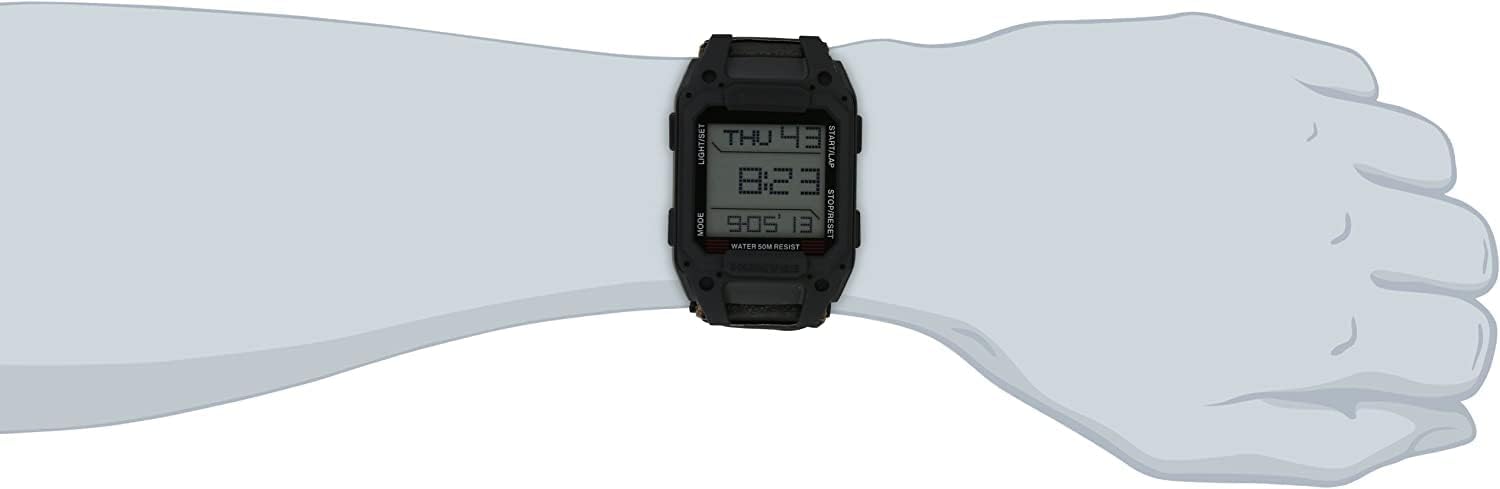
Figure 3: The watch on a wrist, highlighting its durable construction.
4.2. Cleaning
To clean your watch, wipe it with a soft, damp cloth. For the nylon strap, a mild soap solution can be used, followed by rinsing with clean water and air drying. Avoid harsh chemicals or abrasive materials that could damage the watch case or crystal.
4.3. Battery Replacement
The watch uses one CR2 battery. When the display dims or functions become erratic, it may be time to replace the battery. Battery replacement should ideally be performed by a qualified watch technician to ensure proper sealing and maintain water resistance.
5. Troubleshooting
| Problem | Possible Cause | Solution |
|---|---|---|
| Display is dim or blank. | Low battery. | Replace the CR2 battery. |
| Time is incorrect. | Accidental DST change or incorrect setting. | Check DST setting (briefly press STOP/RESET). Re-set time and date as per Section 2.1. |
| Buttons are unresponsive. | Watch may be in an unresponsive state or battery is very low. | Try replacing the battery. If issue persists, contact support. |
| Water appears inside the watch. | Seal compromised or buttons operated underwater. | Immediately stop using the watch and seek professional repair to prevent further damage. |
6. Specifications
- Model Number: HMV-W-RCN-BLK
- Display Type: Digital
- Movement: Quartz
- Case Material: Stainless Steel (case back), Durable Plastic (body)
- Crystal Material: Hardened Mineral Glass
- Strap Material: Nylon with Velcro closure
- Water Resistance: 50 meters (150 feet)
- Case Dimensions: Approximately 32 x 52mm (face), 38.53mm (diameter), 14.43mm (thickness)
- Band Width: 26.08mm
- Weight: 2.4 ounces
- Battery: 1 x CR2 (included)
- Features: 12/24-hour time, Date, 3 Alarms, Countdown/Stop Timer, Chronograph (20 laps), World Time (22 cities), Backlight.

Figure 4: Top-down view of the watch, showcasing the strap and case.
7. Warranty and Support
7.1. Limited Warranty
The Humvee Recon HMV-W-RCN-BLK Digital Watch comes with a 1-year limited warranty from the date of purchase. This warranty covers manufacturing defects in materials and workmanship under normal use. It does not cover damage resulting from misuse, accidents, unauthorized repairs, or normal wear and tear.
To make a warranty claim, please retain your proof of purchase and contact the manufacturer's customer service.
7.2. Customer Support
For technical assistance, troubleshooting, or warranty inquiries, please contact Humvee customer support. Refer to the packaging or the official Humvee website for the most current contact information.