
Atrix VACEXP-03
Atrix VACEXP-03 Express Plus Personal Portable ESD Safe Vacuum Instruction Manual
Model: VACEXP-03
1. Introduction
The Atrix VACEXP-03 Express Plus Personal Portable ESD Safe Vacuum is designed for efficient and safe cleaning of static-sensitive equipment and environments. This lightweight and portable unit offers powerful suction and advanced filtration, making it suitable for various applications from electronics maintenance to general office cleaning. Its ESD-safe design ensures protection for sensitive components.

Image 1: Atrix VACEXP-03 Express Plus Personal Portable ESD Safe Vacuum main unit.
2. Important Safety Information
Please read and understand all safety instructions before operating this appliance. Failure to follow these instructions may result in electric shock, fire, or serious injury.
- Electrical Safety: Do not use outdoors or on wet surfaces. Always unplug the vacuum before servicing or cleaning.
- ESD Safety: This vacuum is designed to be ESD safe. Ensure all accessories are properly connected to maintain the static path to ground when working with sensitive electronics.
- Filtration: The unit uses an Ultrafine H12 filter. Ensure the filter is correctly installed and replaced regularly to maintain optimal performance and prevent exposure to collected dust.
- Flammable Materials: Do not vacuum flammable or combustible liquids, hot ashes, or any materials that could ignite.
- Supervision: Close supervision is necessary when any appliance is used by or near children.
3. Package Contents
Verify that all items are present in the package:
- Atrix VACEXP-03 Express Plus Vacuum Unit
- Detachable Power Cord (110 Volt)
- 6-foot ESD Safe Stretch Hose
- Crevice Tool
- Utility Tool
- Oval Brush
- Standard Ultrafine Filter Cartridge

Image 2: Atrix VACEXP-03 Vacuum with included hose, power cord, and various attachments.
4. Product Features
- Powerful 110 Volt Motor: Provides strong suction for effective cleaning in dust-sensitive areas.
- Compact and Portable: Weighs only 4 lbs with dimensions of 12"L x 6"W x 7"H, making it easy to store and transport.
- ESD Safe Grounded System: Designed with static-safe components for both the vacuum and its accessories, ideal for electronics.
- Ultrafine H12 Filtration: Features a one-quart filter cartridge that is 88% efficient at 0.3 microns, capturing dust, debris, laser toner, and other fine particulates.
- Versatile Applications: Suitable for residential or commercial use, including cleaning air vents, window sills, computers, printers, and video equipment.
5. Setup Guide
- Unpack the Unit: Carefully remove all components from the packaging.
- Install Filter Cartridge: Ensure the standard Ultrafine filter cartridge is securely seated inside the vacuum unit. Refer to the maintenance section for detailed filter installation.
- Attach Hose: Connect the 6-foot ESD safe stretch hose to the intake port on the front of the vacuum unit. Twist until it is firmly in place.
- Connect Power Cord: Insert the detachable power cord into the power inlet located on the rear of the vacuum. Plug the other end into a standard 110-volt electrical outlet.
- Select and Attach Accessory: Choose the appropriate cleaning accessory (crevice tool, utility tool, or oval brush) for your task and attach it to the end of the hose.
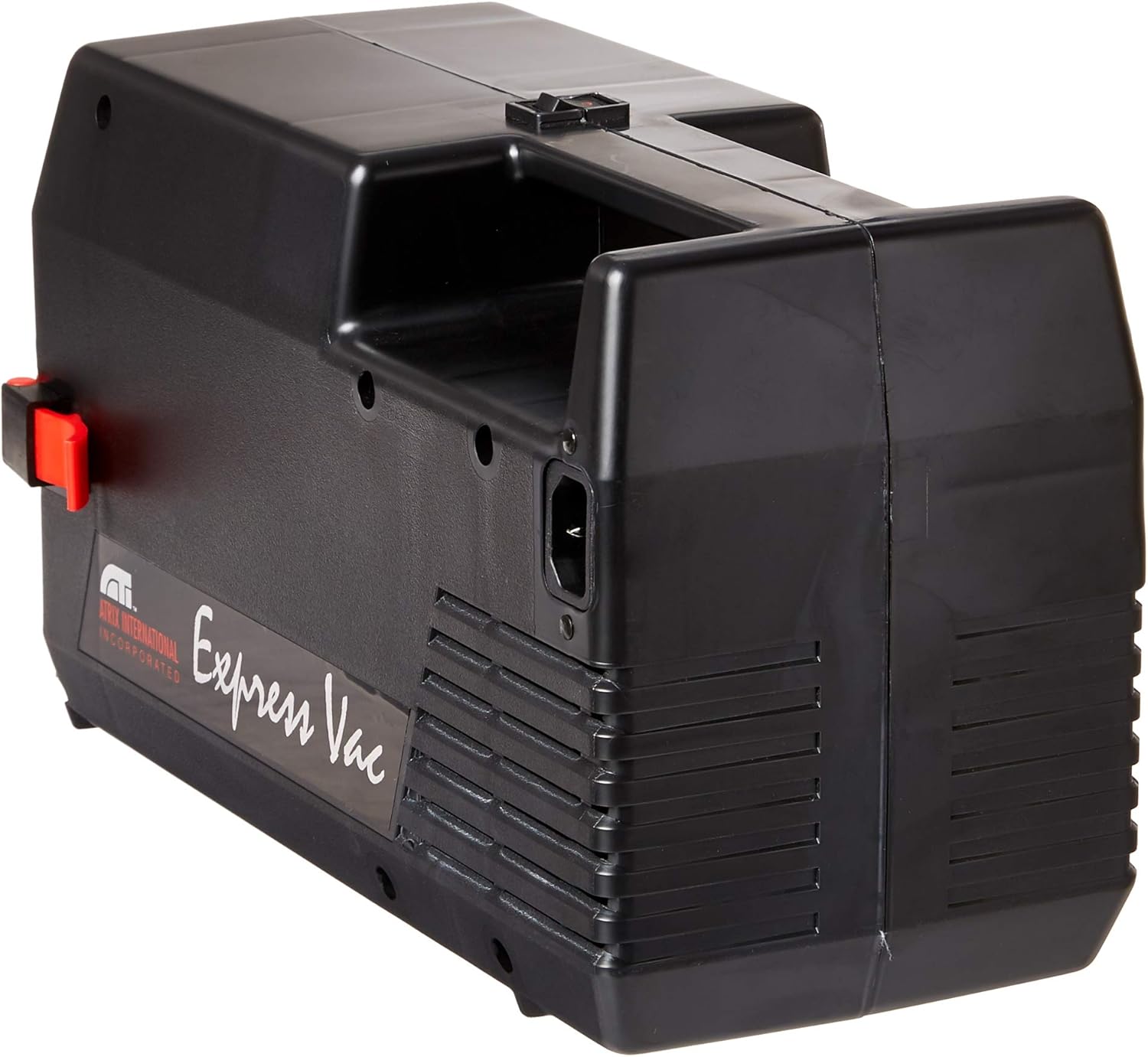
Image 3: Rear view of the Atrix VACEXP-03 Vacuum, highlighting the power cord connection point.
6. Operating Instructions
- Power On: Once assembled and plugged in, locate the power switch on the unit and turn it to the 'ON' position.
- Cleaning: Guide the chosen accessory over the surface to be cleaned. The powerful suction will collect dust and debris into the filter cartridge.
- ESD Safe Operation: When cleaning static-sensitive equipment, ensure you are properly grounded and that the vacuum's ESD-safe features are maintained.
- Using Attachments:
- Crevice Tool: Ideal for tight spaces, corners, and edges.
- Utility Tool: Suitable for general surface cleaning.
- Oval Brush: Excellent for delicate surfaces, keyboards, and vents.
- Power Off: After cleaning, turn the power switch to the 'OFF' position and unplug the unit from the electrical outlet.

Image 4: Atrix VACEXP-03 vacuum in operation with a floor cleaning tool.

Image 5: Atrix VACEXP-03 vacuum in operation with a brush attachment for delicate surfaces.
7. Maintenance
7.1 Filter Replacement
The Atrix VACEXP-03 uses a one-quart Ultrafine H12 filter cartridge. Regular replacement is crucial for maintaining optimal performance and filtration efficiency.
- Power Off and Unplug: Always ensure the vacuum is turned off and unplugged before attempting any maintenance.
- Open Unit: Release the latches on the vacuum unit to open the housing and access the filter compartment.
- Remove Old Filter: Carefully remove the used filter cartridge. Dispose of it according to local regulations, especially if hazardous materials were vacuumed.
- Install New Filter: Insert a new Atrix Ultrafine H12 filter cartridge, ensuring it is properly seated and sealed within the compartment.
- Close Unit: Close the vacuum housing and secure the latches.

Image 6: Atrix Ultrafine H12 Filter Cartridge for VACEXP-03.
7.2 General Cleaning
Wipe the exterior of the vacuum with a damp cloth. Do not use harsh chemicals or abrasive cleaners. Ensure the hose and attachments are free from blockages.
7.3 Filter System Overview Video
Video 1: An overview of the Atrix SafeGuard 360 filter system, demonstrating its features and benefits for filtration and safe disposal. This video highlights the secure and simple filter replacement process.
Video 2: Detailed information on the Atrix SafeGuard 360 Ultrafine H12 Filter Model 31700C, explaining its efficiency and how it handles fine particles like toner.
8. Troubleshooting
If you encounter issues with your Atrix VACEXP-03, refer to the following common problems and solutions:
- No Power:
- Check if the power cord is securely plugged into both the vacuum and the electrical outlet.
- Ensure the power switch is in the 'ON' position.
- Verify the electrical outlet is functional by plugging in another device.
- Loss of Suction:
- Check if the filter cartridge is full and needs replacement.
- Inspect the hose and attachments for any blockages.
- Ensure the hose is securely attached to the vacuum unit.
- Unusual Noise:
- Turn off the vacuum and check for any foreign objects lodged in the hose or attachments.
- Ensure the filter cartridge is correctly installed.
9. Specifications
| Brand | Atrix |
| Model Name | VACEXP-03 |
| Special Feature | Compact, ESD Safe, Portable |
| Filter Type | Cartridge (Ultrafine H12, 88% efficient @ 0.3 microns) |
| Power | 110 Volt, 500 Watts |
| Airflow | 79 CFM |
| Capacity | 1 Quart (Filter Cartridge) |
| Item Weight | 4 pounds |
| Product Dimensions | 12"L x 6"W x 7"H |
| Hose Length | 6 feet (1.8 Meters) |
| Noise Level | 79 Decibels |
| Color | Black |

Image 7: Atrix VACEXP-03 Vacuum with approximate dimensions shown.
10. Warranty and Support
For detailed warranty information and customer support, please refer to the manufacturer's official website. The manufacturer's website provides the most up-to-date information regarding product warranties, service, and technical assistance.
Manufacturer: Atrix
Related documentsVACEXP-03


Ask a question about this manual
Ask about setup, troubleshooting, compatibility, parts, safety, or missing instructions. Manuals+ will review the question and use this page’s manual context to help answer it.