
1. Introduction
Thank you for choosing the Humvee HMV-W-RCN-OD Digital Recon Watch. This manual provides detailed instructions for the proper setup, operation, and maintenance of your watch. Please read this manual thoroughly to ensure optimal performance and longevity of your device.

Image 1.1: The Humvee HMV-W-RCN-OD Digital Recon Watch, featuring its digital display and olive nylon strap.
2. Product Overview
The Humvee HMV-W-RCN-OD is a digital watch designed for durability and functionality. It features a rugged, shock-resistant body, a scratch-resistant mineral glass crystal, and a comfortable olive nylon strap with a hook-and-loop closure. The watch is water-resistant to 50 meters (165 feet), making it suitable for showering, swimming, and light water sports. Key functions include 12/24-hour time display, date, multiple alarms, a countdown timer, and a chronograph with lap recording capabilities.
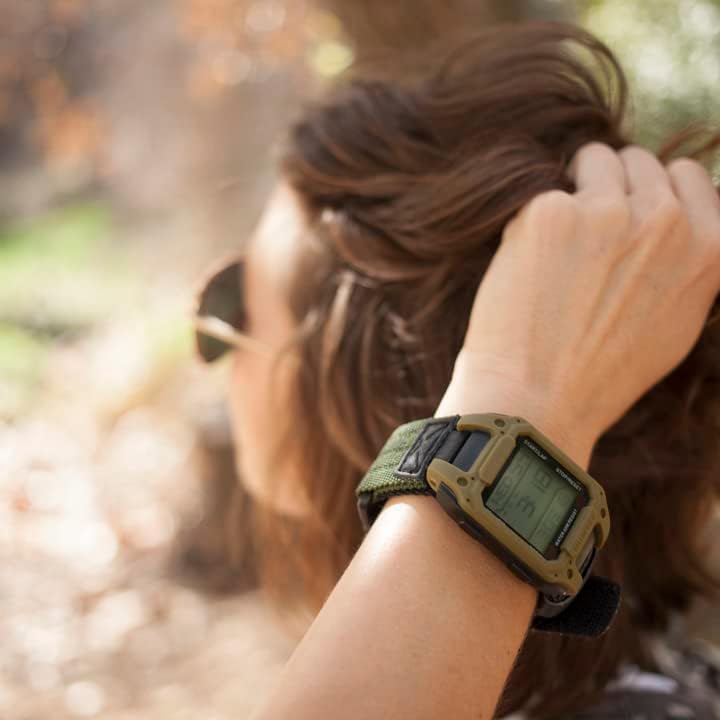
Image 2.1: Close-up view of the watch face, highlighting the digital display and button labels.
Watch Components:
- LIGHT/SET Button (Top Left): Activates backlight, enters/exits setting modes.
- MODE Button (Bottom Left): Cycles through different watch modes (Time, Alarm, Chronograph, Timer, World Time).
- START/LAP Button (Top Right): Starts/stops chronograph, records laps, adjusts settings upwards.
- STOP/RESET Button (Bottom Right): Stops chronograph, resets values, adjusts settings downwards.
- Digital Display: Shows time, date, and function-specific information.
- Nylon Strap: Durable strap with hook-and-loop closure for secure fit.
3. Setup
3.1 Initial Power On
Your watch comes with a pre-installed battery. If the display is blank, press any button to activate it. If the display remains blank, the battery may need replacement (refer to Section 5.2).
3.2 Adjusting the Strap
The watch features an adjustable olive nylon strap with a hook-and-loop closure. To adjust, simply open the hook-and-loop fasteners, position the watch comfortably on your wrist, and secure the strap. Ensure it is snug but not too tight to allow for proper circulation.

Image 3.1: The watch displayed on a wrist, illustrating its fit and size.
4. Operating Instructions
4.1 Navigating Modes
Press the MODE button (bottom left) repeatedly to cycle through the main functions: Time Display → Alarm → Chronograph → Countdown Timer → World Time.
4.2 Setting Time and Date
- From the Time Display mode, press and hold the LIGHT/SET button (top left) until the seconds begin to flash. This indicates setting mode.
- Press the MODE button to cycle through the settings: Seconds → Hours → Minutes → Year → Month → Day → 12/24-hour format.
- Use the START/LAP button (top right) to increase the flashing value or the STOP/RESET button (bottom right) to decrease it.
- Once all settings are adjusted, press the LIGHT/SET button to exit setting mode.
4.3 Using the Alarm
The watch supports up to 3 alarms.
- Press the MODE button until you reach the Alarm mode (indicated by 'ALM' or an alarm icon).
- Press the START/LAP button to select Alarm 1, 2, or 3.
- To set an alarm, press and hold the LIGHT/SET button until the alarm hour flashes.
- Use START/LAP and STOP/RESET to adjust the hour and minute. Press MODE to switch between hour and minute settings.
- Press LIGHT/SET to confirm and exit setting mode.
- To turn an alarm ON/OFF, in Alarm mode, press the STOP/RESET button. An alarm icon will appear/disappear on the display.
4.4 Using the Chronograph (Stopwatch)
The chronograph can record up to 20 laps.
- Press the MODE button until you reach the Chronograph mode (indicated by 'CHM' or 'STW').
- Press START/LAP to begin timing.
- Press START/LAP again to record a lap time while the main timer continues running.
- Press STOP/RESET to stop the chronograph.
- After stopping, press STOP/RESET again to reset the chronograph to zero.
4.5 Using the Countdown Timer
- Press the MODE button until you reach the Countdown Timer mode (indicated by 'TMR').
- To set the timer duration, press and hold the LIGHT/SET button until the hours flash.
- Use START/LAP and STOP/RESET to adjust hours, minutes, and seconds. Press MODE to switch between settings.
- Press LIGHT/SET to confirm the duration.
- Press START/LAP to start the countdown.
- Press START/LAP again to pause the countdown. Press START/LAP to resume.
- Press STOP/RESET to stop and reset the timer to its set duration.
4.6 World Time Function
The watch allows you to view times for 22 different cities.
- Press the MODE button until you reach the World Time mode (indicated by 'W.T.').
- Use the START/LAP button to cycle through the available city codes and view their respective times.
4.7 Backlight
Press the LIGHT/SET button (top left) to illuminate the display for a few seconds, improving visibility in low-light conditions.
Video 4.1: A 21-second video demonstrating the Humvee HMV-W-RCN-OD Digital Recon Watch from various angles, showcasing its design and features.
5. Maintenance
5.1 Water Resistance
The Humvee HMV-W-RCN-OD watch is water-resistant to 50 meters (165 feet). This rating means it is suitable for showering, swimming, and light water sports. It is not recommended for scuba diving or prolonged submersion at significant depths. Avoid operating buttons while the watch is wet or submerged to prevent water ingress.
5.2 Cleaning and Care
- Wipe the watch case and crystal with a soft, damp cloth. Avoid harsh chemicals or abrasive materials.
- The nylon strap can be hand-washed with mild soap and water, then air-dried. Ensure the strap is completely dry before reattaching to the watch or wearing.
- The watch features a scratch-resistant mineral glass crystal, but it is not impervious to all damage. Avoid direct impact or contact with sharp objects.
5.3 Battery Replacement
The watch is powered by a standard watch battery. When the display dims or becomes unresponsive, the battery may need replacement. It is recommended to have battery replacement performed by a qualified watch technician to ensure proper sealing and maintain water resistance.
6. Troubleshooting
- Display is blank or dim: The battery may be low or depleted. Replace the battery (refer to Section 5.3).
- Incorrect time or date: Re-set the time and date according to Section 4.2. Ensure the 12/24-hour format is correctly selected.
- Buttons are unresponsive: Ensure the watch is not in a locked mode (if applicable, though this model does not feature a specific lock). If the issue persists, a battery replacement or professional inspection may be required.
- Water inside the watch: If you observe condensation or water droplets inside the watch, immediately take it to a qualified technician for inspection and repair to prevent further damage.
7. Specifications
| Model Name | HMV-W-RCN-OD |
| Display Type | Digital |
| Movement Type | Quartz |
| Water Resistance Depth | 50 meters (165 feet) |
| Case Material | Stainless Steel |
| Band Material | Nylon |
| Crystal Type | Mineral |
| Case Diameter | 38.44 mm |
| Case Thickness | 14.55 mm |
| Band Width | 28.23 mm |
| Power Source | Battery Powered |
| Features | 12/24-hour time, Date, 3 Alarms, Countdown Timer, Chronograph (20 laps), World Time (22 cities), Backlight |
8. Warranty Information
The Humvee HMV-W-RCN-OD Digital Recon Watch comes with a 1-year limited manufacturer's warranty. This warranty covers defects in materials and workmanship under normal use. It does not cover damage resulting from misuse, accidents, unauthorized repairs, or normal wear and tear. Please retain your proof of purchase for warranty claims.
9. Support
For further assistance, technical support, or warranty inquiries, please contact Humvee Adventure Gear customer service. Refer to the product packaging or the official Humvee Adventure Gear website for current contact information.