1. Introduction
This manual provides essential instructions for the safe and effective use of your CARTREND 7740013 Car Battery Charger and Jump Starter. This device is designed to charge 12V vehicle batteries and provide jump-starting assistance for cars, trucks, and motorcycles. It also features an integrated compressor and work light. Please read this manual thoroughly before first use and retain it for future reference.
2. Safety Instructions
Always observe the following safety precautions to prevent injury or damage to the device and vehicle:
- Read all instructions: Before operating the unit, read and understand all safety and operating instructions.
- Ventilation: Ensure adequate ventilation when charging batteries. Batteries can produce explosive gases.
- Eye and face protection: Always wear appropriate eye protection and protective clothing when working with batteries.
- Avoid sparks and flames: Do not smoke or allow sparks or flames in the vicinity of the battery or charger.
- Proper connection: Connect and disconnect battery clamps only when the charger is switched off.
- Polarity: Connect the red (+) clamp to the positive terminal and the black (-) clamp to the negative terminal. Ensure correct polarity.
- Children and untrained persons: Keep the device out of reach of children and ensure only trained individuals operate it.
- Damaged unit: Do not operate the unit if it has been dropped, damaged, or is not functioning correctly.
- Overheat protection: The device is equipped with overheat protection. If it overheats, it will automatically shut down. Allow it to cool before resuming use.
- Indoor use: Store the unit indoors in a dry, cool place.
3. Package Contents
Verify that all items are present in the package:
- CARTREND 7740013 Power Station (Main Unit)
- AC Charging Adapter (for wall outlet)
- DC Charging Cable (for 12V vehicle outlet)
- Various adapter nozzles for compressor (e.g., for balls, bicycle tires)

Figure 3.1: The CARTREND 7740013 Power Station with its included accessories. This image displays the main unit, an AC charging adapter for household outlets, a DC charging cable for vehicle power sockets, and a set of small adapter nozzles for the air compressor, suitable for inflating various items.
4. Product Overview
Familiarize yourself with the components of your CARTREND Power Station:
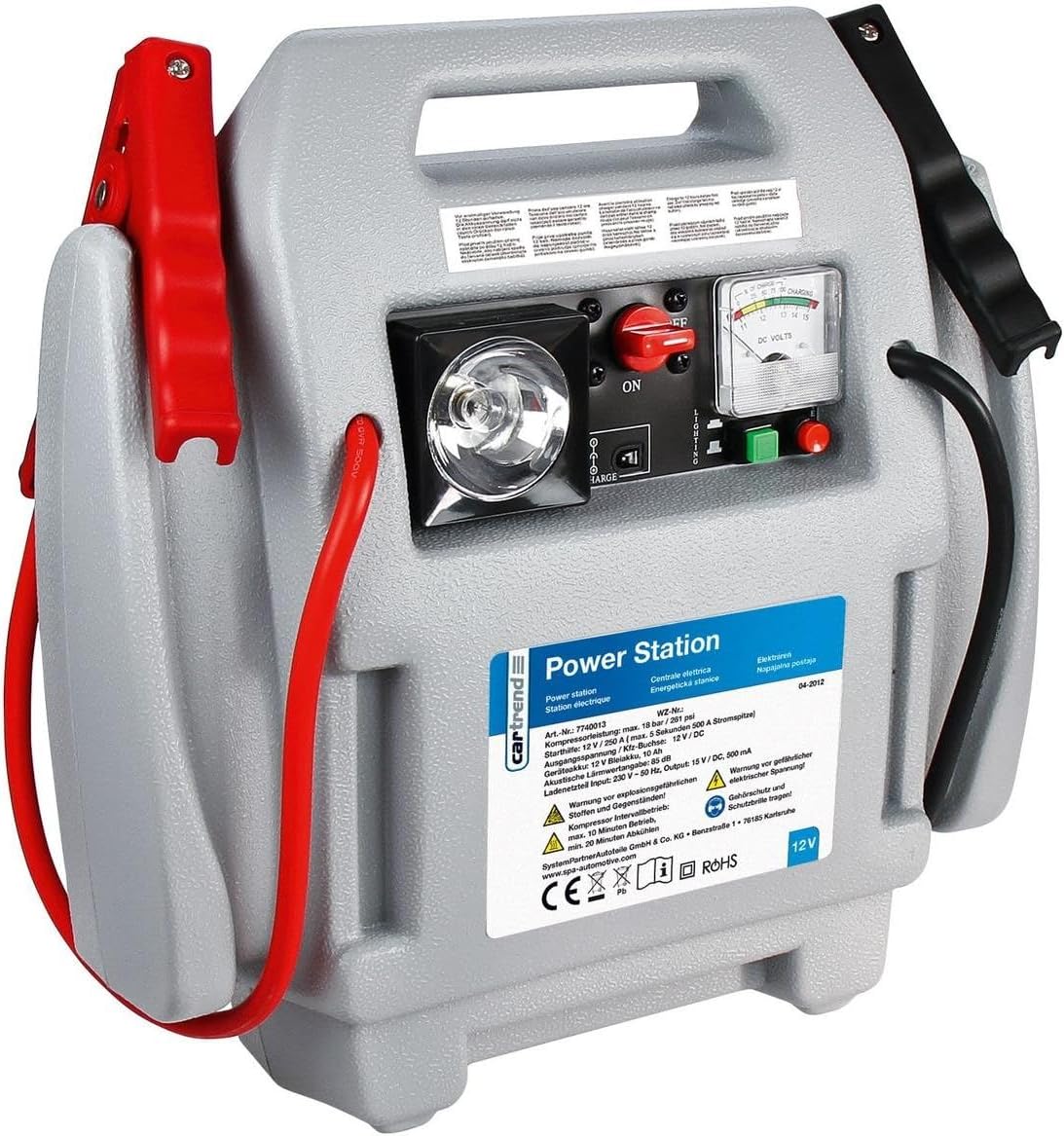
Figure 4.1: The CARTREND 7740013 Power Station. This image highlights the main unit with its integrated handle, heavy-duty battery clamps (red for positive, black for negative), a control panel featuring an ON/OFF switch, a work light, a battery status gauge (DC Volts), and buttons for various functions. The unit also includes an air compressor hose and pressure gauge.
- Heavy-Duty Battery Clamps: Red (+) for positive terminal, Black (-) for negative terminal.
- Integrated Handle: For easy portability.
- Control Panel: Contains switches and indicators.
- ON/OFF Switch: Activates/deactivates the unit.
- Work Light: Provides illumination in low-light conditions.
- Battery Status Gauge (DC Volts): Displays the internal battery voltage of the power station.
- Air Compressor Hose: For inflating tires and other items.
- Pressure Gauge: Displays air pressure during compressor operation.
- 12V DC Output Socket: For powering 12V accessories (e.g., cigarette lighter socket).
- Charging Port: For connecting the AC or DC charging adapter to recharge the internal battery.
5. Setup and Initial Charging
Before using the CARTREND Power Station for the first time, it must be fully charged. It is recommended to fully charge the unit after each use and at least every 3 months to maintain battery health.
5.1 Charging the Internal Battery
- Ensure the Power Station's ON/OFF switch is in the OFF position.
- Connect the AC charging adapter to the charging port on the Power Station.
- Plug the AC charging adapter into a standard 230V AC wall outlet.
- Allow the unit to charge until the battery status indicator shows a full charge. This may take several hours for the initial charge.
- Once fully charged, disconnect the AC adapter from the wall outlet, then from the Power Station.
- Alternatively, you can charge the unit using the DC charging cable from a 12V vehicle outlet. Follow similar steps, ensuring the vehicle engine is running for optimal charging.
Note: Do not overcharge the unit. Disconnect once fully charged. The internal battery is a sealed lead-acid type and requires regular charging to prevent sulfation and extend its lifespan.
6. Operating Instructions
6.1 Jump-Starting a Vehicle
Before jump-starting, ensure the Power Station is fully charged and the vehicle's ignition is off.
- Ensure the Power Station's ON/OFF switch is in the OFF position.
- Connect the RED (+) positive clamp to the positive terminal of the vehicle's discharged battery.
- Connect the BLACK (-) negative clamp to a solid, unpainted metal part of the vehicle's chassis, away from the battery and fuel lines. Do not connect directly to the negative battery terminal.
- Switch the Power Station's ON/OFF switch to the ON position.
- Attempt to start the vehicle. If it does not start after 5-10 seconds, wait at least 3 minutes before trying again to prevent overheating the Power Station.
- Once the vehicle starts, immediately switch the Power Station's ON/OFF switch to the OFF position.
- Disconnect the BLACK (-) negative clamp first, then the RED (+) positive clamp.
- Recharge the Power Station as soon as possible after jump-starting.
6.2 Using the Air Compressor
The integrated air compressor can inflate vehicle tires, sports equipment, and other inflatables.
- Ensure the Power Station's ON/OFF switch is in the ON position.
- Attach the compressor hose nozzle securely to the item you wish to inflate. Use appropriate adapter nozzles if necessary (e.g., for bicycle tires or balls).
- Activate the compressor switch (refer to the control panel diagram for location).
- Monitor the pressure gauge and inflate to the recommended pressure.
- Once the desired pressure is reached, switch off the compressor and disconnect the nozzle.
- Important: Do not operate the compressor continuously for more than 10 minutes. Allow it to cool down for at least 15 minutes between uses to prevent overheating.
6.3 Using the Work Light
The integrated work light provides convenient illumination.
- Ensure the Power Station's ON/OFF switch is in the ON position.
- Locate the work light switch on the control panel and turn it on.
- Turn off the light when not in use to conserve battery power.
6.4 Using the 12V DC Output
The 12V DC output socket can power various 12V accessories (e.g., car vacuum cleaners, portable coolers).
- Ensure the Power Station's ON/OFF switch is in the ON position.
- Plug your 12V accessory into the DC output socket.
- Ensure the accessory's power consumption does not exceed the unit's maximum output capacity.
- Disconnect the accessory when finished to conserve battery power.
7. Maintenance
Proper maintenance ensures the longevity and optimal performance of your Power Station.
- Recharge Regularly: Fully recharge the unit after each use and at least every three months, even if not used, to prevent battery discharge and damage.
- Cleaning: Clean the exterior of the unit with a soft, damp cloth. Do not use harsh chemicals or abrasive cleaners.
- Storage: Store the Power Station in a cool, dry place, away from direct sunlight, moisture, and extreme temperatures. Ensure the ON/OFF switch is in the OFF position during storage.
- Cable Inspection: Periodically inspect the battery clamps, cables, and housing for any signs of damage, wear, or corrosion. Do not use the unit if any components are damaged.
8. Troubleshooting
Refer to this section for common issues and their solutions.
| Problem | Possible Cause | Solution |
|---|---|---|
| Unit does not turn on. | Internal battery is discharged. | Recharge the Power Station fully. |
| Vehicle does not jump-start. | Incorrect clamp connection; Power Station battery low; Vehicle battery severely discharged. | Check clamp polarity and connection to chassis. Ensure Power Station is fully charged. Allow more time for vehicle battery to receive charge before attempting to start. Consult a mechanic if the vehicle still won't start. |
| Compressor does not inflate. | Hose not securely attached; Compressor switch off; Internal battery low. | Ensure hose is tightly connected. Turn on compressor switch. Recharge Power Station. |
| Unit overheats and shuts down. | Prolonged use of compressor or jump-starting attempts. | This is the overheat protection. Allow the unit to cool down for at least 15-30 minutes before resuming use. |
9. Specifications
| Brand: | Cartrend |
| Model Number: | 7740013 |
| Product Type: | Car Battery Charger, Jump Starter, Power Station |
| Voltage: | 12 Volt |
| Vehicle Service Type: | Universal (Auto, Truck, Motorcycle) |
| Item Weight: | 5.41 Kilograms |
| Product Dimensions: | 38 x 20 x 39 cm |
| Special Features: | Overheat protection, Integrated compressor, Work light, 12V DC output |
10. Warranty and Support
Specific warranty information is typically provided with the product at the time of purchase. Please refer to the documentation included in your product packaging for details regarding warranty coverage and terms.
For technical support or service inquiries, please contact Cartrend customer service through their official website or the retailer from whom the product was purchased. Ensure you have your model number (7740013) and proof of purchase available when contacting support.


