
1. Introduction
The HamiltonBuhl Kids-HA2 is a durable, lightweight on-ear stereo headphone designed for educational environments and general use by children. This manual provides essential information for setting up, operating, maintaining, and troubleshooting your headphones.

Figure 1: HamiltonBuhl Kids-HA2 On-Ear Stereo Headphone. This image shows the blue on-ear headphones with a durable cord.
2. Key Features
- Wired Connectivity: Standard 3.5 mm stereo plug for universal compatibility.
- Dura-Cord: A chew, kink, and knot-resistant, PVC-jacketed, braided nylon cord designed for enhanced durability.
- On-Ear Design: Lightweight construction with foam, replaceable ear cushions for comfort.
- Automatic Stereo/Mono (ASM™) Technology: Ensures compatibility with various audio sources.
- Anti-Lice Storage Bag: A heavy-duty, write-on, moisture-resistant, reclosable bag that helps prevent the spread of lice by killing them within 24-48 hours when sealed, without the use of chemicals.
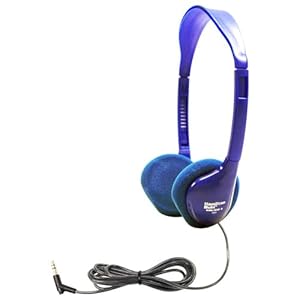
Figure 2: Close-up of the headphone's ear cup and durable Dura-Cord. This image highlights the robust construction of the headphone's cable.
3. Setup
Connecting Your Headphones
- Locate the 3.5 mm audio jack on your device (e.g., MP3 player, tablet, computer, smartphone).
- Insert the 3.5 mm stereo plug of the Kids-HA2 headphone firmly into the device's audio jack.
- Ensure the plug is fully inserted for proper audio transmission and to prevent sound issues.
4. Operating Instructions
Wearing the Headphones
Gently place the earcups over your ears. The headband is designed to provide a comfortable and secure fit for various head sizes.
Volume Control
The Kids-HA2 headphones do not feature integrated volume controls. Adjust the audio volume directly on your connected playback device (e.g., tablet, computer, smartphone).
Compatibility
These headphones are compatible with a wide range of devices including MP3 Players, Cell Phones, Tablets/eReaders, Chromebooks, Computers (Mac & PC), CD Players/Stereos, TVs, and most Gaming Systems that feature a standard 3.5 mm audio output.
5. Maintenance
Cleaning
- Wipe the exterior of the headphones with a soft, dry cloth.
- Do not use liquid cleaners, abrasive materials, or immerse the headphones in water.
- The foam ear cushions are replaceable if they become worn or damaged.
Anti-Lice Storage Bag Usage
- After each use, place the headphones into the provided heavy-duty, reclosable anti-lice storage bag.
- Seal the bag completely. When sealed, lice are killed within 24-48 hours without the use of chemicals.
- This bag is moisture-resistant and features a write-on area for labeling.
6. Troubleshooting
No Sound
- Ensure the 3.5 mm plug is fully inserted into the device's audio jack.
- Check the volume level on your connected device; ensure it is not muted or set too low.
- Test the headphones with another audio device to determine if the issue is with the headphones or the original device.
- Inspect the headphone cord for any visible damage or kinks.
Distorted Sound
- Lower the volume on your device; very high volumes can cause distortion.
- Ensure the 3.5 mm plug is clean and fully inserted into the audio jack.
- Test with another audio source to isolate the problem.
7. Specifications
| Brand | HamiltonBuhl |
| Model | Kids-HA2 |
| Color | Blue |
| Design | On-ear, Personal |
| Speaker Drivers | 30 mm |
| Frequency Response | 50-16,000 Hz |
| Impedance | 32Ω |
| Sensitivity | 105dB±4dB |
| Connectivity | Wired (3.5 mm stereo plug, 120° thin barrel) |
| Cord | 5' Dura-Cord (chew-resistant, PVC-jacketed, braided nylon) |
| Cushions | Foam, replaceable |
| Prop 65 Compliant | Yes |
8. Warranty and Support
Warranty
This HamiltonBuhl product comes with a 1-year warranty from the date of purchase. This warranty covers defects in materials and workmanship under normal use. Please retain your proof of purchase for warranty claims.
Support
For technical assistance, warranty claims, or further information, please contact HamiltonBuhl customer service. You can find detailed support resources and contact information on the official HamiltonBuhl website: