
1. Introduction
Thank you for choosing the Domo DO9089W Digital Kitchen Scale. This manual provides essential information for the safe and efficient operation, maintenance, and troubleshooting of your new kitchen scale. Please read these instructions carefully before first use and keep them for future reference.
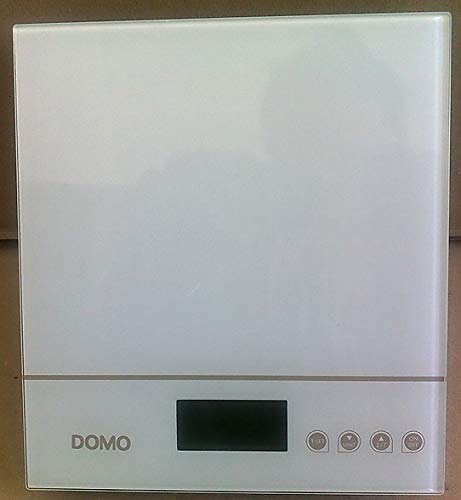
Figure 1: Domo DO9089W Digital Kitchen Scale. This image shows the compact design of the scale with its glass weighing platform and LCD display.
2. Safety Instructions
- Do not immerse the scale in water or other liquids.
- Clean the scale with a damp cloth only. Do not use abrasive cleaners.
- Place the scale on a firm, flat, and stable surface for accurate measurements.
- Do not overload the scale beyond its maximum capacity of 5 kg.
- Keep the scale away from extreme temperatures, direct sunlight, and high humidity.
- This appliance is for household use only.
3. Package Contents
Verify that all items are present in the package:
- 1 x Domo DO9089W Digital Kitchen Scale
- 1 x User Manual (this document)
- Batteries (may or may not be included, check packaging)
4. Setup
4.1. Battery Installation
- Locate the battery compartment on the underside of the scale.
- Open the battery compartment cover.
- Insert the required 3V batteries (typically 2x CR2032, check compartment for exact type and polarity). Ensure correct polarity (+/-).
- Close the battery compartment cover securely.
4.2. Placement
Place the scale on a hard, flat, and level surface. Uneven surfaces can affect weighing accuracy.
5. Operating Instructions
5.1. Power On/Off
- To turn on: Press the ON/OFF button. The LCD display will show '0g' or '0lb'.
- To turn off: Press and hold the ON/OFF button for a few seconds, or the scale will automatically shut off after a period of inactivity.
5.2. Weighing Items
- Ensure the scale is on and displays '0g' or '0lb'.
- Place the item to be weighed directly onto the glass weighing platform.
- The weight will be displayed on the large LCD screen.
5.3. Tare Function (Zeroing)
The tare function allows you to weigh multiple ingredients in the same container or to subtract the weight of a container.
- Place an empty container on the weighing platform. The display will show its weight.
- Press the TARE button (often labeled 'T' or integrated with the ON/OFF button). The display will reset to '0g'.
- Add the ingredient to the container. The display will show only the weight of the ingredient.
- Repeat the tare process for additional ingredients.
5.4. Unit Conversion
To switch between weighing units (e.g., grams, pounds, ounces), press the UNIT or MODE button (if available). The current unit will be indicated on the LCD display.
5.5. Automatic Shut-off
The scale is equipped with an automatic shut-off feature to conserve battery life. It will turn off after a period of inactivity, typically around 60-120 seconds.
6. Maintenance and Cleaning
- Wipe the scale with a slightly damp cloth. Do not use chemical or abrasive cleaning agents.
- Do not allow water to enter the interior of the scale.
- Remove batteries if the scale will not be used for an extended period to prevent leakage.
7. Troubleshooting
| Problem | Possible Cause | Solution |
|---|---|---|
| Scale does not turn on | Dead or incorrectly installed batteries. | Replace batteries with new ones, ensuring correct polarity. |
| Inaccurate readings / Cannot zero | Scale on an uneven surface; Overloaded; Internal error. | Place scale on a flat, stable surface. Ensure weight is within 5 kg limit. Try removing batteries for 10 seconds and reinserting. |
| Display shows 'Err' or 'O-Ld' | Scale is overloaded. | Remove items from the scale immediately. Do not exceed 5 kg. |
| Buttons unresponsive or sensitive | Moisture or debris on buttons; Software glitch. | Ensure buttons are clean and dry. Remove batteries for a few seconds to reset the scale. |
8. Specifications
| Feature | Specification |
|---|---|
| Model Number | DO9089W |
| Brand | DOMO |
| Maximum Capacity | 5 kg |
| Accuracy | 1 g |
| Display Type | LCD |
| Material | Glass weighing platform |
| Dimensions (L x W x H) | 18 x 18 x 4 cm |
| Weight | Approximately 762 g |
| Power Source | 3V batteries (type may vary, check compartment) |
| Automatic Shut-off | Yes |
9. Warranty and Support
This product comes with a 24-month warranty for the appliance itself. For items equipped with batteries, the batteries are guaranteed for 6 months. This warranty covers manufacturing defects under normal use. It does not cover damage resulting from misuse, accidents, unauthorized modifications, or normal wear and tear.
For warranty claims or technical support, please contact your retailer or the DOMO customer service department. Please have your proof of purchase and model number (DO9089W) ready.