
Hoover PD20000B
Contents
Hoover Dirt Devil Easy Steam Mop PD20000B User Manual
Model: PD20000B
1. Introduction
Thank you for choosing the Hoover Dirt Devil Easy Steam Mop PD20000B. This steam mop is designed to provide effective and hygienic cleaning for various sealed hard floor surfaces using the power of steam. Please read this manual thoroughly before operating your steam mop to ensure safe and efficient use.

Figure 1.1: The Hoover Dirt Devil Easy Steam Mop PD20000B. This image shows the complete steam mop unit, featuring its red body, black handle, and white cleaning pad attached to the base.
2. Important Safety Instructions
WARNING: To reduce the risk of fire, electric shock, or injury, read all instructions before using this appliance.
- Always ensure the appliance is unplugged from the electrical outlet before servicing.
- Do not leave the appliance unattended when plugged in. Unplug from outlet when not in use and before servicing.
- Do not use outdoors or on wet surfaces.
- Do not allow to be used as a toy. Close attention is necessary when used by or near children.
- Use only as described in this manual. Use only manufacturer's recommended attachments.
- Do not use with damaged cord or plug. If appliance is not working as it should, has been dropped, damaged, left outdoors, or dropped into water, return it to a service center.
- Do not pull or carry by cord, use cord as a handle, close a door on cord, or pull cord around sharp edges or corners. Do not run appliance over cord. Keep cord away from heated surfaces.
- Do not unplug by pulling on cord. To unplug, grasp the plug, not the cord.
- Do not handle plug or appliance with wet hands.
- Do not put any object into openings. Do not use with any opening blocked; keep free of dust, lint, hair, and anything that may reduce air flow.
- Keep hair, loose clothing, fingers, and all parts of body away from openings and moving parts.
- Turn off all controls before unplugging.
- Use extra care when cleaning on stairs.
- Do not use to pick up flammable or combustible liquids, such as gasoline, or use in areas where they may be present.
- Do not pick up anything that is burning or smoking, such as cigarettes, matches, or hot ashes.
- Do not use without filter in place.
- Do not use on unsealed wood floors or unglazed ceramic floors.
- Steam is hot. Do not direct steam at people, animals, or electrical outlets.
3. Package Contents
Please check the contents of your package to ensure all items are present:
- Dirt Devil Easy Steam Mop Unit
- 2 x Multi-Layer Microfiber Cloth Pads (Machine Washable)
- 1 x Microfiber "Shaggy" Dusting Pad (Machine Washable)
- 1 x Carpet Glide Attachment
- 1 x Fill Cup
- 1 x Funnel
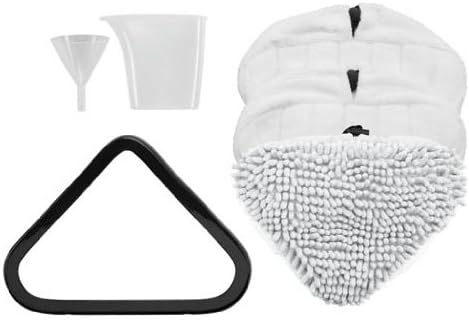
Figure 3.1: Included accessories. This image displays the funnel, fill cup, two microfiber cloth pads (one standard, one shaggy), and the triangular carpet glide attachment.
4. Assembly and Setup
Follow these steps to assemble and prepare your steam mop for first use:
- Attach the Handle: Insert the handle into the main body of the steam mop until it clicks securely into place.
- Attach a Cleaning Pad: Place the desired microfiber cleaning pad onto the bottom of the steam mop head. The pad should adhere securely via its fastening system.
- Fill the Water Reservoir: Ensure the steam mop is unplugged. Open the water tank cap. Use the provided fill cup and funnel to pour clean tap water into the reservoir. Do not overfill. Close the cap securely.
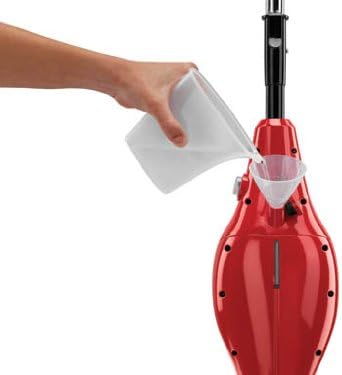
Figure 4.1: Filling the water reservoir. A hand is shown pouring water from a measuring cup into the steam mop's reservoir using the provided funnel.
5. Operating Instructions
Before operating, ensure the water reservoir is filled and a cleaning pad is attached.
- Power On: Plug the steam mop into a grounded electrical outlet. Press the power button located on the main body of the unit. The indicator light will illuminate.

Figure 5.1: Activating the steam mop. A finger is shown pressing the power button on the side of the red steam mop body.
- Heating Time: The steam mop will be ready to use in approximately 30 seconds.
- Steam Cleaning Hard Floors: Once ready, slowly move the steam mop across the sealed hard floor surface. The continuous steam will clean and sanitize the floor. The V-shaped head allows for easy maneuverability around furniture and into corners.
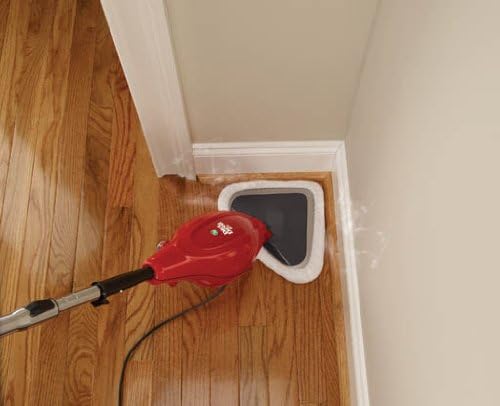
Figure 5.2: Cleaning a corner. The steam mop is shown effectively cleaning into a tight corner of a wooden floor.

Figure 5.3: Cleaning under furniture. The low-profile head of the steam mop is shown reaching under a wooden dresser.

Figure 5.4: Steam cleaning on tile. The steam mop is shown emitting steam while cleaning a dark tiled floor.

Figure 5.5: Steam cleaning on wood. The steam mop is shown emitting steam while cleaning a polished wooden floor.
- Using the Carpet Glide: For refreshing carpets and rugs, attach the carpet glide over the cleaning pad. Move the steam mop slowly over the carpeted area. This is for refreshing only, not deep cleaning.

Figure 5.6: Using the carpet glide. The steam mop, with the carpet glide attached, is shown on a light-colored carpet, emitting steam.
- Finishing: When finished, press the power button to turn off the unit, then unplug it from the electrical outlet.
6. Maintenance and Care
- Cleaning Pads: The microfiber cleaning pads are machine washable. Wash them with similar colors and air dry for best results. Do not use bleach or fabric softener.
- Emptying Water Reservoir: After each use, allow the unit to cool, then empty any remaining water from the reservoir.
- Exterior Cleaning: Wipe the exterior of the steam mop with a damp cloth. Do not use harsh chemicals or abrasive cleaners.
- Storage: Store the steam mop in a cool, dry place. Wrap the power cord neatly around the cord hooks.
- Descaling (Recommended): To maintain optimal performance and prevent mineral buildup, periodically descale the unit. Consult the full PDF manual for detailed descaling instructions, typically involving a vinegar solution.
7. Troubleshooting
| Problem | Possible Cause | Solution |
|---|---|---|
| No steam produced | No water in reservoir Unit not plugged in Power button not pressed Mineral buildup | Fill water reservoir Ensure unit is plugged into a working outlet Press the power button Descale the unit |
| Poor cleaning performance | Cleaning pad is dirty Too much water on floor Mineral buildup | Replace or wash cleaning pad Move mop slower to allow steam to work Descale the unit |
| Unit not heating | Unit not plugged in Power button not pressed Electrical issue | Ensure unit is plugged in Press the power button Check circuit breaker; try another outlet |
8. Specifications
- Model: PD20000B
- Brand: Hoover (Dirt Devil)
- Wattage: 1500 Watts
- Heat Time: Approximately 30 seconds
- Item Weight: 5.5 pounds
- Special Feature: Swivel Head
- Surface Recommendation: Sealed Hard Floors
- Power Source: Corded Electric
9. Warranty and Support
This Hoover Dirt Devil Easy Steam Mop PD20000B comes with a 1-Year Limited Warranty from the date of purchase. Please retain your proof of purchase for warranty claims.
For warranty service, technical support, or to purchase replacement parts, please visit the official Hoover website or contact their customer service department. You can find more detailed information and contact options on the Hoover official website.
Documents and downloads
Ask a question about this manual
Ask about setup, troubleshooting, compatibility, parts, safety, or missing instructions. Manuals+ will review the question and use this page’s manual context to help answer it.