Introduction
This manual provides detailed instructions for the operation and maintenance of your Eno ET-3000 Chromatic Clip-on Tuner. Please read this manual thoroughly before using the device to ensure proper function and longevity.
The Eno ET-3000 is a versatile chromatic tuner designed for various string instruments, including guitar, bass, ukulele, and violin. It utilizes a vibration sensor for accurate tuning and features an easy-to-read LCD display.
Key Features
- Chromatic Tuning: Suitable for a wide range of instruments.
- Vibration Sensor: Ensures accurate tuning by detecting instrument vibrations.
- Easy-to-Read LCD Display: Red-to-green indicator clearly shows tuning status (sharp/flat).
- 360-Degree Rotating Display: Allows for optimal viewing angles.
- Built-in Backlight: Enhances visibility in low-light conditions.
- Dual Tuning Modes: Clip-on for silent tuning or built-in microphone for standalone use.
- Compact and Portable: Small size for easy transport in a gig bag or music case.
- Battery Operated: Uses 1 x CR2032 cell battery (included).
Package Contents
- Eno ET-3000 Chromatic Clip-on Tuner
- 1 x CR2032 Lithium Metal Battery
- User Manual (this document)
Setup
1. Battery Installation
The Eno ET-3000 tuner comes with a CR2032 battery included. If the battery needs replacement:
- Locate the battery compartment on the back of the tuner.
- Use a coin or small screwdriver to gently twist the battery cover counter-clockwise to open.
- Insert a new CR2032 battery with the positive (+) side facing upwards.
- Replace the battery cover and twist clockwise to secure.
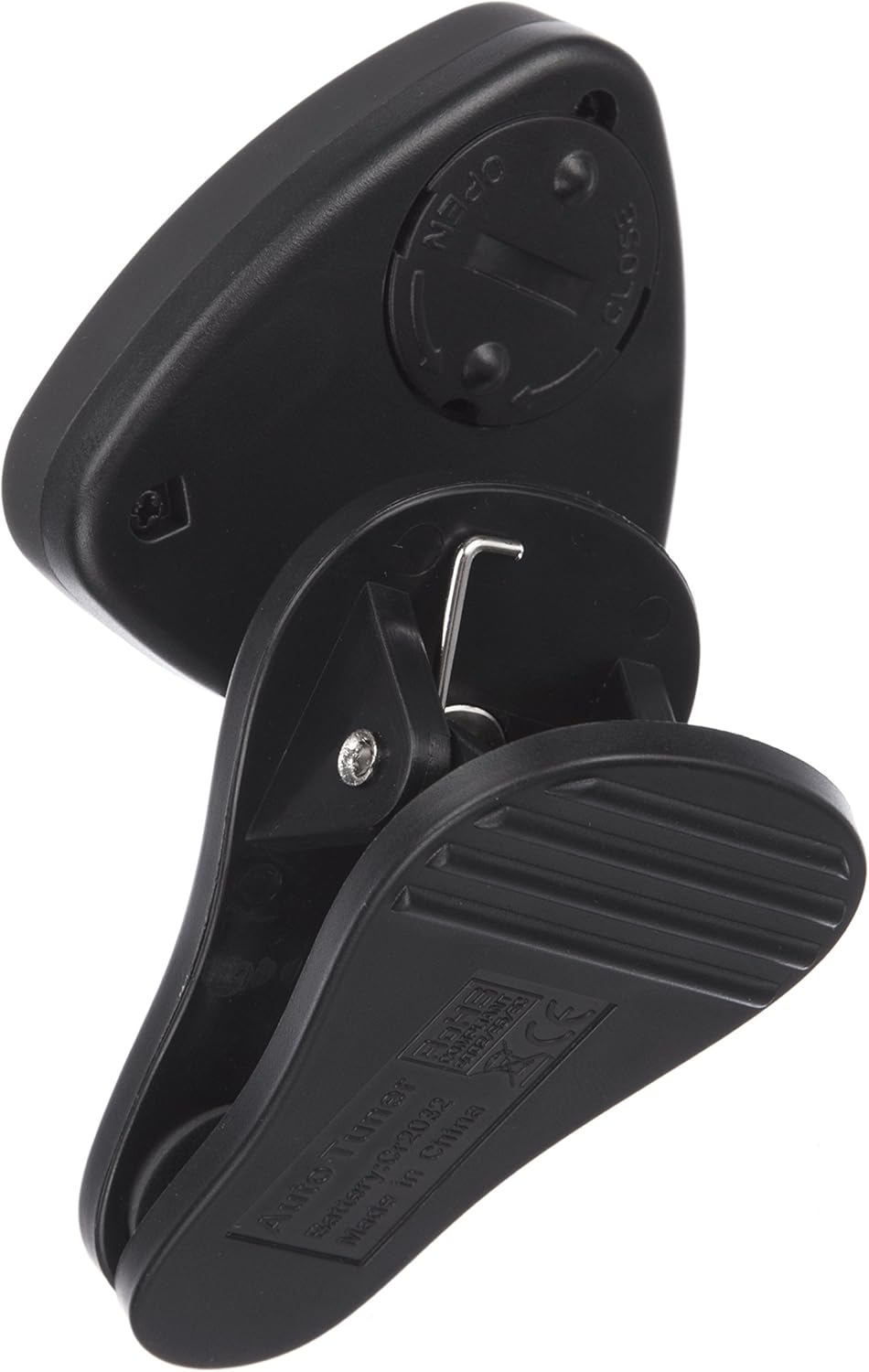
Figure 1: Rear view of the Eno ET-3000 tuner, highlighting the circular battery compartment cover. This image shows the clip mechanism and the battery cover, indicating where to open it for battery replacement.
2. Attaching the Tuner
For optimal vibration detection, attach the tuner to the headstock of your instrument.
- Open the clip by pressing the lever.
- Securely attach the clip to the headstock of your guitar, bass, ukulele, or violin. Ensure the tuner is firmly attached but not overtightened to avoid damage to the instrument finish.
- Adjust the display angle using the 360-degree rotating joint for comfortable viewing.

Figure 2: The Eno ET-3000 tuner clipped onto the headstock of an acoustic guitar. The tuner's display is visible, showing tuning information, demonstrating proper attachment for vibration-based tuning.

Figure 3: The Eno ET-3000 tuner clipped onto the headstock of an electric guitar. This image illustrates the tuner's versatility in attaching to different types of guitar headstocks, with the display showing tuning status.
Operating Instructions
1. Power On/Off
Press and hold the ON/OFF button located on the front of the tuner to power it on or off.

Figure 4: Front view of the Eno ET-3000 tuner, showing the LCD display, the "ON/OFF" button, "MODE" button, and arrow buttons. The display shows a tuning reading, indicating the tuner is active.
2. Selecting Tuning Mode
Press the MODE button to cycle through the available tuning modes:
- Chromatic (C): Tunes all notes.
- Guitar (G): Optimized for guitar tuning.
- Bass (B): Optimized for bass guitar tuning.
- Ukulele (U): Optimized for ukulele tuning.
- Violin (V): Optimized for violin tuning.
The selected mode will be displayed on the LCD screen.
3. Tuning Your Instrument
Once the tuner is on and the correct mode is selected:
- Pluck a single string on your instrument.
- The display will show the note name and a meter indicating whether the note is sharp, flat, or in tune.
- Red Display: Indicates the note is flat or sharp.
- Green Display: Indicates the note is in tune.
- Adjust your instrument's tuning peg until the display turns green and the needle is centered.

Figure 5: Close-up of the Eno ET-3000 tuner's LCD display. The screen shows a note (e.g., 'A') and a bar graph with a needle, indicating whether the pitch is flat (left, red), sharp (right, red), or in tune (center, green). This visual feedback is crucial for accurate tuning.
4. Using the Built-in Microphone
If you prefer not to clip the tuner to your instrument, or for instruments where clipping is not feasible, you can use the built-in microphone. Simply place the tuner near the sound source of your instrument.
Maintenance
- Cleaning: Wipe the tuner with a soft, dry cloth. Do not use abrasive cleaners or solvents.
- Battery: Replace the CR2032 battery when the display becomes dim or the tuner does not power on. Remove the battery if the tuner will not be used for an extended period to prevent leakage.
- Storage: Store the tuner in a cool, dry place away from direct sunlight and extreme temperatures.
- Handling: Avoid dropping the tuner or subjecting it to strong impacts, as this may damage internal components or the display.
Troubleshooting
| Problem | Possible Cause | Solution |
|---|---|---|
| Tuner does not power on. | Battery is dead or incorrectly installed. | Replace the CR2032 battery or ensure it is installed with the correct polarity (+ side up). |
| Display is dim or flickering. | Low battery power. | Replace the CR2032 battery. |
| Tuner is not detecting notes accurately. |
|
|
| Display shows "CLIP" but no note. | No sound input or sound is too quiet. | Pluck the string more firmly or ensure the tuner is close to the sound source (if using microphone). |
Specifications
| Model: | ET-3000 (Item model number: 20537) |
| Tuning Range: | A0 (27.5Hz) - C8 (4186Hz) |
| Tuning Accuracy: | ±0.5 cent |
| Detection Method: | Vibration (Clip) / Microphone |
| Tuning Modes: | Chromatic, Guitar, Bass, Ukulele, Violin |
| Power Supply: | 1 x CR2032 Lithium Metal Battery (included) |
| Dimensions: | 2.24 x 2.05 x 3.86 inches (5.7 x 5.2 x 9.8 cm) |
| Weight: | 0.352 ounces (10 grams) |
Warranty Information
Please refer to the warranty card included with your product or visit the official Eno website for detailed warranty information. Keep your purchase receipt as proof of purchase for any warranty claims.
Customer Support
For technical assistance, troubleshooting not covered in this manual, or general inquiries, please contact Eno customer support through their official website or the contact information provided on the product packaging.


