
Introduction
The Air King DH55 Dehumidistat Switch is designed to automatically control the operation of a dehumidifier or central HVAC unit based on the humidity level of a room. This device helps maintain desired humidity levels, contributing to a more comfortable and healthy indoor environment. It features an adjustable dial control for setting humidity preferences between 20% and 80% relative humidity.
This manual provides essential information for the safe installation, operation, and maintenance of your DH55 Dehumidistat Switch.
Safety Information
WARNING: Risk of Electric Shock.
- Installation should only be performed by a qualified electrician or a person with basic electrical knowledge.
- Always disconnect power at the circuit breaker or fuse box before installing or servicing the dehumidistat.
- Ensure all wiring connections are secure and comply with local electrical codes.
- Do not use this device with loads exceeding its specified electrical ratings.
Failure to follow these instructions may result in electric shock, fire, or property damage.
Package Contents
- One (1) Air King DH55 Wall Mounted Dehumidistat Control
Setup and Installation
The Air King DH55 Dehumidistat Switch is designed for wall-mounted installation, similar to a standard light switch. It controls a connected dehumidifier or HVAC unit by sensing ambient humidity.
- Power Disconnection: Before beginning installation, turn off power to the circuit at the main service panel to prevent electrical shock.
- Location Selection: Choose a suitable indoor location for the dehumidistat. Avoid areas near heat sources, cold drafts, or direct sunlight, as these can affect humidity readings. The location should be representative of the general humidity level of the area you wish to control.
- Wiring: The DH55 typically wires in series with the power supply to the controlled appliance (e.g., dehumidifier). Connect the incoming power line to one terminal of the dehumidistat and the outgoing line to the appliance to the other terminal. Ensure proper polarity if specified by the appliance or local codes. Refer to the wiring diagram provided with the unit for specific connections.
- Mounting: Secure the dehumidistat to the wall using appropriate screws and anchors. Ensure it is level and firmly attached.
- Restore Power: Once installation is complete and all connections are secure, restore power at the main service panel.

Image: Front view of the Air King DH55 Dehumidistat Switch. The dial is clearly visible with markings for relative humidity percentages from 20 to 80, and 'ON' and 'OFF' indicators. The Ranco logo is at the bottom left.
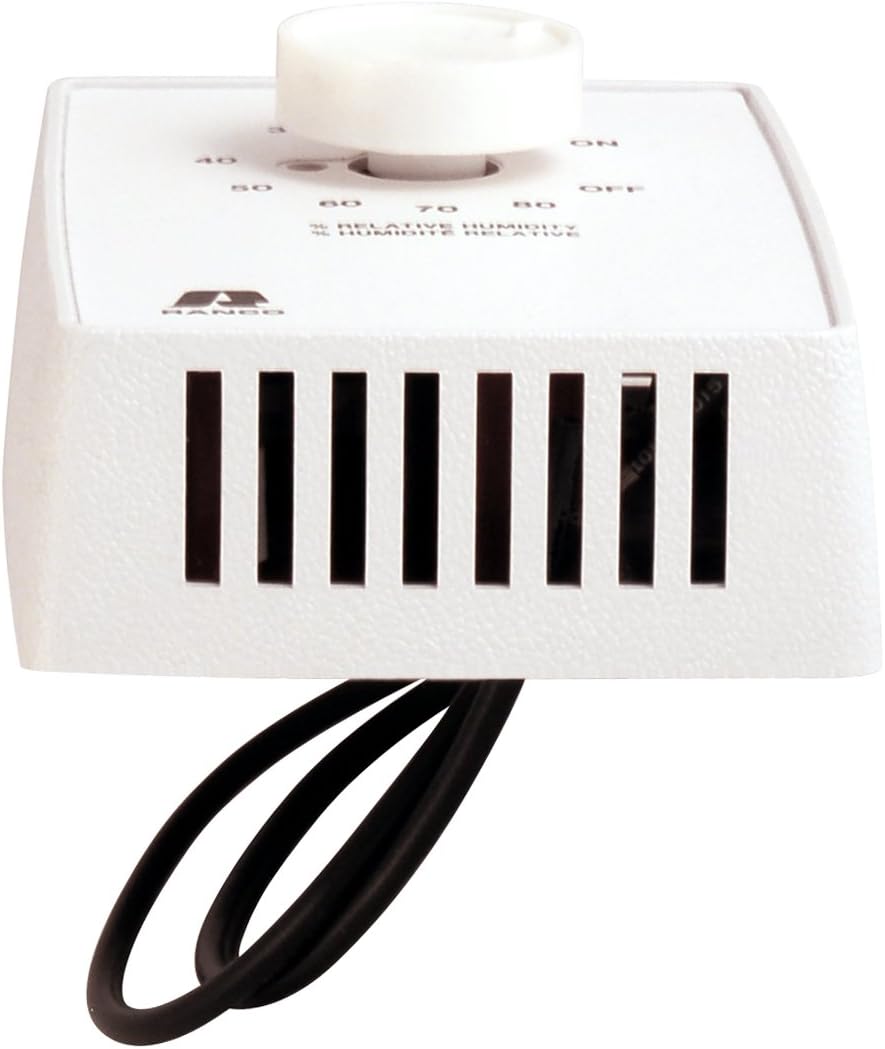
Image: Top-down view of the Air King DH55 Dehumidistat Switch. This perspective highlights the ventilation grilles on the top surface, which allow air to reach the humidity sensor. Electrical wires are visible extending from the back of the unit.
Operating Instructions
The DH55 Dehumidistat Switch operates using a simple dial control to set the desired relative humidity level.
- Power On: Ensure power is supplied to the dehumidistat and the connected appliance.
- Set Desired Humidity: Rotate the dial to the desired relative humidity percentage. The range is typically from 20% to 80%.
- If the ambient humidity rises above the set point, the dehumidistat will activate the connected appliance (e.g., turn on a dehumidifier).
- If the ambient humidity falls below the set point, the dehumidistat will deactivate the connected appliance (e.g., turn off a dehumidifier).
- "ON" Setting: Turning the dial to the "ON" position will continuously operate the connected appliance, regardless of the humidity level.
- "OFF" Setting: Turning the dial to the "OFF" position will deactivate the connected appliance. Note that some units may not have a distinct "OFF" position on the dial, and setting it to the highest humidity percentage (e.g., 80%) might effectively keep the unit off in most environments.
It may take some time for the dehumidistat to accurately sense the room's humidity and respond. Allow for a brief delay after adjusting the setting.
Maintenance
The Air King DH55 Dehumidistat Switch requires minimal maintenance.
- Cleaning: Periodically wipe the exterior of the unit with a soft, dry cloth to remove dust. Do not use abrasive cleaners or solvents.
- Sensor Area: Ensure the ventilation grilles (if present) are free from dust and obstructions to allow for accurate humidity sensing. Do not insert objects into the grilles.
- Inspection: Annually inspect the wiring connections for any signs of wear or damage. If any damage is observed, disconnect power and have it repaired by a qualified professional.
Troubleshooting
If your Air King DH55 Dehumidistat Switch is not functioning as expected, consider the following common issues:
- Appliance Not Turning On/Off:
- Verify that the dehumidistat dial is set to a humidity level appropriate for the current room conditions.
- Check if the connected appliance (dehumidifier/HVAC) is powered on and functioning correctly independently.
- Ensure all electrical connections are secure and power is supplied to the circuit.
- Confirm the circuit breaker has not tripped.
- Inaccurate Humidity Readings:
- Ensure the dehumidistat is not located near sources of heat, cold, or direct airflow that could skew readings.
- Clean any dust or debris from the sensor area/ventilation grilles.
- Compare the dehumidistat's behavior with a separate, calibrated hygrometer placed in the same area. Note that a slight difference in readings is normal due to sensor placement and calibration.
If problems persist after attempting these troubleshooting steps, contact customer support.
Specifications
| Feature | Detail |
|---|---|
| Manufacturer | Air King |
| Model Number | DH55 |
| Part Number | DH55 |
| Item Weight | 7.2 ounces |
| Product Dimensions | 3.13 x 4.5 x 2 inches |
| Color | White |
| Material | Plastic |
| Humidity Range | Adjustable from 20% to 80% Relative Humidity |
| Special Features | Automatically turns dehumidifier or central HVAC unit on/off |
| Included Components | Wall Mounted Dehumidistat Control |
| Batteries Required | No |
Warranty Information
The Air King DH55 Dehumidistat Switch comes with a 1-Year Limited Warranty covering parts only. This warranty covers defects in materials and workmanship under normal use. For warranty claims or detailed terms and conditions, please refer to the official Air King warranty documentation or contact customer support.
Customer Support
For technical assistance, troubleshooting beyond this manual, or warranty inquiries, please contact Air King customer support. Have your product model number (DH55) and purchase information ready when contacting support.
Contact information (e.g., phone number, website) typically found on product packaging or the manufacturer's official website.