1. Overview
The Peavey PV 12M is a rugged, trapezoidal 2-way floor monitor designed for professional audio applications. It features a 12-inch Sheffield Pro 1200+ premium woofer and a 14T 1.4-inch titanium-diaphragm compression driver, coupled to a constant-directivity horn. This monitor is built to withstand the rigors of road use and delivers clear, powerful sound with 500 watts program power handling.
Key Features:
- Two-way floor monitor design.
- Frequency response: 68 Hz to 17 kHz.
- 12-inch Sheffield Pro 1200+ woofer with 2.5-inch voice coil.
- 14T compression driver with titanium diaphragm.
- 500 W program power handling.
- Sound Guard™ IV tweeter protection.
- Carpet covering and heavy-duty metal grille for durability.
- Steel handle for easy transport.
- Can be angled at 30 or 45 degrees from the floor, or pole mounted.

Figure 1: Front view of the Peavey PV 12M 2-Way Floor Monitor with its protective grille.
2. Setup
Proper setup is crucial for optimal performance and longevity of your Peavey PV 12M floor monitor. This passive monitor requires an external power amplifier.
2.1 Physical Placement
- Floor Monitor Use: Place the monitor on the stage floor. The trapezoidal design allows it to be angled at either 30 or 45 degrees, directing sound towards the performer.
- Pole Mounting: The monitor features a pole mount socket on the bottom, allowing it to be mounted on a standard speaker pole for elevated sound projection. Ensure the pole and stand are stable and rated for the monitor's weight (approximately 41 pounds).
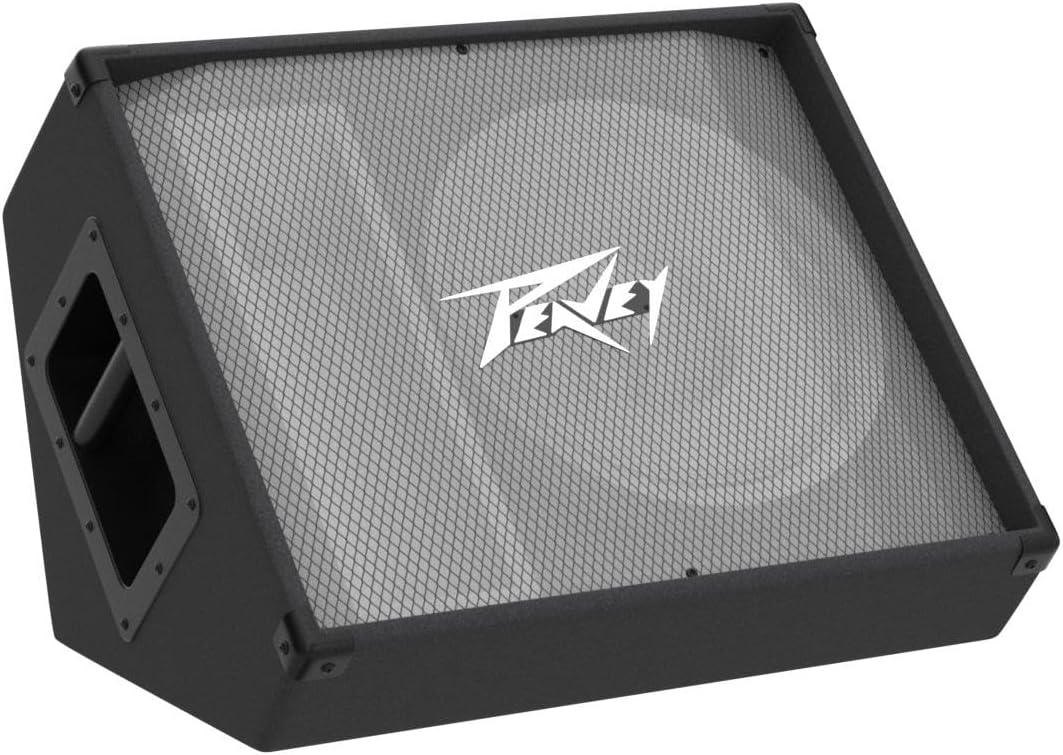
Figure 2: Angled view of the Peavey PV 12M, demonstrating its design for floor monitoring.
2.2 Connections
The PV 12M features two 1/4-inch, full-range parallel inputs for easy daisy-chaining with other passive monitors or connecting to a power amplifier.
- Connecting to a Power Amplifier: Use a high-quality speaker cable with 1/4-inch TS connectors to connect one of the monitor's inputs to an output channel of your power amplifier. Ensure the amplifier's impedance matches the monitor's (8 Ohms).
- Daisy-Chaining Multiple Monitors: If connecting multiple PV 12M monitors, use a speaker cable to link the output of the first monitor to the input of the second, and so on. Be mindful of the total impedance presented to your amplifier.

Figure 3: Peavey PV 12M with indicated dimensions (24"D x 20"W x 15"H).
2.3 Setup Video Guides
The following videos provide visual guidance on setting up passive stage monitors, which can be applied to your Peavey PV 12M.
Video 1: Setup instructions for the Rockville RSM15P passive monitor, demonstrating connections to an amplifier and daisy-chaining.
Video 2: General guide on how to set up RSM Series passive monitors, including mixer connections and stage placement.
3. Operation
Once properly connected to a suitable power amplifier, your Peavey PV 12M monitor is ready for operation. Always ensure your amplifier is powered on and set to a low volume before sending audio signals.
- Volume Control: Adjust the overall volume through your external mixer and power amplifier. Start with low levels and gradually increase to the desired listening volume.
- Sound Guard™ IV Tweeter Protection: The PV 12M incorporates Sound Guard™ IV tweeter protection, which helps prevent damage to the high-frequency driver from excessive power or clipping. While this system offers protection, it is still recommended to avoid prolonged operation at extreme clipping levels.
- Frequency Response: The monitor is designed to deliver a flat frequency response from 68 Hz to 17 kHz. Any equalization should be applied via your mixer or external processing equipment to tailor the sound to your specific environment or preference.
4. Maintenance
Regular maintenance will ensure the longevity and optimal performance of your Peavey PV 12M floor monitor.
- Cleaning: Use a soft, dry cloth to clean the exterior of the monitor. For the carpet covering, a vacuum cleaner with a brush attachment can remove dust and debris. Avoid using liquid cleaners directly on the grille or speaker components.
- Storage: Store the monitor in a dry, temperature-controlled environment. Avoid extreme temperatures and high humidity, which can damage internal components and the cabinet material.
- Transport: Utilize the integrated steel handle for carrying. When transporting, ensure the monitor is secured to prevent movement and impact damage. Consider using protective covers or cases for extended travel.
- Inspection: Periodically inspect speaker cables for any signs of wear or damage. Replace damaged cables immediately to prevent signal loss or potential electrical hazards.
5. Troubleshooting
If you encounter issues with your Peavey PV 12M floor monitor, refer to the following common troubleshooting steps:
- No Sound:
- Ensure all cables are securely connected between the mixer, amplifier, and monitor.
- Verify the power amplifier is turned on and receiving power.
- Check the volume levels on your mixer and amplifier; ensure they are not muted or set too low.
- Test with different cables or a different audio source to rule out faulty equipment.
- Distorted Sound:
- Reduce the volume level on your mixer and amplifier. Overdriving the amplifier or monitor can cause distortion.
- Check for any loose cable connections.
- Ensure the impedance of the monitor (8 Ohms) is compatible with your power amplifier's output.
- If using multiple monitors, verify the total impedance is within the amplifier's safe operating range.
- Intermittent Sound:
- Inspect all cables for damage or loose connections.
- Ensure the power amplifier is not overheating.
6. Specifications
| Feature | Detail |
|---|---|
| Model Name | Peavey PV 12M |
| Item Model Number | 570650 |
| Speaker Type | 2-Way Floor Monitor |
| Woofer Diameter | 12 Inches (Sheffield Pro 1200+ with 2.5" voice coil) |
| Tweeter Diameter | 1.4 Inches (14T titanium-diaphragm compression driver) |
| Power Handling | 500 W program / 1,000 W peak |
| Frequency Response | 68 Hz to 17 kHz |
| Impedance | 8 Ohms |
| Connectivity Technology | Coaxial (Two 1/4-inch, full-range parallel inputs) |
| Material | Medium Density Fiberboard, Carpet, Steel |
| Product Dimensions | 24"D x 20"W x 15"H |
| Item Weight | 41 Pounds |
| Mounting Type | Floor Standing, Pole Mountable |
| Included Components | Two-way floor monitor, Sound Guard™ IV tweeter protection, carpet covering, steel handle, heavy duty metal grille |
7. Warranty & Support
The Peavey PV 12M 2-Way Floor Monitor comes with a limited warranty. For specific details regarding warranty coverage, duration, and terms, please refer to the warranty card included with your product or visit the official Peavey website.
Customer Support:
For technical assistance, troubleshooting, or service inquiries, please contact Peavey customer support directly. Contact information can typically be found on the manufacturer's website or in the product packaging.


