
Introduction
The Optex HX-40 is a high-performance passive infrared (PIR) motion detector designed for high-mount outdoor security applications. It utilizes a unique pyro element to provide multiple pattern detection within 94 high-density detection zones. This advanced technology enables accurate discrimination of moving objects, significantly reducing false and missed alarms often caused by severe outdoor environmental changes.
The HX-40 is engineered to meet stringent requirements for reliable detection in challenging environments. It features an Ideal Detection Area Setting, allowing the detection angle to be configured at 40°, 30°, 18.3°, or 13.3°, providing flexibility for installation based on specific site surroundings.

Image: Front-side view of the Optex HX-40 High Mount Outdoor PIR Motion Detector, showcasing its compact and weather-resistant design.
Safety Information
Read all instructions carefully before installation and operation. Failure to follow these guidelines may result in product malfunction, property damage, or personal injury.
- Installation should be performed by qualified personnel in accordance with all local and national electrical codes.
- Disconnect all power to the installation area before wiring or servicing the detector.
- Do not attempt to disassemble or modify the detector beyond the instructions provided in this manual. Unauthorized modifications void the warranty.
- Ensure the detector is mounted securely to prevent it from falling.
- Avoid mounting the detector near sources of strong electromagnetic interference.
Package Contents
The standard Optex HX-40 package typically includes the following components:
- Optex HX-40 Motion Detector Unit
- Mounting Bracket
- Mounting Screws and Wall Plugs (quantities may vary)
- Instruction Manual (this document)
Setup and Installation
Proper setup and installation are critical for the optimal performance and reliability of your HX-40 motion detector. This device is specifically designed for high-mount outdoor applications.
Mounting Location Considerations
- Mounting Height: Install the detector at a height between 2.5 meters (8.2 feet) and 3 meters (9.8 feet) for optimal detection coverage.
- Environmental Factors: Avoid direct sunlight, rapidly moving foliage, or strong heat sources (e.g., air conditioner vents, exhaust fans) within the detection area, as these can cause false alarms.
- Clear Line of Sight: Ensure there are no permanent obstructions (walls, large trees, vehicles) that could block the detector's view of the intended detection zone.
- Stable Surface: Mount the detector on a stable, vibration-free surface.
Mounting the Detector
- Separate the Unit: Carefully detach the main detector unit from its mounting bracket. This usually involves releasing a latch or screw.
- Secure the Bracket: Position the mounting bracket at the desired location and mark the drilling points. Drill pilot holes, insert wall plugs if necessary, and securely fasten the bracket to the wall using the provided screws.
- Reattach Main Unit: Carefully reattach the main detector unit to the secured mounting bracket, ensuring it clicks into place or is fastened according to the design.

Image: The Optex HX-40 motion detector unit separated from its wall-mount bracket, illustrating the internal structure and connection points for wiring.
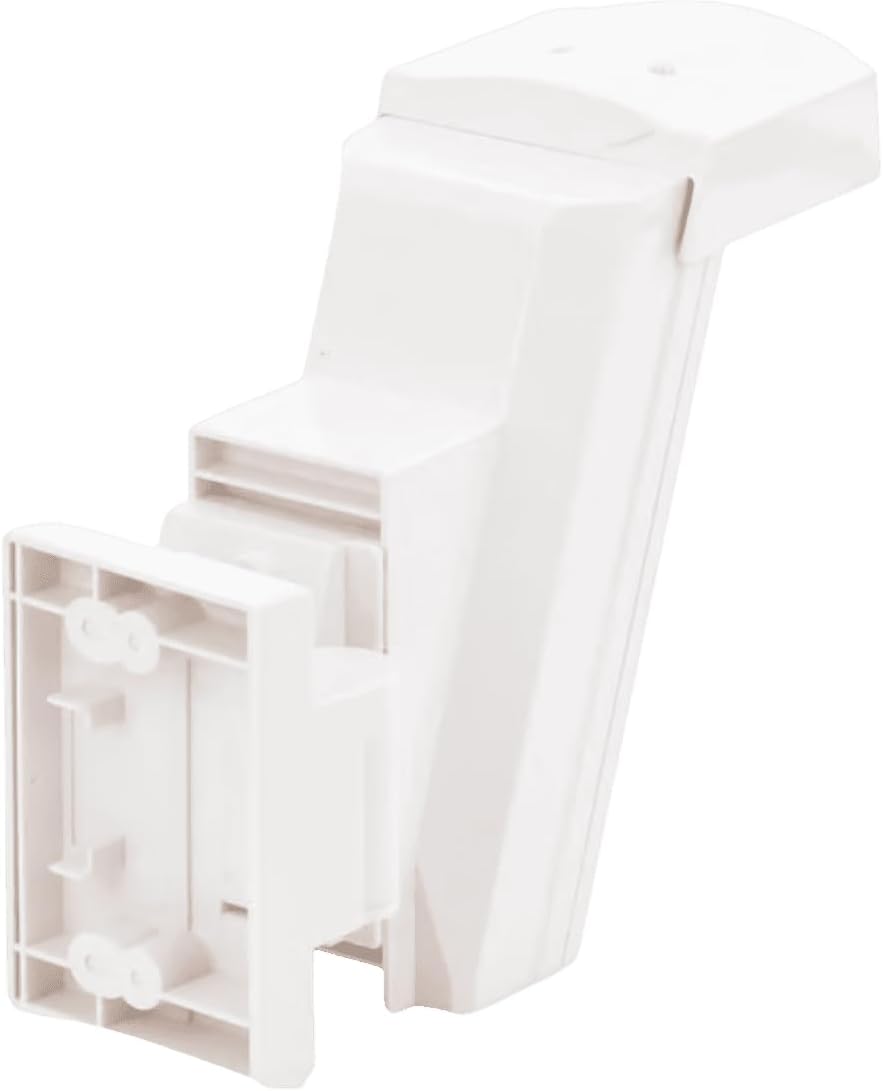
Image: The Optex HX-40 motion detector unit with its wall-mount bracket securely attached to a surface, showing the rear view.
Wiring Connections
Refer to the wiring diagram inside the detector's housing for specific terminal connections. Ensure power is disconnected before making any connections.
- Power Input: Connect the power supply (typically 9.5-16V DC) to the designated power terminals. Observe correct polarity.
- Alarm Output: Connect the alarm output terminals to your security system's alarm input zone. The HX-40 typically provides a normally closed (NC) or normally open (NO) relay output.
- Tamper Switch: Connect the tamper switch terminals to your security system's tamper zone. This will trigger an alarm if the detector's cover is removed.
Detection Area Setting
The HX-40 allows for adjustment of the detection area to suit specific installation requirements. Consult the internal settings or dip switches (if applicable) to select one of the following detection angles:
- 40° (Wide)
- 30°
- 18.3°
- 13.3° (Narrow)
Operating Instructions
Powering On
Once the detector is securely mounted and all wiring connections are complete, apply power to the unit. The detector will typically undergo a brief warm-up period, indicated by a flashing LED. During this time, avoid entering the detection area.
Walk Test
After the warm-up period, perform a walk test to verify the detection area and ensure proper operation. Walk across the entire intended detection zone, observing the detector's LED indicator and the response of your connected alarm system.
- Walk from different directions and at various speeds within the detection area.
- Confirm that the detector's LED illuminates and your alarm system registers a detection event each time.
- Adjust the detector's angle or detection area settings if coverage is not as desired.
Sensitivity Adjustment
The HX-40 may include sensitivity adjustment settings (e.g., dip switches or potentiometers) to fine-tune its response. Adjust sensitivity as needed to prevent false alarms caused by environmental factors while ensuring reliable detection of intruders. Refer to the specific instructions inside the detector's housing for details on sensitivity adjustments.
Maintenance
Regular maintenance ensures the long-term reliability and performance of your Optex HX-40 motion detector.
- Cleaning: Periodically clean the detector's lens and housing with a soft, damp cloth. Avoid abrasive cleaners or solvents that could damage the plastic.
- Obstruction Check: Regularly inspect the detection area for any new obstructions such as growing foliage, spider webs, or debris that could block the sensor's view or cause false alarms.
- Wiring Inspection: Annually inspect all wiring connections for signs of wear, corrosion, or damage. Ensure all connections are secure.
- Functionality Test: Perform a walk test periodically (e.g., monthly or quarterly) to confirm the detector is functioning correctly and its detection pattern remains optimal.
Troubleshooting
This section addresses common issues you might encounter with the Optex HX-40 motion detector.
| Problem | Possible Cause | Solution |
|---|---|---|
| No detection when motion occurs |
|
|
| Frequent false alarms |
|
|
| LED indicator not working |
|
|
Specifications
Key technical specifications for the Optex HX-40 High Mount Outdoor PIR Motion Detector:
| Feature | Detail |
|---|---|
| Brand | Optex |
| Model | HX-40 |
| Detection Method | Passive Infrared (PIR) |
| Detection Zones | 94 high-density zones |
| Detection Area Settings | 40°, 30°, 18.3°, 13.3° |
| Power Source | Corded Electric (9.5-16V DC) |
| Mounting Type | Wall Mount |
| Item Weight | 0.6 Kilograms (1.32 pounds) |
| Product Dimensions | 3.62 x 5.83 x 7.76 inches |
| Compatible Devices | Security Systems, Smart Home Hubs |
| Recommended Uses | Driveway, Garden, Lawn |
| UPC | 788924085791 |
| Date First Available | April 23, 2009 |
Warranty Information
For detailed warranty terms and conditions pertaining to the Optex HX-40 motion detector, please refer to the official Optex website or contact your authorized Optex distributor. Warranty coverage typically includes defects in materials and workmanship for a specified period from the date of purchase.
Support and Contact
Should you require technical assistance, have product inquiries, or need service for your Optex HX-40, please utilize the following resources:
- Official Optex Website: Visit www.optexamerica.com for product documentation, FAQs, and support contact information.
- Authorized Dealer: Contact the authorized Optex dealer or installer from whom you purchased the product for local support and service.


