1. Product Overview
The Vivitar Series 1 Wireless 2-in-1 Shutter Release (Model VIVRC200A700) is designed to provide remote control for compatible Sony Alpha A700, A850, and A900 Digital SLR cameras. This device allows photographers to trigger the camera's shutter wirelessly, reducing camera shake and enabling various shooting modes from a distance.
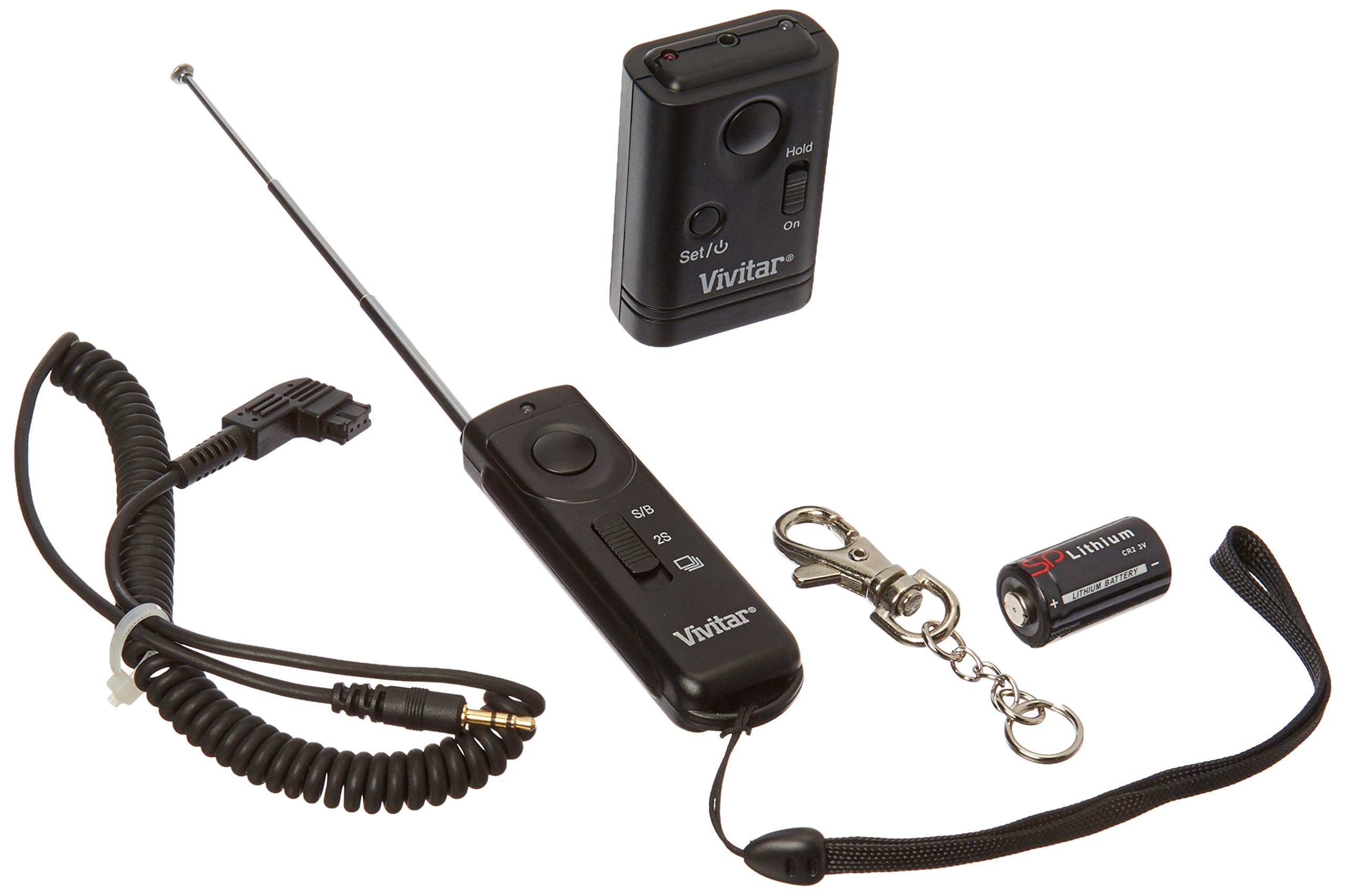
Image 1.1: Vivitar Series 1 Wireless 2-in-1 Shutter Release. This image shows the compact remote control unit, typically black or dark gray, with a few buttons for various shutter functions.
2. Key Features
- Instant Release: Activates the camera shutter immediately upon button press.
- Multi Exposure: Initiates a sequence of 5 consecutive pictures with a single press, or continuous shooting when held down.
- 2 Second Release: Provides a 2-second delay before shutter activation, useful for self-portraits or reducing camera shake.
- Long Exposure: Designed for bulb mode photography. Press and hold the shutter release for 3 seconds to open the shutter, then press again to close it.
- Wireless Operation: Enables remote control, minimizing physical contact with the camera.
- Compatibility: Specifically designed for Sony Alpha A700, A850, and A900 Digital SLR cameras.
3. Setup Guide
3.1. Battery Installation
- Locate the battery compartment on the back of the remote control unit.
- Open the compartment cover by sliding or gently prying it open.
- Insert the required battery (e.g., CR2025 lithium coin cell, check product packaging for exact type) with the positive (+) side facing up.
- Close the battery compartment cover securely.
3.2. Connecting to Camera
The Vivitar Series 1 Wireless Shutter Release operates wirelessly and does not require a physical cable connection to the camera. Ensure your camera is set to receive remote control signals. Refer to your camera's manual for specific settings related to remote shutter release operation.
- Ensure the camera's remote control function is enabled in its settings menu.
- Point the remote control unit towards the camera's infrared receiver (if applicable, consult camera manual).
4. Operating Instructions
Familiarize yourself with the buttons on the remote control. Typically, there is a main shutter button and potentially other function buttons.
4.1. Instant Release
To take an immediate picture:
- Point the remote control towards the camera.
- Press the main shutter release button once. The camera will capture an image instantly.
4.2. Multi Exposure / Continuous Shooting
This mode allows for multiple shots or continuous shooting:
- For 5 Consecutive Pictures: Press the shutter release button once. The camera will automatically take 5 pictures in quick succession.
- For Continuous Shutter Release: Press and hold the shutter release button. The camera will continue to take pictures as long as the button is held down. Release the button to stop.
Note: Camera settings may influence the exact behavior of multi-exposure and continuous shooting modes. Refer to your camera's manual for details.
4.3. 2 Second Release
To activate a 2-second delay before the shutter fires:
- Point the remote control towards the camera.
- Press the dedicated 2-second delay button (if available) or the main shutter button after setting the camera to 2-second delay mode (consult camera manual). The camera will delay for 2 seconds, then capture the image.
4.4. Long Exposure (Bulb Mode)
For extended exposure times using your camera's bulb mode:
- Set your camera to Bulb mode.
- Press and hold the shutter release button on the remote for approximately 3 seconds. The camera's shutter will open.
- To close the shutter and end the exposure, press the shutter release button once more.
Important: Ensure your camera is properly configured for bulb mode operation before using this feature.
5. Maintenance
- Cleaning: Use a soft, dry cloth to clean the exterior of the remote control. Do not use liquid cleaners or solvents.
- Battery Replacement: Replace the battery when the remote's range decreases or it becomes unresponsive. Refer to Section 3.1 for battery installation.
- Storage: Store the remote control in a cool, dry place away from direct sunlight and extreme temperatures. Remove the battery if storing for extended periods to prevent leakage.
- Avoid Impact: Protect the device from drops and impacts, which can damage internal components.
6. Troubleshooting
| Problem | Possible Cause | Solution |
|---|---|---|
| Remote not triggering camera. |
|
|
| Inconsistent response. |
|
|
| Multi-exposure not working as expected. |
|
|
7. Product Specifications
- Model Number: VIVRC200A700
- Brand: Vivitar
- Compatibility: Sony Alpha A700, A850, A900 Digital SLR cameras
- Type: Wireless Shutter Release
- Dimensions: 8 x 5 x 1.5 inches (Product dimensions, likely packaging)
- Weight: 4 ounces (Item weight, likely packaging)
- Color: Black
- Special Feature: Ergonomic
- Power Source: Battery (Type not specified in input, typically CR2025 or similar)
8. Warranty and Support
For warranty information and technical support, please refer to the documentation included with your purchase or visit the official Vivitar website. Keep your proof of purchase for warranty claims.
Manufacturer: VIVITAR
Date First Available: September 1, 2009


